6.2 Amazon Sidewalk BLE protocol stack
Amazon Sidewalk BLE supports two types of messages that play the main role in the BLE communication between Endpoints in the Amazon Sidewalk environment.
The first message type is the Beacon that is used for communication initiation, e.g. data transfer, registration, time synchronization. The protocol stack for the Beacon is shown in figure 6.1

The Beacon frame format and a detailed description of the different advertisement payloads is included in section 6.2.1.
The second message type is the data message that is used for data transmission and reception by the user application (custom commands) and Amazon Sidewalk management and security class commands used for registration, time synchronization, factory reset, and challenge request. The protocol stack of the data message is shown in figure 6.2.
The Application Layer frame format and application commands are described in Chapter 3. The Presentation Layer frame format is described in section 5.1.1.1. The Flex Layer is described in section 6.2.1.6.
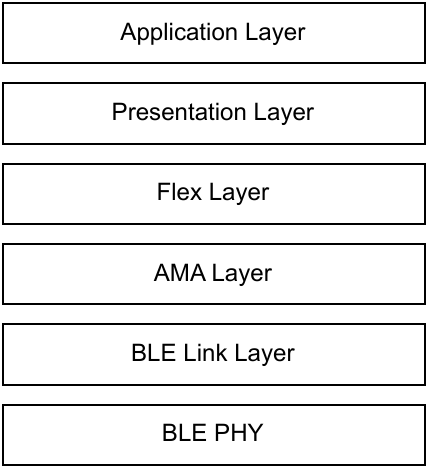
The AMA (Alexa Mobile Accessory) Layer is common to the Beacon and Data formats. Details of the AMA frame and AMA frame types may be found in section 6.2.1.9.
The BLE Link Layer and BLE PHY are described in the BLE Specification v 4.2.
6.2.1 Beacon frame format
The BLE Beacon is used for communication initiation. The following types of Beacons are defined based on the communication purpose:
- Beacon for initiating registration of a new Endpoint to the Amazon Sidewalk network.
- Beacon for initiating counter-based time synchronization procedure from the Amazon Sidewalk Cloud.
- Beacon for initiating Endpoint-encrypted connection.
- Beacon for presence detection and determining device state (ONLINE/OFFLINE).
The Beacon frame format is common to all Beacons, and selected fields in the Beacon frame define the purpose of the Beacon. The Beacon frame format contains two main blocks: Header and Manufacturing Data. The Header includes information related to the BLE Ad Type and BLE UUID of the service. Manufacturing Data contains information about the Amazon Sidewalk application, network service, device state and Application-Specific Data.

Every time the SDK starts advertising, the device advertises every 160 ms for the first 30 s after boot and 1 s afterwards, independently of the advertisement type. These values are user-configurable in the SDK. The Sidewalk BLE Gateways does not scan for advertisements all the time. Increasing the frequency of advertisements will reduce the latency to establish a BLE connection. However, configuring a longer interval for advertisement periodicity may result in high connection latency or an inability to connect altogether, if the Endpoint’s advertising window does not overlap with the Sidewalk BLE Gateway’s scanning window.
An Endpoint shall move to perform periodic time synchronization advertising mode for 60 s once every two (default) hours.
Beacons advertised by the Endpoint shall be forwarded by a Gateway to the cloud using three types of policies:
- Upload - Beacons are forwarded to the cloud without a delay.
- Accumulate - the Gateways maintain the latest Beacon information for each type of Beacon received and forward the first Beacon received of a particular type. The accumulated Beacon is sent after the defined accumulation period.
- Drop - unknown or unsupported Beacon formats are dropped by the Gateway.
| Beacon type | Policy name | Accumulation period |
|---|---|---|
| Registration/Provisioning | Upload | N/A |
| Counter-based time synchronization | Accumulate | 30 s |
| Time-based connection request | Accumulate | 30 s |
| Presence detection and determining device state | Accumulate | 10 min |
| Unknown | Drop | N/A |
6.2.1.1 Beacon Header
The Beacon header block is coded in Tag, Length, Value format. All fields of the Beacon header are mandatory. Each field has only one value that is defined and supported by the specification. The header fields are presented in figure 6.4.

The header field values are constant and not configurable. The following values shall be applied in each header field:
| Field name | Field size | Field value | Description |
|---|---|---|---|
| Flags Ad Type Length | 1B | 0x02 | |
| Flags Ad Type Identifier | 1B | 0x01 | |
| Flags Ad Type Value | 1B | 0x06 | BLE only accessory |
| List of 16-bit Service Class UID Ad Type Length | 1B | 0x03 | |
| List of 16-bit Service Class UUID Ad Type Identifier | 1B | 0x03 | |
| List of 16-bit Service Class UUID Ad Type Value | 2B | 0x03FE | AMA Service UUID |
6.2.1.2 Beacon Manufacturing Data
Manufacturing Data fields are presented in figure 6.5.

fig 6.5 BLE Beacon - Manufacturing Data
The length of the Manufacturing Data is mainly determined by application-specific data that contain information used for Beacon sender identification and authorization. The Manufacturing Data Tag and Vendor ID are constant and not configurable.
| Field name | Field size | Field value | Description |
|---|---|---|---|
| Manufacturing Data Length | 1B | 0xB - 0x17 | Size of subsequent fields of the Manufacturing Data Block |
| Manufacturing Data Tag | 1B | 0xFF | |
| Vendor ID | 2B | 0x0171 | Amazon.com Services LLC (value assigned by Bluetooth SIG) |
| Service Type | Service value | Service Description |
|---|---|---|
| Sidewalk Services | 0x00 - 0x06 | Sidewalk Cloud Services |
| 0x07 - 0x1F | reserved | |
| 0x20 | Amazon Device Application | |
| 0x21 | IoT Wireless Application | |
| 0x22 - 0x25 | Amazon Device Application | |
| 0x26 - 0xFF | reserved |
6.2.1.3 Manufacturing data - Application ID
The Application ID field contains the identification of the Beacon receiver.
6.2.1.4 Manufacturing data - Device State
Device State includes information related to the device of the Beacon sender.

fig 6.6 BLE Beacon - Device State
| Mnemonic | Length | Value | Description |
|---|---|---|---|
dev_prot | 1b | 0x0 | reserved |
| 0x1 | BLE | ||
dev_mod | 2b | 0x0 | Normal mode |
| 0x1 | Registration Mode | ||
| 0x2 | Connection Request | ||
| 0x3 | reserved | ||
bat_lvl | 2b | 0x0 | Critical level |
| 0x1 | Low level | ||
| 0x2 | Normal level | ||
| 0x3 | reserved | ||
adv_frmt | 3b | 0x0 - 0x1 | Sidewalk Beacon version |
| 0x2 - 0x7 | reserved |
6.2.1.5 Manufacturing data - Application Specific Data

fig 6.7 BLE Beacon - Application Specific Data
Application-Specific Data format may differ for different Beacon types.
Frame Indicator contains information related to the type of device identification that is included in the TXID field (see frmt_ind description). It contains information about the Beacon/frame format version that is supported by the sender of the Beacon (see section 5.1.1 and uasl_ver description).
| Field name | Field value | Field meaning |
|---|---|---|
frmt_ind | 0x0 | TXID time based frame |
| 0x1 | TXID counter based frame | |
| 0x2 | Sidewalk ID / SMSN based frame | |
| 0x3 | reserved | |
uasl_ver | 0x0 | ASL version |
| 0x1 - 0x3 | reserved | |
pld_ind | 0x0 | No Data |
| 0x1 - 0xF | reserved |
The Frame Indicator has the following values defined for the different types of Beacon:
| Application ID | Device State | Frame indicator Value | Beacon type |
|---|---|---|---|
| 0x04 | 0x23, 0x2B, 0x33 | 0x80 | Registration/Provisioning |
| 0x03 | 0x21, 0x29, 0x31 | 0x40 | Counter-based time synchronization |
| 0x06 | 0x35, 0x2D, 0x25 | 0x00 | Time-based connection request |
| 0x21 | 0x21, 0x29, 0x31 | 0x00 | Presence detection and determining device state |
The Application-Specific Data format for different Beacon types is presented in figures 6.8, 6.9, and 6.10.
- Beacon for initiating registration of a new device to the Amazon Sidewalk network.

fig 6.8 BLE Beacon - Application Specific Data - Registration and Provisioning
- Beacon for initiating counter-based time synchronization.

fig 6.9 BLE Beacon - Application Specific Data - Counter based time synchronization
- Beacon for initiating Endpoint connection and presence detection.

fig 6.10 BLE Beacon - Application Specific Data - Time based connection request and presence detection
6.2.1.6 Flex frame format
Amazon Sidewalk data transmission over BLE uses the single flex frame format. The frame format is presented in figure 6.11. The frame contains two main blocks:
- Flex Header Length that indicates the length of subsequent fields.
- Flex Header that contains the sequence of several flex keys that include flex key tags, length and their associated values. Flex key tags, values and description of each flex key are described in section 6.2.1.8. Flex key shall be coded in either Standard format or Optimized format (see section 6.2.1.7).

fig 6.11 BLE Data - Flex layer frame format
6.2.1.7 Flex key coding format
Flex keys are encoded in either Standard or Optimized format. The most significant 2 bits of the first octet in the flex key, define the encoding format used.
| Bits 8 and 7 value | Coding format | Comment |
|---|---|---|
| 0x3 | standard | The flex key value size is indicated in the Flex Key Value Length field (see fig 6.12). |
| 0x2 | 4B optimized format | The flex component value is coded on 4 B. (see fig 6.13) |
| 0x1 | 2B optimized format | The flex component value is coded on 2 B. (see fig 6.14) |
| 0x0 | 1B optimized format | The flex component value is coded on 1 B. (see fig 6.15) |

fig 6.12 Flex key coding - Standard format

fig 6.13 Flex key coding - 4 B optimized format

fig 6.14 Flex key coding - 2 B optimized format

fig 6.15 Flex key coding - 1 B optimized format
6.2.1.8 Flex keys
The flex keys supported by Amazon Sidewalk data transmission over BLE are shown in Table 6.1
Table 6.1 Flex keys
| Flex Key Name | Flex Key Tag | Flex Key Value Length | Presence M/O/C | Description |
|---|---|---|---|---|
FLEX_KEY_DST | 0x01 | 1 - 5B | M | Destination address. The coding is the same as dst field in Link Layer - Message frame format (see section 5.1.3.2). |
FLEX_KEY_DST_FRMT | 0x02 | 1B | M | Destination address format (see FLEX_KEY_DST). The coding is the same as dst_frmt field in Link Layer - Message frame format (see section 5.1.3.2). |
FLEX_KEY_ENCR_ENA | 0x04 | 1B | M | Network level encryption flag. Value 0x00 and absence of the flex components means that encryption is disabled. Value 0x01 means that encryption is enabled. The Flex Payload is encrypted. |
FLEX_KEY_SRC | 0x10 | 1 - 5B | M | Source address. The coding is the same as src field in Link Layer - Message frame format (see section 5.1.3.2). |
FLEX_KEY_SRC_FRMT | 0x11 | 1B | M | Source address format (see FLEX_KEY_SRC). The coding is the same as src_frmt field in Link Layer - Message frame format (see section 5.1.3.2). |
FLEX_KEY_PROTOCOL_VER | 0x12 | 1B | M | Flex Protocol Version Number. Value 0x01 is the only value supported by the specification. |
FLEX_KEY_SEC_REF | 0x1B | 1B | M | Security reference configuration. The coding is the same as sec_ref field in Network Layer frame format (see section 5.1.2.2). Absence of this flex component means that security reference is GCS. |
FLEX_KEY_SEC_REF_COUNTER_VAL | 0x1C | 4B | C | Counter value to be used as security reference. The field is mandatory when FLEX_KEY_SEC_REF indicates security reference COUNTER. |
FLEX_KEY_SEC_TOPOLOGY | 0x1E | 1B | M | Network security topology. The coding is the same as sec_top field in Network Layer frame format (see section 5.1.2.2). |
FLEX_KEY_LL_SEQ_NUM | 0x21 | 1 - 3B | M | BLE Link Layer sequence number. 2MSbs specify size of field in bytes. |
FLEX_KEY_AUTH_TAG | 0x23 | 4B | M | Authentication tag. |
FLEX_KEY_IS_DATA_ASL_FORMATTED | 0x2B | 1B | M | Flex Payload formatting flag. Value 0x00 or absence of this flex component means that Presentation Layer is not included (not supported, used for backward compatibility only). Value 0x01 means the ASL frame format. |
6.2.1.9 AMA frame format
The Amazon Sidewalk frame format is encapsulated within an Amazon proprietary (AMA - Alexa Mobile Accessory) format for which the specification will be publicly available in the near future.