3.2 Application commands
Application commands are divided into four types that are coded in the Presentation layer in the opc field. The type and the main purpose of each one are as follows:
- Get/Read - the sender requests data to be returned from the receiver
- Set/Write - the sender requests an action to be performed by the receiver
- Notify - the sender provides an information to the receiver
- Response - the receiver uses it to respond to Get/Read, Set/Write or Notify command types
The sender shall always provide information whether the response from the receiver is required (see resp_req field in the Presentation layer frame format, shown in figure 5.3). The response type command may be requested in the following cases:
- It shall be always requested in case of Get/Read command. The response command shall include requested data.
- It may be requested for Set/Write command type. The response may not include the command payload but it shall include the status of the performed operation (see
status_hdr_inc,status_code_incandstatus_codefields in the Presentation layer frame format, shown in figure 5.3). - It may be requested for Notify command type.
Each command is uniquely identified by: Command class, Command ID and sequence number (see seq_num field in the Presentation layer frame format, shown in figure 5.3). A new sequence number shall be generated for each Get/Read, Set/Write and Notify command. The response command type shall have a copy of the sequence number that was included in the related Get/Read, Set/Write or Notify command.
Commands are sent in an asynchronous manner. The sender may not wait for a response before another command is sent to the recipient - e.g. it may send a few commands subsequently that are uniquely identified and wait for responses that are related to the sent commands (see Figure 3.8).

Fig. 3.8 Commands and responses
3.2.1 Custom commands
Custom commands are used to exchange data between a user application running on an Endpoint and an application service that is in the cloud. The user application data is included in the command data field.

Fig. 3.9 Custom command - Command data format
-
Command class
Mnemonic Length Value Description cmd_class3b 0x01 The value is common for all custom commands. -
Command ID
Mnemonic Length Value Type Command name Command direction cmd_id3b 0x00 Read CUSTOM_GET_CMD UL, DL cmd_id3b 0x00 Write CUSTOM_SET_CMD UL, DL cmd_id3b 0x00 Notify CUSTOM_NOTIFY_CMD UL, DL cmd_id3b 0x00 Response CUSTOM_RESP_CMD UL, DL -
Command data - User application data
Mnemonic Length Value Description user_dataX B data bytes A user application data. The field contains user application data. The included data length shall not exceed:
- 200 B for SubG-FSK Endpoints
- 19 B for SubG-CSS Endpoints
3.2.2 Management commands
3.2.2.1 Time management commands
The set of time management commands contains the following ones: GET_TIME and RESP_TIME. Commands are used by an Endpoint for time synchronization with the Amazon Sidewalk Cloud. For a detailed description of Global Clock Synchronization [GCS], see section 4.2.
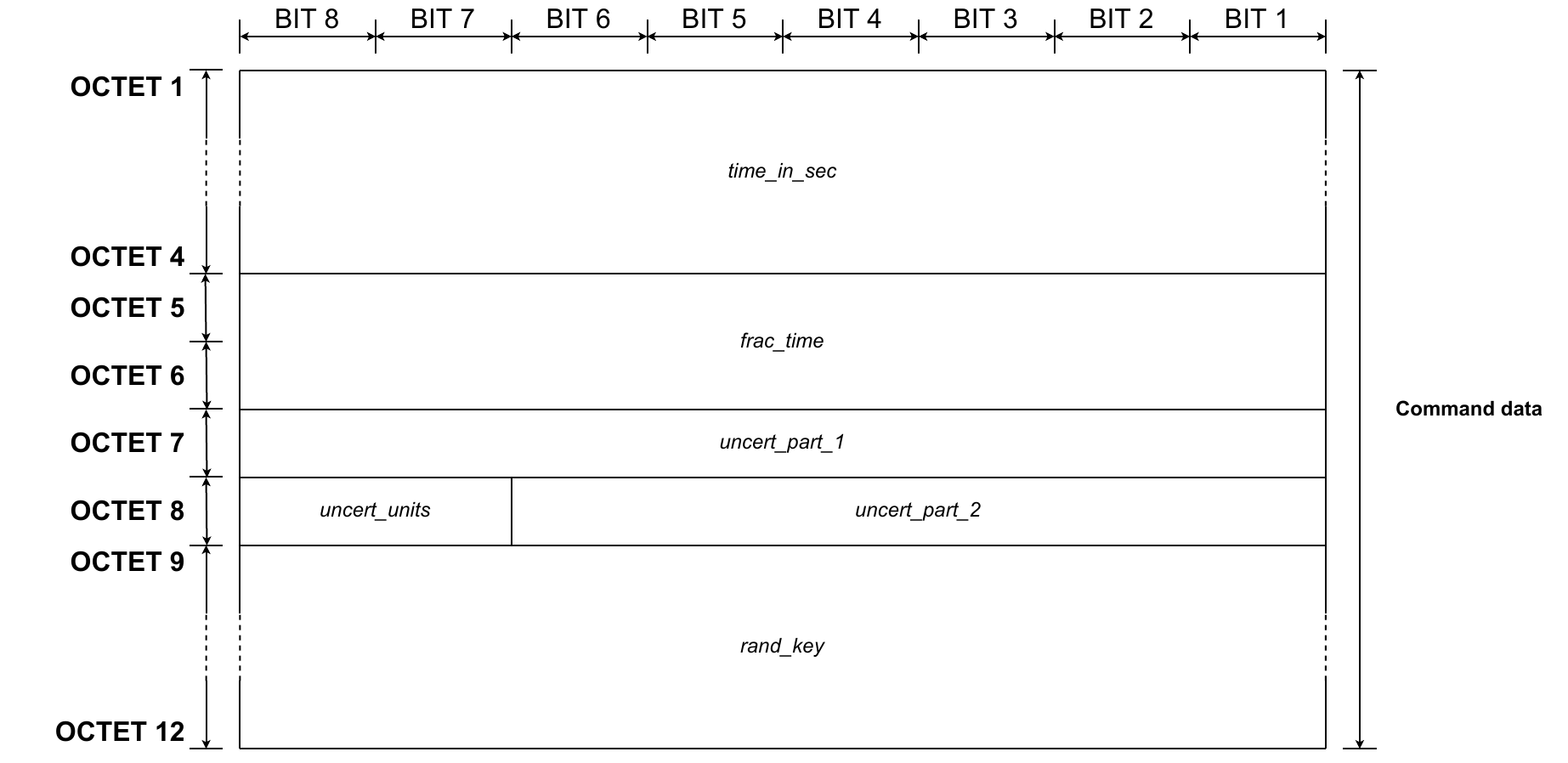
Fig. 3.10 Time commands - Command data format
-
Command class
Mnemonic Length Value Description cmd_class12b 0x00 The value is common for all management commands. -
Command ID
Mnemonic Length Value Type Command name Command direction cmd_id12b 0x108 Read GET_TIME UL cmd_id12b 0x108 Response RESP_TIME DL -
Command data - Time in seconds
Mnemonic Length Value Description time_in_sec4B time The value is presented in seconds. The field indicates the time since the GPS epoch (00:00:00 Jan 6, 1980).
-
Command data - Fractional time
Mnemonic Length Value Description fract_units2B fractional time The value is expressed in units of 1/32768 s (30.5 us). The field indicates the remaining fractional time.
-
Command data - Uncertainty units
Mnemonic Length Value Description uncert_units2b 0x0 1/32768 s (30.5us) uncert_units2b 0x1 32/32768 s (0.97 ms) uncert_units2b 0x2 1024/32768 s (31.25 ms) uncert_units2b 0x3 8192/32768 s (250 ms) The field indicates the error/uncertainty units of a single bit of uncertainty in time that is presented by two fields:
uncert_part_1anduncert_part_2.The maximum value of error/uncertainty in time based on units is as follows:
- for 0x0 maximum is 0.5 s
- for 0x1 maximum is 16 s
- for 0x2 maximum is 8.5 min
- for 0x3 maximum is 1.13 h
-
Command data - Uncertainty
Mnemonic Length Value Description uncert_part_11B Less significant part of current error/uncertainty. This part presents bits 0 - 7 of uncertainty uncert_part_26b Most significant part of current error/uncertainty. This part presents bits 8 - 13 of uncertainty The field indicates the current error/uncertainty. The total of the error/uncertainty is 14b. The value is split into two fields
uncert_part_1anduncert_part_2in the frame. The value is expressed in units specified byuncert_units. -
Command data - Random key
Mnemonic Length Value Description rand_key4B random value The value is generated by the sender device. RESP_TIME command shall include the copy of random key received in GET_TIME command.
3.2.2.2 Join commands
Join command Join-Req Message uses Amazon Sidewalk CMD ID ‘SET JOIN REQ’. Join command Join-Resp Message uses Amazon Sidewalk CMD ID ‘SET JOIN RESP’. They are used for initial connection establishment, namely Network Join procedure as well as periodic connection refreshes, namely Network Sync procedures as detailed in section 8.3. The information content carried with these commands vary depending on use case, i.e. whether used for Network Join or Network Sync processes, as well as the communication mode and profile configuration of the Endpoint. The contents of and are listed in Table 3.1 and Table 3.2, and detailed in section 3.2.2.2.3.
Table 3.1 Information content carried in the JOIN-REQ CMD Payload
| `*Profile** | Use Case | Tag and Length Identifier (TL) | Profile Attributes |
|---|---|---|---|
| Async Connection Mode Profiles A, B, D | Network Join | 0xC407 | 1. Device Profile ID (1B) 2. Window validity period in seconds (2B) 3. Window count (1B) 4. Receive window interval (2B) 5. Periodic uplink interval (Provable reachability interval) (1B) |
| Async Connection Mode Profiles A, B, D | Network Sync | 0xC407 | 1. Device Profile ID (1B) 2. Window validity period in seconds (2B) 3. Window count (1B) 4. Receive window interval (2B) 5. Periodic uplink interval (Provable reachability interval) (1B) |
| Sync Connection Mode Profile 1 | Network Join | 0xC305 | ID of the selected GW (5B) |
| Sync Connection Mode Profile 1 | Network Sync | 0xC305 | ID of the selected GW (5B) |
| Sync Connection Mode Profile 2 | Network Join | 0x4D | UL Link Latency (1B) and Load (1B) |
| Sync Connection Mode Profile 2 | Network Join | 0x4C | DL Link Latency (1B) and Load (1B) |
| Sync Connection Mode Profile 2 | Network Join | 0xC305 | ID of the selected GW (5B) |
| Sync Connection Mode Profile 2 | Network Join | 0x09 | Link Duration (1B) |
| Sync Connection Mode Profile 2 | Network Sync | 0xC305 | ID of the selected GW (5B) |
Table 3.2 Information content carried in the JOIN-RESP CMD Payload
| Profile | Use Case | Tag and Length Identifier (TL) | Profile Attributes |
|---|---|---|---|
| Async Connection Mode Profiles A, B, D | Network Join | 0x00 | Success or Failure (1B) |
| Async Connection Mode Profiles A, B, D | Network Sync | 0x00 | Success or Failure (1B) |
| Sync Connection Mode Profile 1 | Network Join | 0x00 | Success or Failure (1B) |
| Sync Connection Mode Profile 1 | Network Sync | 0x00 | Success or Failure (1B) |
| Sync Connection Mode Profile 2 | Network Join | 0x08 | Request Accept Reject (1B) |
| Sync Connection Mode Profile 2 | Network Join | 0x46 | UL Schedule (2B) |
| Sync Connection Mode Profile 2 | Network Join | 0x41 | DL Schedule (2B) |
| Sync Connection Mode Profile 2 | Network Join | 0x47 | Contention Param (2B) |
| Sync Connection Mode Profile 2 | Network Join | 0x09 | Link Duration (1B) |
| Sync Connection Mode Profile 2 | Network Sync | 0x00 | Success or Failure (1B) |
3.2.2.2.1 Command class
| Mnemonic | Length | Value | Description |
|---|---|---|---|
cmd_class | 12b | 0x00 | The value is common for all management commands. |
3.2.2.2.2 Command ID
| Mnemonic | Length | Value | Type | Command name | Command direction |
|---|---|---|---|---|---|
cmd_id | 12b | 0x22F | Write | SET_JOIN_REQ | UL |
cmd_id | 12b | 0x22F | Response | RESP_JOIN_REQ | DL |
3.2.2.2.3 Command Payload
The command payloads of the ‘Join Commands’ carry several different fields of information content as listed in table 3.1 and table 3.2. Each payload can carry several different information fields, each of which encoded following a TLV format (type-length-value) differentiating information from one another. The type and length fields indicate the type and size of the information content in the field followed by a value field carrying the information. In the case of asynchronous connection mode profiles, ‘SET JOIN REQ’ payload contains a single TLV field, namely ‘Async profile attributes’. In the case of synchronous connection mode profile 2’s ‘Join Process’ usage, ‘SET JOIN REQ’ CMD payload contains four different individually encoded TLV fields. All other usages include only a single TLV encoded field.
` Async profile attributes (0x04) This information field has 7 B of information payload requiring 2 B TL field with a value of ‘0xC407’ making the total CMD payload size of 9 B. The information content is listed in order as follows:
-
Device Profile id
Mnemonic Length Value Description profile_id1B 0x80 Profile A profile_id1B 0x81 Profile B The field indicates the Power Profile ID used by an Endpoint.
-
Window Validity Period
Mnemonic Length Value Description val_period2B 0x0 Unlimited validity period. val_period2B 0x0001 - 0xFFFF Validity period in seconds. The field indicates the time period when an Endpoint is accessible by the cloud. The time counter starts after the last transmission received by the cloud. Downlink transmission shall not be performed after the validity period is expired by the cloud. The cloud shall wait until the next uplink frame to transmit its data in the downlink direction.
-
Number of downlink opportunities
Mnemonic Length Value Description nb_dl_slot1B 0, 5, 10, 15, 20 The number of downlink opportunities. The field indicates the number of downlink opportunities that are available after uplink transmission. Value 0 means infinite downlink opportunities. For more information about
nb_dl_slotsee section 5.3.1. -
Downlink opportunities separation
Mnemonic Length Value Description dl_separation2B 5000 DL opportunities separation in ms. The field indicates the time period between two consecutive downlink opportunities. For detailed information about
dl_separationparameter, see section 5.3.1, section 5.5.2.1, section and 5.5.2.2. -
Uplink frequency of synchronization packets
Mnemonic Length Value Description ul_sync_interval1B 0x00 Profile A ul_sync_interval1B 0x05 Profile B The field indicates the time interval of between subsequent uplink synchronization packets in minutes. Uplink frequency of synchronization packets may be considered also as Provable Reachable Interval (PRI) that identifies the longest interval since last uplink when the cloud may expect uplink data. It does not limit the ability of an Endpoint to send more uplink packets. The value may differ for selected Endpoints’ Connection Profiles. For detailed information about
ul_sync_intervalparameter, see section 5.5.2.1, and section 5.5.2.2.Value 0 means that the time interval is undefined. It means that the cloud does not know when an uplink packet may come. * Synchronous Connection Mode Profile 2 UL Link Characteristics (0xD)
This information field has 2 B of payload requiring 1 B TL field with a value of ‘0x4C’. The first byte of the value contains indicates the desired interval between UL opportunities in increments of 63 ms. The second byte of the information contains an enum indicating the expected load of the node.
-
Synchronous Connection Mode Profile 2 DL Link Characteristics (0xD)
This information field has 2 B of payload requiring 1 B TL field with a value of ‘0x4C’. The first byte of the value contains indicates the desired interval between DL opportunities in increments of 63 ms. The second byte of the information contains an enum indicating the expected load of the node.
-
Synchronous Connection Mode - Node ID (0x3)
This information field has 5 B of value, i.e. requiring an extra byte of explicit length field, making the TL field give a value of ‘0xC305’. The information contains the ID of the Gateway selected as the Sidewalk Relay, as discovered by its ‘Beacon’ packet contents.
-
Synchronous Connection Mode Link Duration (0x9)
This information field has 1 B of payload requiring 1 B TL field with a value of ‘0x09’. The information contains link reservation duration at the Sidewalk Relay without requiring any transmissions activity. Prior to expiration of the reservation, the Endpoints can extend this reservation via an uplink packet for another full reservation period. In ‘SET JOIN REQ’, the information field indicates the desired wake-up characteristics of the Endpoint. In ‘SET JOIN RESP’, the information field indicates the requirement set by the Gateway keeping the reservation. The Endpoint adopts to the value in the ‘SET JOIN RESP’.
-
Status response (0x0) The field indicates whether SET_JOIN_REQ command is either accepted or rejected. The field is commonly used in Synchronous and Asynchronous connection modes.
Mnemonic Length Value Description status_resp1B 0x00 accepted status_resp1B 0x01 rejected
3.2.2.3 Device profile commands
Device profile commands are applicable to SubG-CSS devices only. Commands purpose is:
- To get information related to the current configuration of the Connection Profiles used by the Endpoint (GET_DEVICE_PROFILE, RESP_DEVICE_PROFILE)
- To request the Endpoint to set the selected Connection Profile using the configuration provided (SET_DEVICE_PROFILE )

Fig. 3.11 SET-DEVICE-PROFILE and RESP-DEVICE-PROFILE commands - Command data format

Fig. 3.12 GET-DEVICE-PROFILE command - Command data format
-
Command class
Mnemonic Length Value Description cmd_class12b 0x00 The value is common for all management commands. -
Command ID
Mnemonic Length Value Type Command name Command direction cmd_id12b 0x230 Read GET_DEVICE_PROFILE DL cmd_id12b 0x230 Write SET_DEVICE_PROFILE DL cmd_id12b 0x230 Response RESP_DEVICE_PROFILE UL -
Command data - Format ID
Mnemonic Length Value Description format_id1B 0x01 SubG-CSS device Connection Profile settings. -
Commands data - Profile ID
Mnemonic Length Value Description profile_id1B 0x80 Profile A profile_id1B 0x81 Profile B The field indicates the Connection Profile ID used by an Endpoint.
-
Command data - Number of downlink opportunities
Mnemonic Length Value Description nb_dl_slot1B 0, 5, 10, 15, 20 The number of downlink opportunities. The field indicates the number of downlink opportunities that are available after uplink transmission. Value 0 means infinite downlink opportunities. For detailed information about
nb_dl_slotparameter, see Section 5.3.1. -
Command data - Downlink opportunities separation
Mnemonic Length Value Description dl_separation2B 5000 DL opportunities separation in ms. The field indicates the time period between two consecutive downlink opportunities.
3.2.2.4 Reset commands
The reset command is used by the Amazon Sidewalk Cloud to request a reset type to be performed by the Endpoint. The SET_RESET command is used for this purpose. The Endpoint confirms reset execution using NOTIFY_RESET command.

Fig. 3.13 SET-RESET command - Command data format

Fig. 3.14 NOTIFY-RESET command - Command data format
-
Command class
Mnemonic Length Value Description cmd_class12b 0x00 The value is common for all management commands. -
Command ID
Mnemonic Length Value Type Command name Command direction cmd_id12b 0x112 Write SET_RESET DL cmd_id12b 0x112 Notification NOTIFY_RESET UL -
Command data - Reset type
Mnemonic Length Value Description reset_type1B 0x00 Soft reset clears the persistent configuration.Requires factory reset to be performed. reset_type1B 0x01 Hard reset is the same as Soft reset. reset_type1B 0x02 Reboots the device. -
Command data - Reset target
Mnemonic Length Value Description reset_target1B 0x00 RESET_TARGET_ALL reset_target1B 0x01 RESET_TARGET_MCU reset_target1B 0x02 RESET_TARGET_HOST -
Command data - Reboot delay
Mnemonic Length Value Description reboot_delay1B 0x00 - 0xFF Reboot delay in seconds.
3.2.3 Capability and Configuration commands
The capabilities of the Endpoint shall be notified to the Sidewalk cloud upon successful registration and time acquisition. In the case of FSK and LoRa links, the notification of capabilities of the Endpoint shall be completed upon successful completion of join procedure. The Endpoint can receive a configuration update from Sidewalk cloud that might require it to change its behavior to adhere to the new configuration downloaded. For instance, Sidewalk cloud could download a configuration to an Endpoint to enforce traffic rate throttling. Upon receiving such a configuration, the Endpoint would limit the number of messages that it sends out.
-
Command class
Mnemonic Length Value Description cmd_class4b 0x00 The value is common for all metrics commands. -
Command IDs
Mnemonic Length Value Type Command name Command direction cmd_id4b 0x02 Read EP_CAP_CFG_READ DL cmd_id4b 0x02 Notify EP_CAP_CFG_NOTIFY UL cmd_id4b 0x02 Write EP_CAP_CFG_WRITE DL cmd_id4b 0x02 Response EP_CAP_CFG_RESP UL
3.2.3.1 Capability Parameters
The Endpoint shall notify to the Sidewalk cloud service the following listed capability parameters.
| Parameter | Description |
|---|---|
sdk_version | The version of Sidewalk SDK that the device incorporates. |
links_supported | The Sidewalk network links that the device supports. |
features_supported | The Sidewalk Endpoint SDK features that the device supports. |
qualificaiton_id | The qualification id that is provided to the device by Sidewalk qualification. |
max_tx_power | The maximum transmit power configured for all the supported links. |
power_source | The device is battery powered or line powered. |
3.2.3.2 Configuration Parameters
The Endpoint shall support the configuration of the following parameters through a downlink message sent from the Sidewalk cloud services.
| Parameter | Description |
|---|---|
enable_metrics | The configuration to turn on and off reporting of Sidewalk metrics. |
metrics_periodicity | The periodicity of the metrics the Sidewalk EP reports to Sidewalk Cloud. |
traffic_throttling | The configuration to turn on and off traffic rate throttling. |
3.2.4 Metrics commands
Metrics Commands report Endpoint metrics for synchronous and asynchronous connections. Values are determined by the Endpoint, and sent to the cloud periodically. Metrics data shall be reported by Endpoint asynchronously. The Endpoint shall support synchronous retrieval of its metrics data through a downlink message from the Sidewalk cloud services. Metrics data shall be classified into categories and each category shall contain one or more metrics. Metrics data shall be reported once in a day through an explicit message to Sidewalk cloud service. This periodicity can be changed by the Sidewalk cloud service. Metrics data shall be immediately flushed if the Sidewalk connectivity is not present at the time of reporting. The Sidewalk cloud service can download configuration to the Endpoint to enable or disable reporting metrics of one or all categories. Metrics data shall be reported to Sidewalk cloud using one explicit message with configured retry parameters. When all the data cannot be accommodated in one explicit message, the remaining metric data is sent as part of subsequent messages from the Endpoint.
-
Command class
Mnemonic Length Value Description cmd_class4b 0x0B The value is common for all metrics commands. -
Command IDs
Mnemonic Length Value Type Command name Command direction cmd_id4b 0x0E Read REQ_READ_METRICS_FWK DL cmd_id4b 0x0E Response RESP_REQ_METRICS_FWK UL cmd_id4b 0x0E Notify NOTIFY_REQ_METRICS_FWK UL cmd_id4b 0x0F Read SET_CONFIG_METRICS_FWK DL cmd_id4b 0x0F Response RESP_CONFIG_METRICS_FWK UL -
Category - BLE Link
Mnemonic Length Value Description num_ul4B 0x00 - 0xFFFFFFFF Number of ULs. num_dl4B 0x00 - 0xFFFFFFFF Number of DLs. num_ul_fail4B 0x00 - 0xFFFFFFFF Number of UL failures. num_dl_decode_fail4B 0x00 - 0xFFFFFFFF Number of DL decode failures. num_dl_buffer_underrun1B 0x00 - 0xFF buffers. num_msg_bursts2B 0x00 - 0xFFFF Message burst is defined as more than 30 messages in a minute. avg_ul_msg_size1B 0x00 - 0xFF Average size of UL messages. avg_dl_msg_size1B 0x00 - 0xFF Average size of DL messages. num_conn_success2B 0x00 - 0xFFFF Number of successful connections. num_conn_attempts2B 0x00 - 0xFFFF Number of connection attempts. num_conn_attempts_error2B 0x00 - 0xFFFF with critical errors. avg_rssi1B -127 - +127 Average RSSI of messages received. min_rssi1B -127 - +127 with. -
Category - FSK Link
Mnemonic Length Value Description num_ul4B 0x00 - 0xFFFFFFFF Number of ULs. num_dl4B 0x00 - 0xFFFFFFFF Number of DLs. num_ul_fail2B 0x00 - 0xFFFF Number of UL failures. num_dl_decode_fail2B 0x00 - 0xFFFF Number of DL decode failures. num_dl_buffer_underrun1B 0x00 - 0xFF buffers. num_msg_bursts1B 0x00 - 0xFF Message burst is defined as more than 20 messages per minute. avg_ul_msg_size1B 0x00 - 0xFF Average size of UL messages. avg_dl_msg_size1B 0x00 - 0xFF Average size of DL messages. num_sidewalk_network_ul2B 0x00 - 0xFFFF Sidewalk cloud. -
Category - FSK MAC Layer
Mnemonic Length Value Description num_radio_errors2B 0x00 - 0xFFFF Number of radio errors encountered. num_radio_critical_errors1B 0x00 - 0xFF encountered. num_tx4B 0x00 - 0xFFFFFFFF link layer acknowledgments. num_tx_fail4B 0x00 - 0xFFFFFFFF Number of messages failed to transmit. num_tx_fail_no_ack1B 0x00 - 0xFF due to lack of link layer acknowledgment. num_rx4B 0x00 - 0xFFFFFFFF link layer acknowledgments. num_tx_ack4B 0x00 - 0xFFFFFFFF Number of acknowledgments transmitted. num_crc_errors4B 0x00 - 0xFFFFFFFF Number of CRC errors. avg_rssi1B -127 - +127 Average RSSI of messages received. min_rssi1B -127 - +127 with. -
Category - LoRa Link
Mnemonic Length Value Description num_ul2B 0x00 - 0xFFFF Number of ULs. num_dl2B 0x00 - 0xFFFF Number of DLs. num_ul_fail2B 0x00 - 0xFFFF Number of UL failures. num_dl_decode_fail2B 0x00 - 0xFFFF Number of DL decode failures. num_dl_buffer_underrun1B 0x00 - 0xFF Number of DL failures due to lack of buffers. num_msg_bursts1B 0x00 - 0xFF Number of message bursts. Message burst is defined as more than 12 messages per hour for a mobile device and 4 messages per hour for a static device. avg_ul_msg_size1B 0x00 - 0xFF Average size of UL messages. avg_dl_msg_size1B 0x00 - 0xFF Average size of DL messages. num_sidewalk_network_ul2B 0x00 - 0xFFFF cloud. -
Category - LoRa MAC Layer
Mnemonic Length Value Description num_radio_errors2B 0x00 - 0xFFFF Number of radio errors encountered. num_radio_critical_errors1B 0x00 - 0xFF Number of critical radio errors encountered. num_tx2B 0x00 - 0xFFFF Number of messages transmitted. num_rx2B 0x00 - 0xFFFF Number of messages received. num_crc_errors1B 0x00 - 0xFF Number of CRC errors. avg_rssi1B -127 - +127 Average RSSI of messages received. min_rssi1B -127 - +127 The lowest RSSI a message is received with. -
Category - Retries and Duplicates
Mnemonic Length Value Description num_retries_ble4B 0x00 - 0xFFFFFFFF Number of retries performed on BLE link. num_retries_fsk2B 0x00 - 0xFFFF Number of retries performed on FSK link. num_retries_lora2B 0x00 - 0xFFFF Number of retries performed on LoRa link. num_duplicates_ble4B 0x00 - 0xFFFFFFFF Number of duplicates received on BLE link. num_duplicates_fsk2B 0x00 - 0xFFFF Number of duplicates received on FSK link. num_duplicates_lora2B 0x00 - 0xFFFF Number of duplicates received on LoRa link. avg_rtt1B 0x00 - 0xFF Average round trip time for all messages. -
Category - Registration
Mnemonic Length Value Description num_reg_attempts1B 0x00 - 0xFF Number of registration attempts performed. num_reg_errors1B 0x00 - 0xFF Number of registration attempts failed. num_key_refresh_attempts1B 0x00 - 0xFF Number of key refresh performed. num_key_refresh_errors1B 0x00 - 0xFF Number of key refresh attempts failed. -
Category - Time Synchronization
Mnemonic Length Value Description num_time_sync_requests2B 0x00 - 0xFFFF Number of time sync requests performed. num_time_sync_responses2B 0x00 - 0xFFFF Number of time sync responses received. time_sync_periodicity2B 0x00 - 0xFFFF The periodicity of time sync requests. drift_ms1B 0x00 - 0xFF Endpoint GCS time and GCS time received in time sync response. -
Category - Network Synchronization
Mnemonic Length Value Description num_nw_join_requests_fsk2B 0x00 - 0xFFFF performed. num_nw_join_responses_fsk2B 0x00 - 0xFFFF Number of join responses received. num_nw_join_requests_lora2B 0x00 - 0xFFFF performed. num_nw_join_responses_lora2B 0x00 - 0xFFFF performed. -
Category - Security
Mnemonic Length Value Description num_decrypt_errors2B 0x00 - 0xFFFF Number of decryption errors. num_auth_errors2B 0x00 - 0xFFFF Number of authentication errors. -
Category - FFN
Mnemonic Length Value Description num_ffn_retries2B 0x00 - 0xFFFF Number of FFN retry attempts. -
Category - Sidewalk Bulk Transfer
Mnemonic Length Value Description num_file_xfer1B 0x00 - 0xFF Number of File transfer attempts. num_file_xfer_errors1B 0x00 - 0xFF Number of File transfer errors. -
Category - Multi Link Management
Mnemonic Length Value Description num_conn_attempts_ble2B 0x00 - 0xFFFF Number of connection attempts over BLE. num_conn_attempts_fsk2B 0x00 - 0xFFFF Number of connection attempts over FSK. num_conn_attempts_lora2B 0x00 - 0xFFFF Number of connection attempts over LoRa. num_conn_timeouts_ble2B 0x00 - 0xFFFF Number of connection timeouts over BLE. num_conn_timeouts_fsk2B 0x00 - 0xFFFF Number of connection timeouts over FSK. num_conn_timeouts_lora2B 0x00 - 0xFFFF Number of connection timeouts over LoRa. min_time_successful_conn2B 0x00 - 0xFFFF connection. max_time_successful_conn2B 0x00 - 0xFFFF connection. num_links_traversed1B 0x00 - 0xFF connection. last_policy_selected1B 0x00 - 0xFF The last MLM policy selected. -
Category - Automatic Connection Management
Mnemonic Length Value Description num_conn_attempts_ble2B 0x00 - 0xFFFF Number of connection attempts over BLE. num_conn_attempts_fsk2B 0x00 - 0xFFFF Number of connection attempts over FSK. num_conn_attempts_lora2B 0x00 - 0xFFFF Number of connection attempts over LoRa. num_conn_timeouts_ble2B 0x00 - 0xFFFF Number of connection timeouts over BLE. num_conn_timeouts_fsk2B 0x00 - 0xFFFF Number of connection timeouts over FSK. num_conn_timeouts_lora2B 0x00 - 0xFFFF Number of connection timeouts over LoRa. links_priority_config1B 0x00 - 0xFF Order of priority of links to connect. timeout_config_ble2B 0x00 - 0xFFFF Timeout configured for BLE link. timeout_config_fsk2B 0x00 - 0xFFFF Timeout configured for FSK link. timeout_config_lora2B 0x00 - 0xFFFF Timeout configured for LoRa link. min_time_successful_conn2B 0x00 - 0xFFFF connection. max_time_successful_conn2B 0x00 - 0xFFFF connection.