5.4 Gateway connection modes
In the sub-GHz band, a Gateway operates in one of four modes:
- SubG-FSK-only mode (see figure 5.63)
- SubG-CSS-only mode (see figure 5.64)
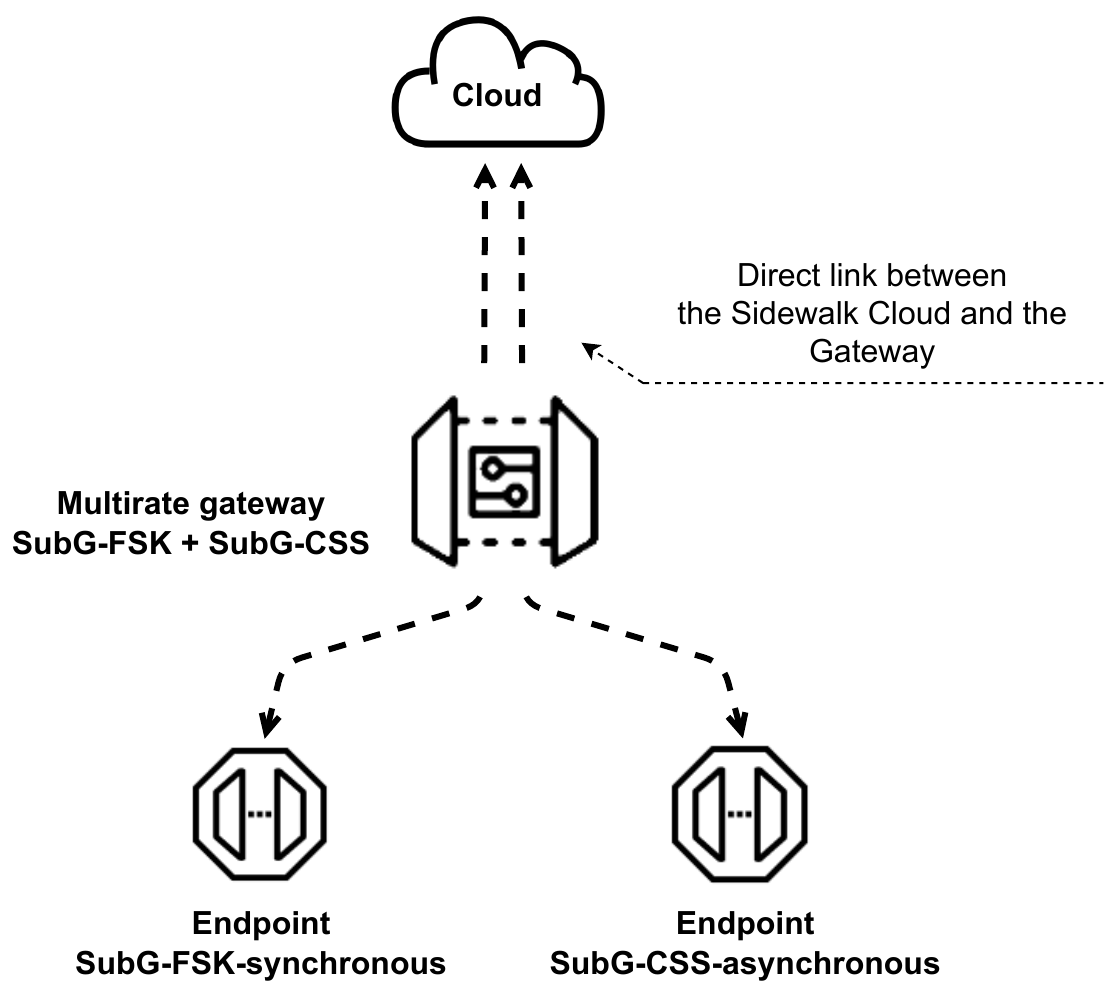
- SubG-FSK+SubG-CSS mode, also called multirate mode (see figure 5.65)
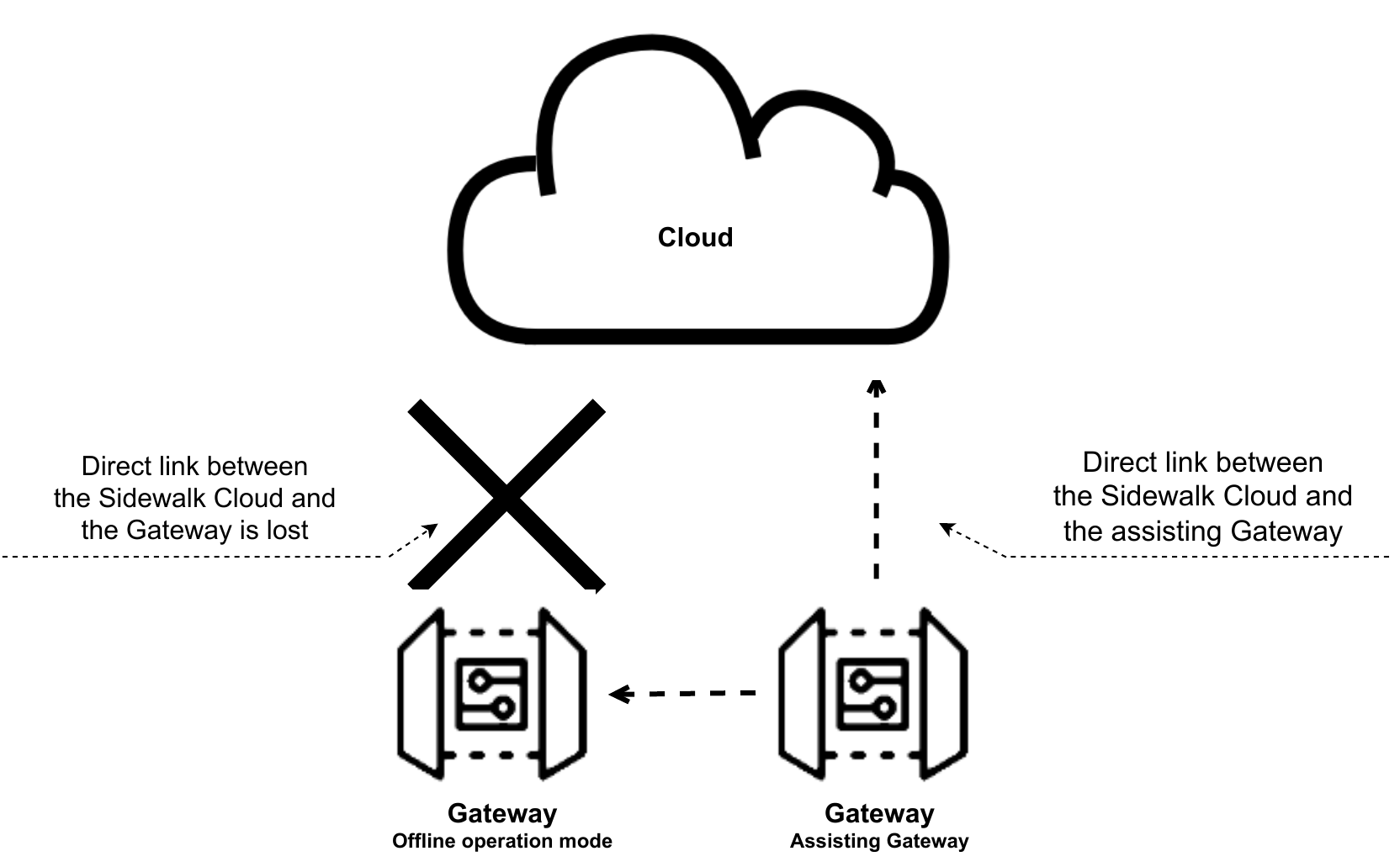
- Offline operation mode (see figure 5.66)
The first three modes support different Endpoint types with communication to the Amazon Sidewalk Cloud. Gateways transfer Endpoints’ packets to the cloud through the direct communication link that may be handled by different communication technologies like Wi-Fi, LAN or cellular connectivity. These Gateways operation modes are described in detail in section 5.4.1, section 5.4.2, and section 5.4.3
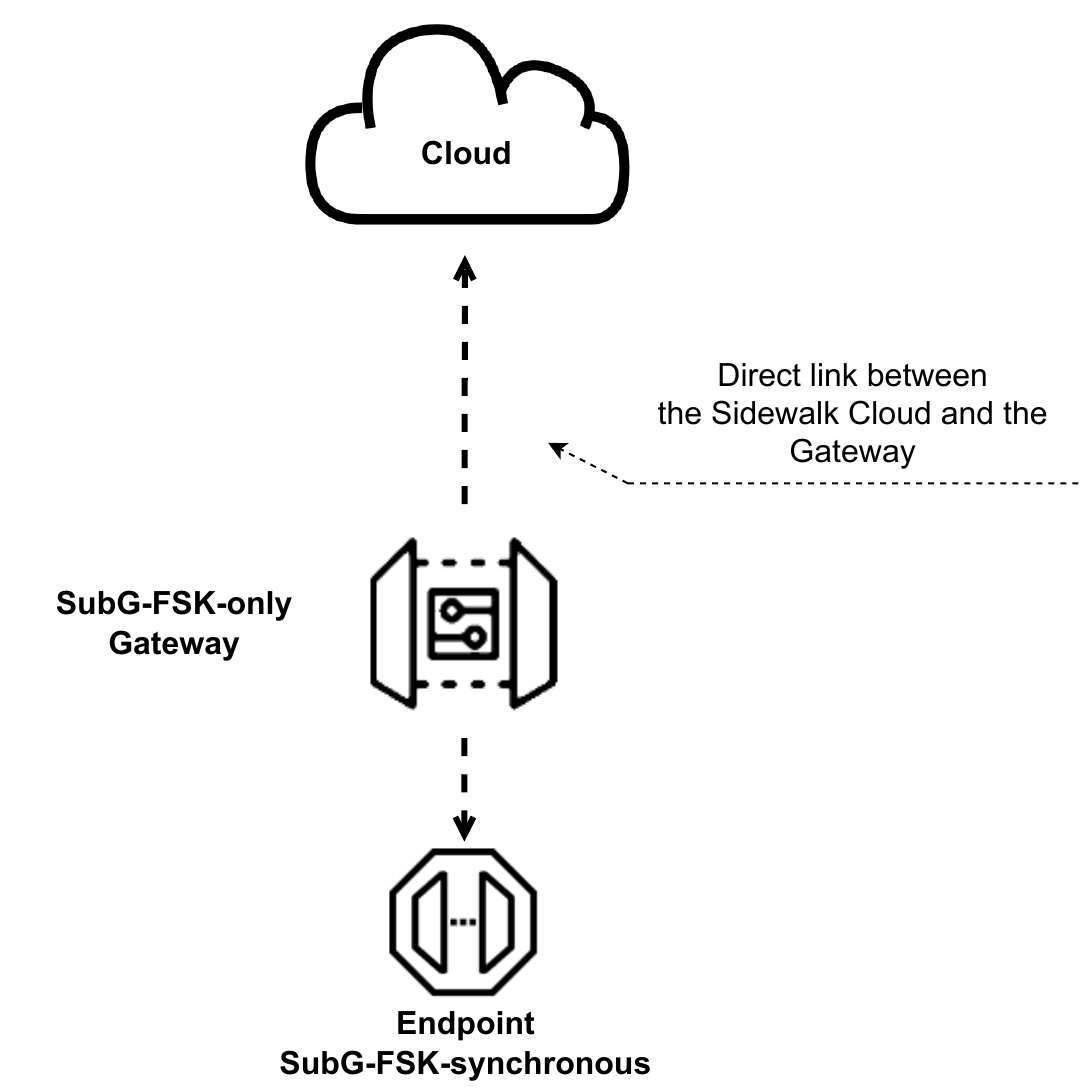
fig 5.63 SubG-FSK-only gateway
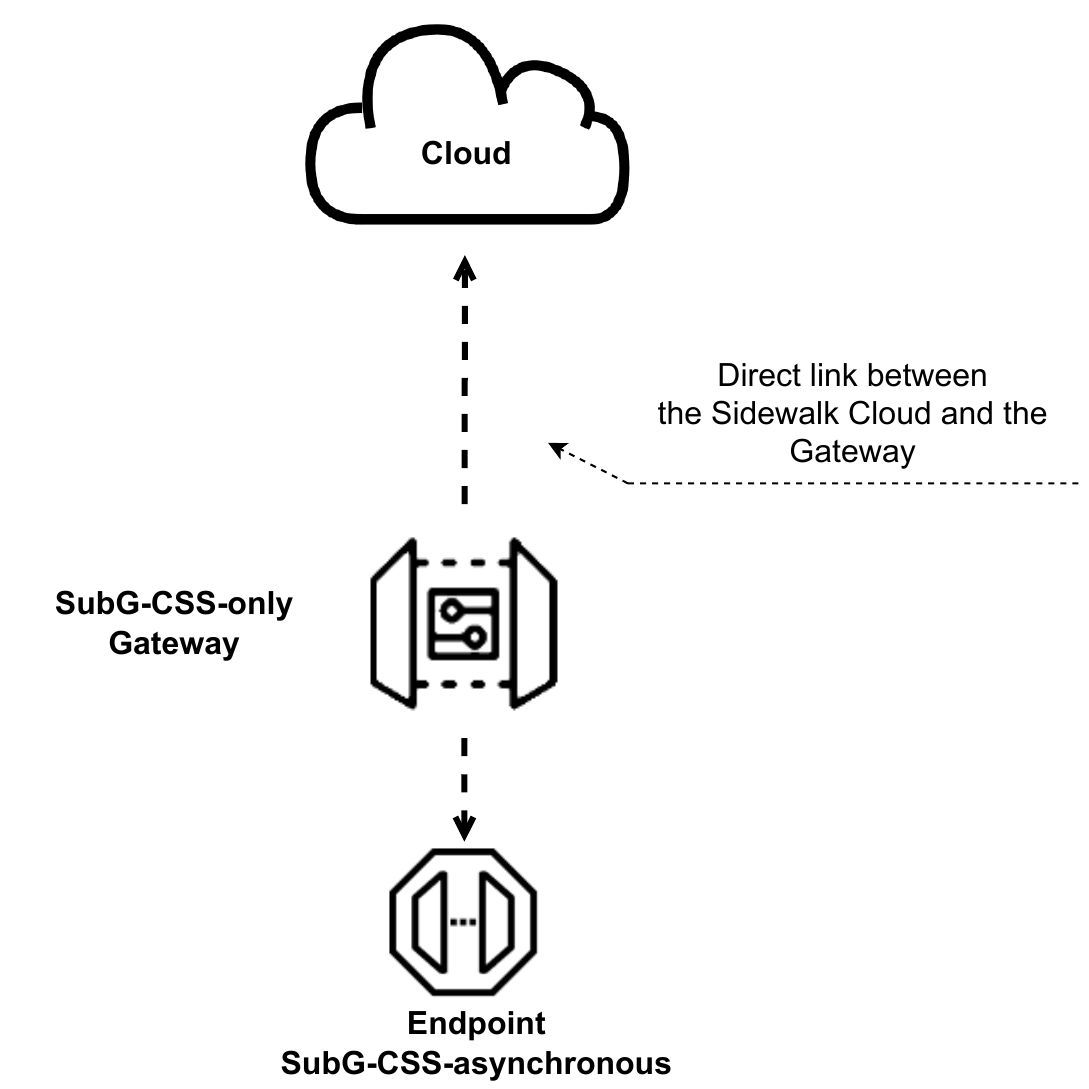
fig 5.64 SubG-CSS-only gateway
Offline operation mode shall be used by the Gateway when a direct link to the Amazon Sidewalk Cloud is lost. The switch to this mode shall be done automatically and the Gateway behaves like a SubG-CSS Endpoint. The SubG-CSS connection is used in this case. The connectivity to the cloud is provided by a neighborhood Gateway that is called an assisting Gateway. Endpoints cannot connect to the network through the Gateway operating in this mode.
5.4.1 SubG-FSK-only operation mode
In this mode, the Gateway’s responsibility is to send the Beacon frequently and to handle SubG-FSK Endpoints’ traffic in uplink and downlink directions.
The Gateway not transmitting data shall listen to the medium to detect uplink traffic. The Gateway shall start an uplink preamble detection in slots for hdr_listening_time duration (see figure 5.67). When a transmission of a preamble is detected in hdr_listening_time period, then reception of the uplink packet shall be started. The Gateway shall continue listening to the medium in the upcoming slot after the reception of an uplink packet is completed (see figure 5.68). The device not detecting traffic in hdr_listening_time shall switch the radio to the inactive state till upcoming selection activity.
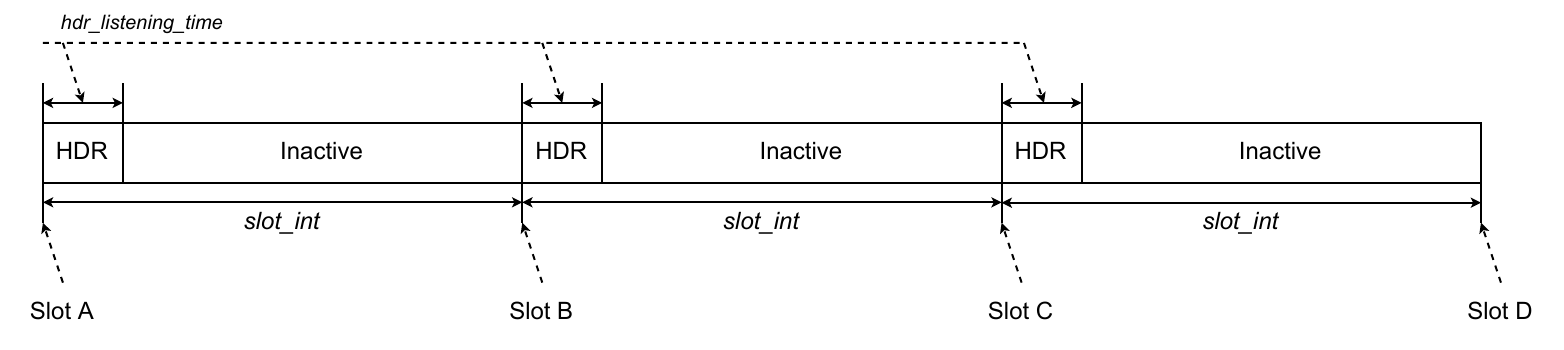
fig 5.67 Gateway timing - SubG-FSK-only
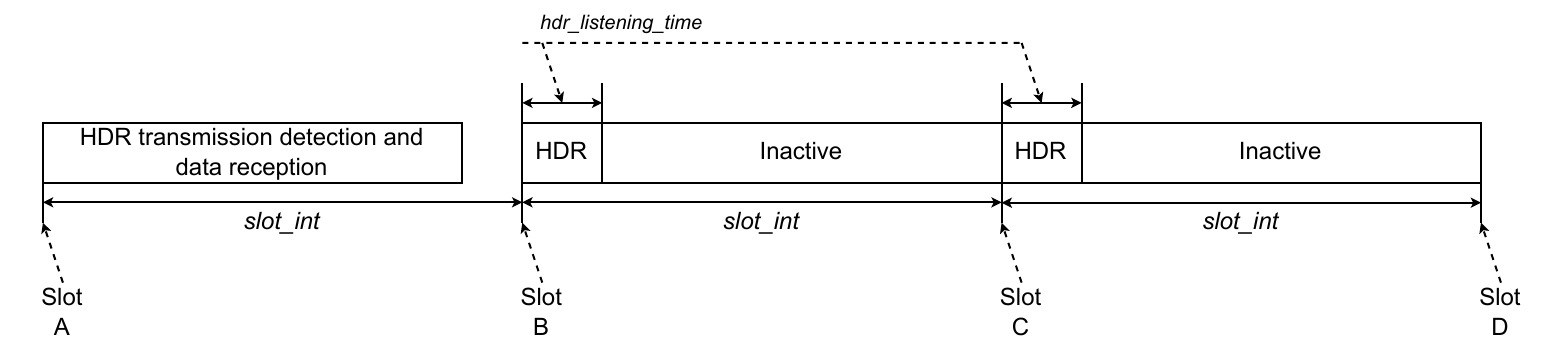
fig 5.68 SubG-FSK-only gateway - data reception
The downlink transmission is possible only during the instance of time when the Endpoint starts listening in the assigned downlink slots. The Gateway shall start the downlink transmission on the upcoming downlink slot. The Gateway does not check the medium availability but starts its transmission on the sub_slot_nb-1 detection sub-slot. This promotes the Gateway over Endpoints and gives higher priority to a downlink transmission. The mechanism is described in section 5.2.5.
5.4.2 SubG-CSS-only operation mode
In this mode, the Gateway responsibility is to handle SubG-CSS Endpoints’ traffic in the uplink and downlink directions.
The Gateway not transmitting data shall listen to the medium to detect uplink traffic. Listening to the medium is done periodically each slot_int for ldr_listening_time duration. The radio shall be inactive for the remainder of the slot_int period (see figure 5.69).

fig 5.69 Gateway timing - SubG-CSS-only
When an Endpoint transmission of a preamble is detected in ldr_listening_time period then reception of the uplink packet shall be started. The Gateway reception is spanned over a few slot_int (see 5.1.4.2.4). The Gateway shall continue listening to the medium in the upcoming slot after the reception of an uplink packet is completed (see figure 5.70).

fig 5.70 SubG-CSS-only gateway - data reception
The SubG-CSS downlink transmission is scheduled in a synchronous way. The synchronization is based on each uplink Epoch frame (see section 5.3). The Amazon Sidewalk Cloud stores information when the SubG-CSS Endpoint can receive data and provides these parameters to the Gateway. This is based on the Join procedure and Connection Profile settings of the Endpoint. The start of a downlink transmission may not be aligned with the listening schedule (see figure 5.71 and section 5.5 when downlink transmission may happen). The Gateway is also responsible for applying the correct preamble size to the PHY level based on the possible time drift determined by the crystal quality.

fig 5.71 SubG-CSS-only gateway - data transmission
5.4.3 Multirate operation mode
In this mode, the Gateway’s responsibility is to send the Beacon frequently and to handle SubG-CSS and SubG-FSK Endpoints traffic in uplink and downlink directions. This Gateway mode is a combination of SubG-CSS-only and SubG-FSK-only modes.
The Gateway listens to SubG-FSK and SubG-CSS uplink traffic sequentially. The listening schedule is determined in the same way as for the SubG-FSK-only Gateway. SubG-FSK traffic detection starts in each slot for hdr_listening_time duration. When SubG-FSK traffic is not detected, then SubG-CSS traffic detection is started for ldr_listening_time duration. When SubG-CSS traffic is not detected, then the cycle is repeated (see figure 5.72).
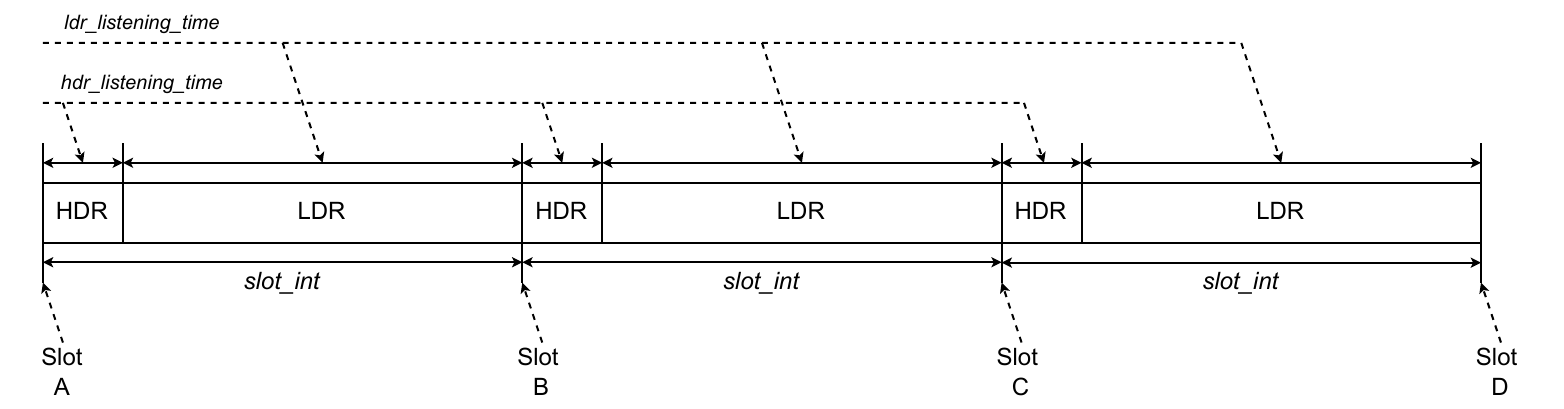
fig 5.72 Gateway timing - SubG-CSS and SubG-FSK
The Gateway switches between modulations till the moment a transmission is detected in one of the modulations, which triggers reception of the uplink packet. The data reception may span a few slots. When the packet reception is completed, then the Gateway shall continue to listen to the medium starting from upcoming either SubG-FSK or SubG-CSS mode (see example on figure 5.73).
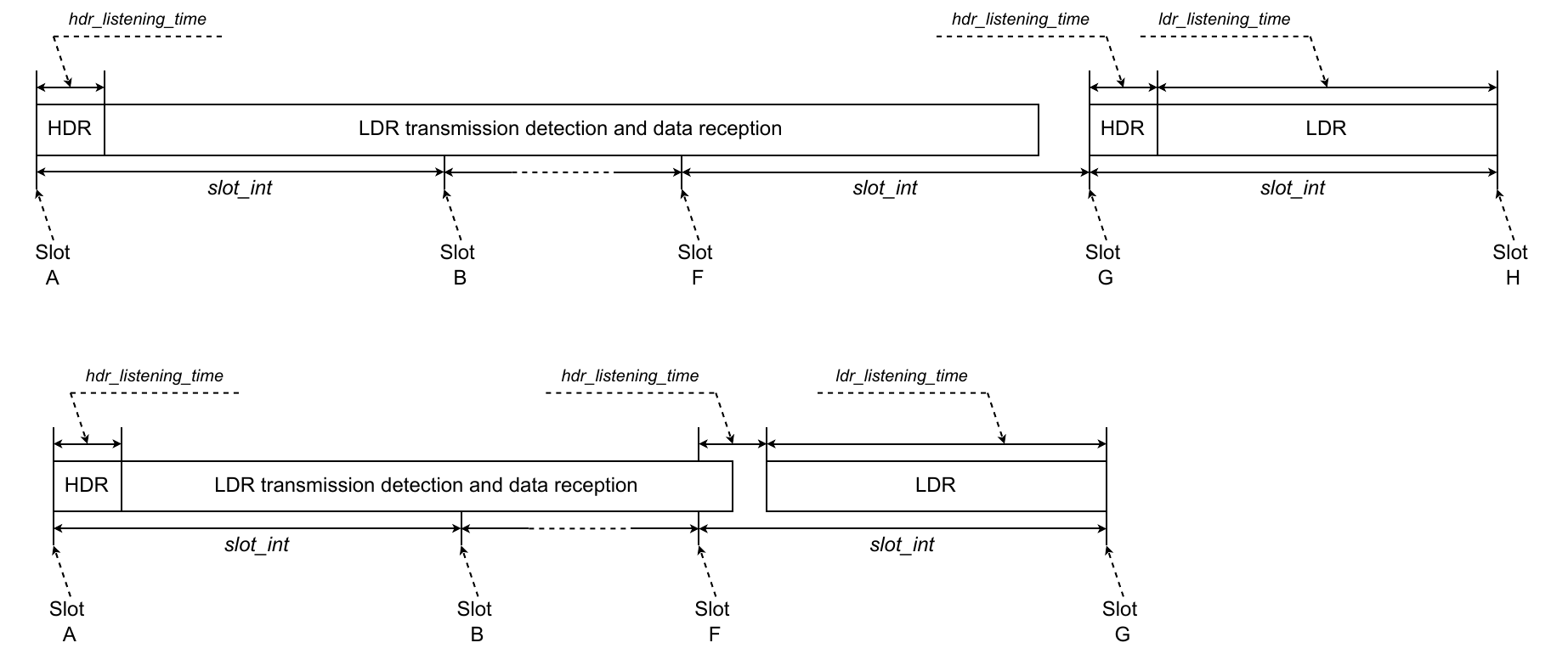
fig 5.73 Multirate gateway - data reception
The SubG-FSK downlink transmission in case of multirate mode has the same scheduling and rules as described in section 5.4.1. The SubG-CSS downlink transmission rules are the same as described in section 5.4.2. In SubG-CSS-only mode, the start of a downlink transmission is not aligned with the listening schedule and may span a few slots (see example in figure 5.74).

fig 5.74 Multirate gateway - data transmission