8.1 Power up
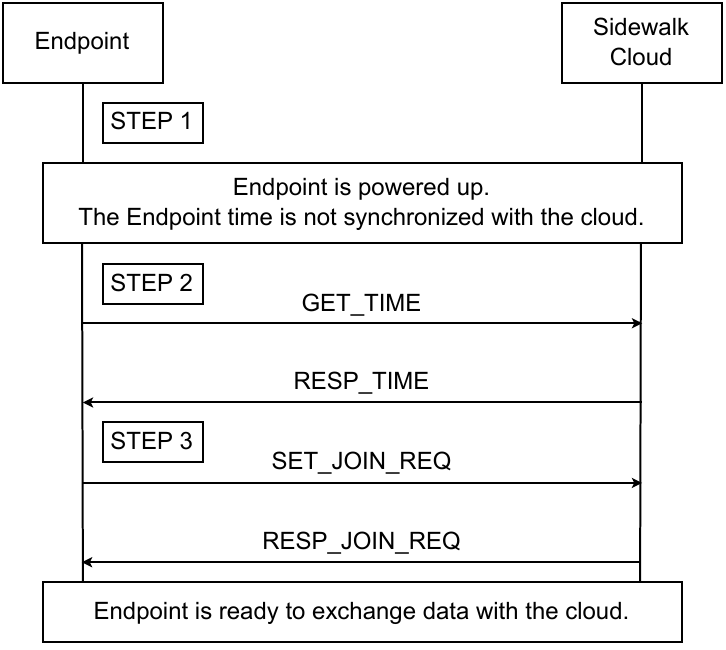
The flow chart specifies the command sequence that shall be exchanged between the Endpoint and the Amazon Sidewalk Cloud to make an Endpoint fully operational. The procedure is as follows:
- STEP 1 - The Endpoint powers up and initializes Amazon Sidewalk SDK with one of the three types of connection modes, i.e. BLE, SubG-CSS or SubG-FSK connection modes. The parameters of the selected connection mode, stored in the Endpoint’s non-volatile memory, are loaded back. These parameters can be modified to desired values by resetting them through Amazon Sidewalk APIs. In the next boot-up,
-
STEP 2 - Amazon Sidewalk is started through the
sid_startinstruction. This instruction triggers the protocol to start forming the initial communication link. Depending on the connection mode that the Endpoint is initialized as follows:- in the case of BLE connection mode, the instruction initializes the components for BLE communication, starts sending out advertisement packages and waits for connection initiation requests from nearby Gateways. The BLE communication link is established via a handshake request by an Amazon Sidewalk Gateway responding to the advertisement package as described in section 6.2;
- in the case of the SubG-FSK connection mode, the instruction starts a Beacon Discovery operation as described in section 5.2.1. Upon discovering the Gateway, SubG-FSK connection with the discovered Gateway is established using “Common Slots” schedule as described in 5.5.1.1.1;
- in the case of the SubG-CSS connection modes, the instruction initializes the components to send SubG-CSS packets but does not send or receive any packets.
- STEP 3 - The Endpoint shall establish time synchronization with the Amazon Sidewalk Cloud by using
GET_TIMEandRESP_TIMEcommand pairs. These commands use counter-based keys (see details in section 4.2, and section 4.5, and further details of this process are described in . The Endpoint proceeds with Step 4 after establishing time synchronization. - STEP 4 - The Endpoint initiates the Amazon Sidewalk join procedure by using
set_join_reqandresp_join_reqcommand pairs as described in section 8.3. Upon completing this step, the Endpoint reports Amazon Sidewalk Connected state to its app. Once connected, the Endpoint allows uplink and downlink data message flows between application servers and the Endpoint through the Amazon Sidewalk Cloud. -
STEP 5 - The Endpoint starts maintaining Amazon Sidewalk connectivity. This maintenance involves:
- link layer connectivity between and the Endpoint in the connection mode being used including BLE, 900 MHz synchronous or asynchronous modes.
- GCS synchronization maintenance through periodic updates as described in section 8.2.1,
- Amazon Sidewalk connectivity maintenance through periodic Network Synchronization messages as described in section 5.6.