5.6 Connection maintenance with network synchronization
Endpoints in a WAN network are not always connected to a Gateway that belongs to the same account. Endpoints may roam from one Gateway to another Gateway or lose the connection to it, and thus to the cloud. Therefore, Endpoints in the WAN network keep monitoring the connection with the cloud by sending synchronization requests to the cloud either periodically or sporadically in specific states. There are three types of synchronization requests, included in two application layer commands for network synchronization,
- Time management command described in section 3.2.2.1.
- JOIN command described in section 3.2.2.2.
- In the specified piggybacking state, uplink data is piggybacked with synchronization request TLV, described in network diagnostic data Format ID in section 5.1.2.2.3. When the cloud receives uplink data with this format ID, it replies JOIN command with type “Notify” to Endpoints as a synchronization response. This process is described in section 3.2.2.2.
In any state, when Endpoints receive responses to the above commands, Endpoints will be set as synchronized for a certain period. See figure 5.82 - an Endpoint sends a synchronization request and a synchronization response is received. In this way, the Endpoints are able to know the status of connectivity with the network. This also ensures Endpoints are updating the routing table in the cloud, so that the cloud can deliver the downlink packet to the correct Gateway. When the network is detected as not synchronized, Endpoints working in SubG-FSK connection mode will trigger Beacon discovery, looking for a new Gateway to which a synchronization request can be sent. For Endpoints working in SubG-CSS connection mode, uplink might still be connected. Hence, Endpoints will stay in the piggybacking state, any uplink data in this state will be synchronization request, receiving a synchronization response can bring device back to synchronized.
Based on the Endpoint’s connection profile setting, the behavior of network synchronization will be slightly different. For further information, see the following subsections.
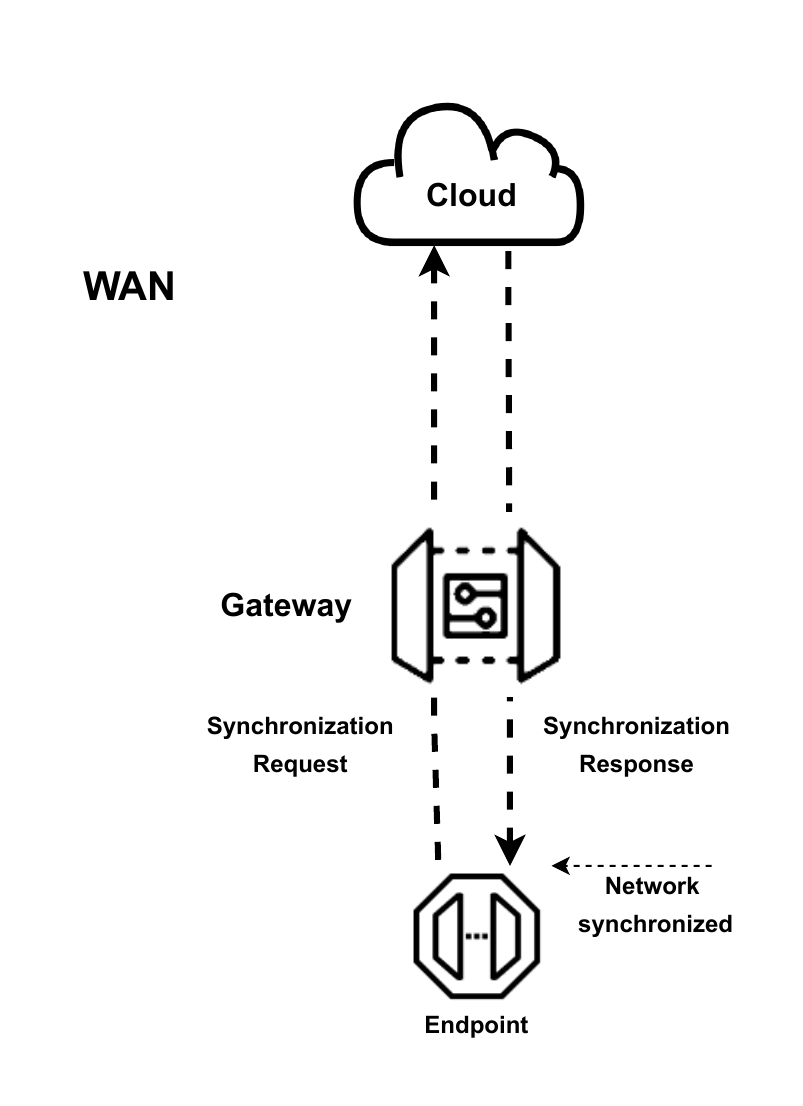
fig 5.82 Network synchronization
5.6.1 Connection Profiles 1 and 2
The behavior of time synchronization is the same for Connection Profiles 1 and 2. Periodic synchronization is activated for them. Endpoints are set as synchronized for 840 s when receiving a synchronization response and enter the piggybacking state at the halfway point of the synchronized period, 420 s. If no synchronization responses are received within the synchronized period, JOIN command described in section 3.2.2.2 is sent due to activation of periodic synchronization. Endpoints trigger Beacon discovery autonomously when they have failed to synchronize with the network. See figure 5.83.
Endpoints may leave the piggybacking state earlier and are set as synchronized for another 840 s when receiving a synchronization response in the piggybacking state. See figure 5.84.
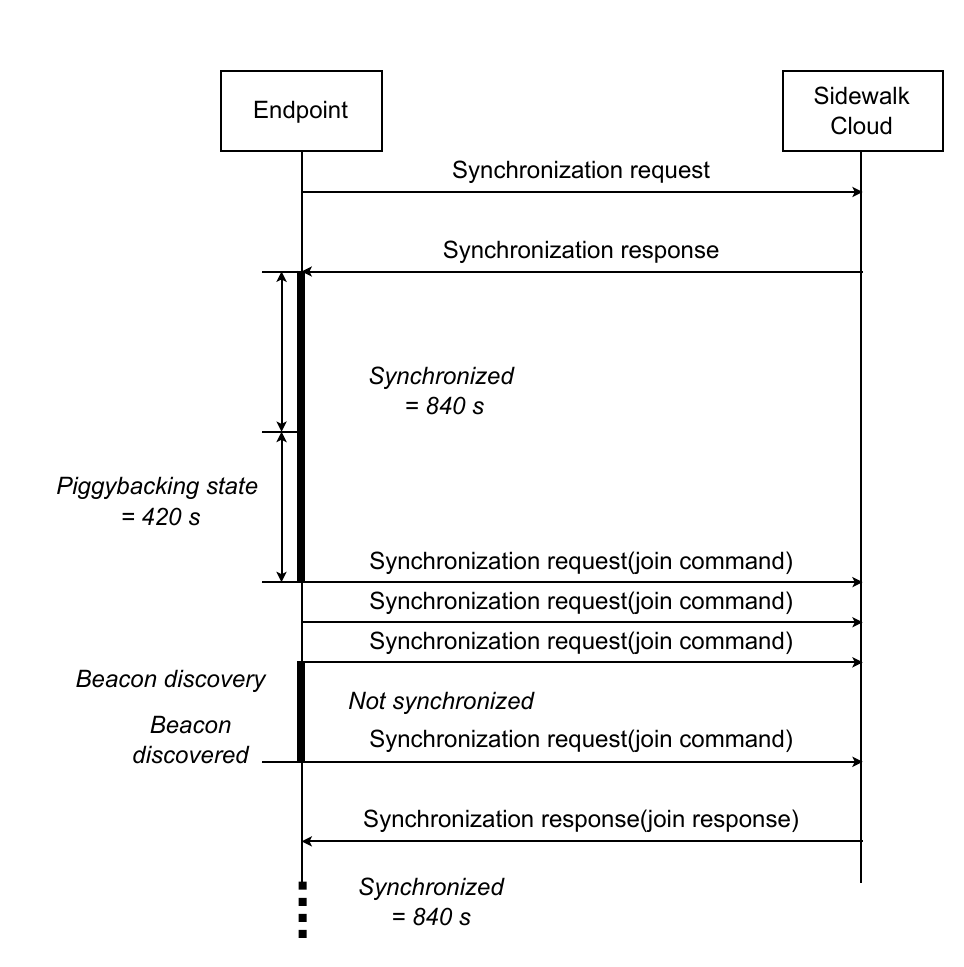
fig 5.83 Profile 1 and 2 network synchronization
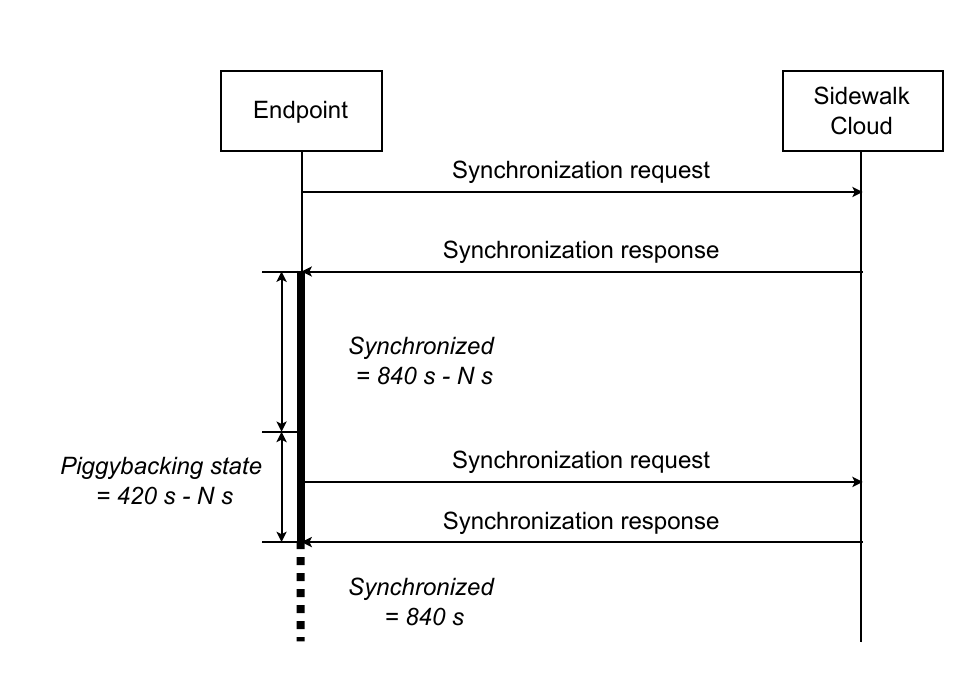
fig 5.84 Profile 1 and 2 synchronized in the piggybacking state
5.6.2 Connection Profile A
To save energy, there is no periodic synchronization required for Profile A. Most of the time, Endpoints stay in the piggybacking state. When a synchronization response is received, Endpoints are set as synchronized for a period of 300 s. Endpoints enter the piggybacking state again at the halfway point of the synchronized period, 150 s. If no synchronization responses are received in the synchronized period, Endpoints are set as not synchronized and remain in the piggybacking state. See figure 5.85.
Similar to Profiles 1 and 2, Endpoints leave the piggybacking state earlier and are set as synchronized for another 300 s when receiving a synchronization response in the piggybacking state.
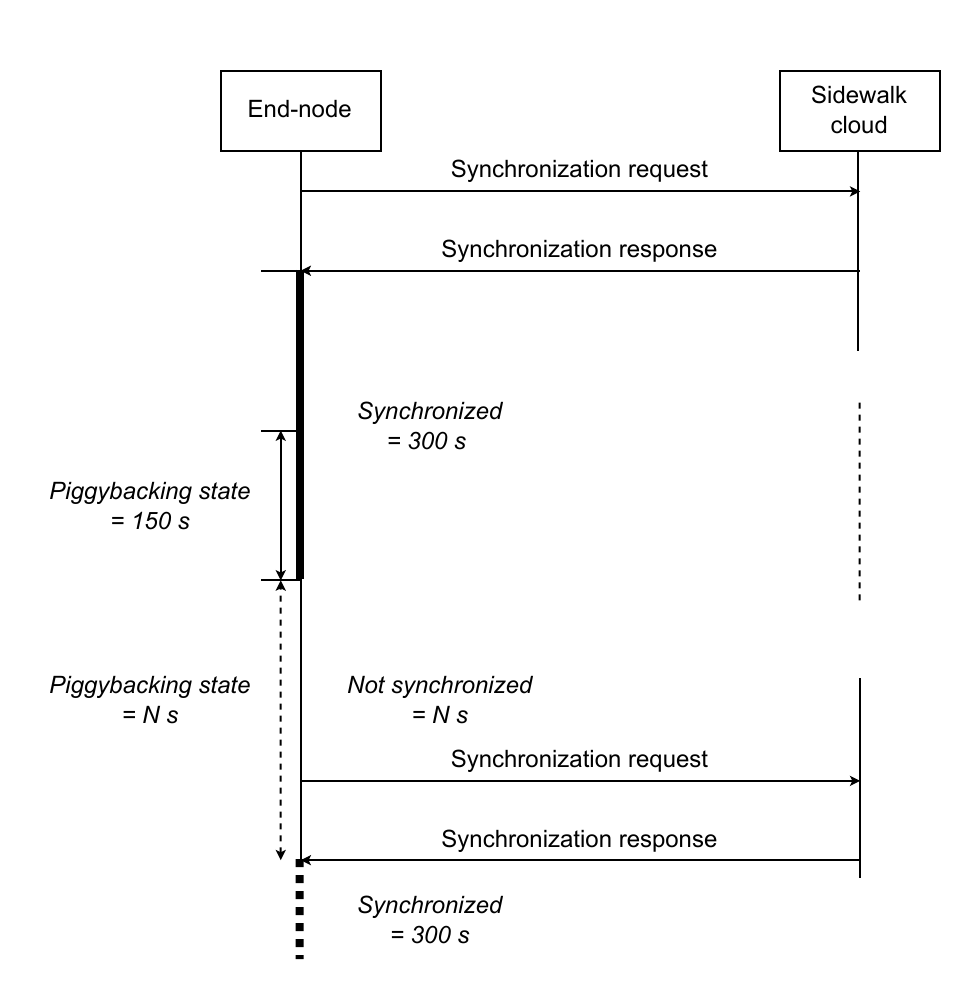
fig 5.85 Profile A network synchronization
5.6.3 Connection Profile B
Periodic synchronization is activated for Profile B. As in Profile A, Endpoints are set as synchronized for 300 s when receiving a synchronization response and enter the piggybacking state at the halfway point of the synchronized period, 150 s. If no synchronization responses are received within the synchronized period, JOIN command described in section 3.2.2.2 is sent due to the activation of periodic synchronization. On failure of the first periodic synchronization, the Endpoints are set as not synchronized and periodic synchronization will be retried three times, then Endpoints stop it and stay in the piggybacking state. See figure 5.86.
Same as Profile A, Endpoints leave the piggybacking state earlier and are set as synchronized for another 300 s when receiving a synchronization response in the piggybacking state.
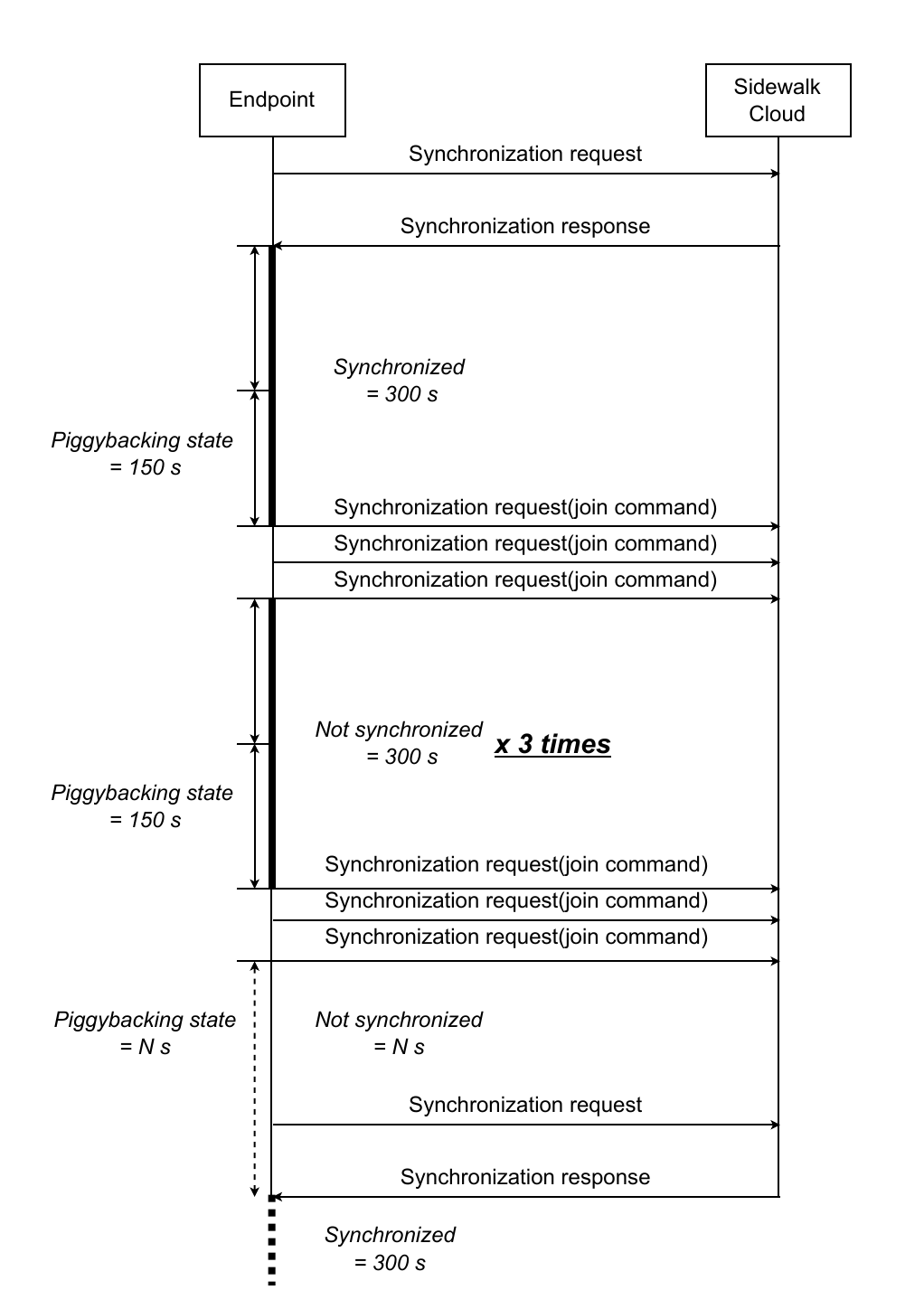
fig 5.86 Profile B network synchronization
5.6.4 Connection Profile C
Profile C operates in continuous RX mode, providing the lowest downlink latency among all asynchronous profiles. To save energy, there is no periodic synchronization required for Profile C (same as Profile A). Most of the time, Endpoints stay in the piggybacking state. When a synchronization response is received, Endpoints are set as synchronized for a period of 300 s. Endpoints enter the piggybacking state again at the halfway point of the synchronized period, 150 s. If no synchronization responses are received in the synchronized period, Endpoints are set as not synchronized and remain in the piggybacking state.
Profile C is characterized by:
- Continuous RX mode - the device stays in receive mode continuously
rx_window_count= 0xFF (SID_RX_WINDOW_CONTINUOUS)dl_separation= 0 (SID_LINK3_RX_WINDOW_SEPARATION_CONTINUOUS)- No periodic network sync (same behavior as Profile A)
- Highest power consumption among asynchronous profiles
- Lowest downlink latency - immediate response to incoming messages
This profile is suitable for line-powered devices that require minimal downlink latency and are not constrained by power consumption.
Table 5.4 Profile C parameters
| Parameter | Value | Note |
|---|---|---|
rx_window_count | 0xFF | continuous RX mode |
dl_separation | 0 | continuous, no interval |
5.6.5 Connection Profile D - Offline operation mode
The offline Gateway operation, Connection Profile D, is also called “Distress Gateway” mode. The Gateway that loses the direct internet connectivity to the cloud shall automatically switch to Distress Gateway mode. The Gateway shall establish Amazon Sidewalk Cloud connectivity through another Gateway using LoRa modulation. Gateways that provide connection to the Distress Gateway are called assisting Gateways. When the link is recovered then the Gateway switches to a normal operation state automatically.
During the distress mode of operation, the Distress Gateway may send Beacons periodically but this is dependent on the initial operation mode:
- multirate mode - the Gateway sends a Beacon periodically;
- SubG-FSK-only mode - the Gateway sends a Beacon periodically;
- SubG-CSS-only mode - the Gateway does not send a Beacon periodically.
The Gateway notifies the cloud that the link is lost using a distress message. The message is sent frequently with different time intervals between two consecutive messages. The first interval has minimum value min_dis_mess_int and increases exponentially for subsequent distress messages up to max_dis_mess_int. When an ACK is received from the cloud, the Gateway continues sending the message with the maximum defined interval max_dis_mess_int. When ACK is not received and the maximum defined time interval between two consecutive messages is reached then the Gateway shall reset the interval to min_dis_mess_int and repeat the exponential increase of the interval between distress messages up to max_dis_mess_int.
The Distress Gateway has two ways to communicate with the cloud:
- common channel - this shall be used for sporadic message exchange.
- dedicated link over separate channel - this method uses a different channel from a common one for bulky data transfer - e.g. file transfer. The Gateway shall start distress mode using the common channel and may optionally switch to a dedicated channel with a message from the Amazon Sidewalk Cloud over the common channel. The channel selection and criteria for switching to a dedicated channel is controlled by the cloud. The assisting Gateway which handles the connection over a dedicated link cannot support traffic from other SubG-CSS devices but is still able to support SubG-FSK Endpoints.
The transmission between two Gateways, the Distress Gateway and the assisting Gateway, is fully asynchronous in both uplink and downlink directions. This is the only difference when compared to the communication scheme between a SubG-CSS Endpoint and a Gateway where downlink is synchronized based on the uplink Epoch frame. The Epoch frames are not used in distress mode communication between Gateways. Additionally, a long preamble is used in both directions for downlink and uplink on the PHY Layer.