5.1 Protocol Stack Layers and Structure
The protocol stack is illustrated in figure 5.1.
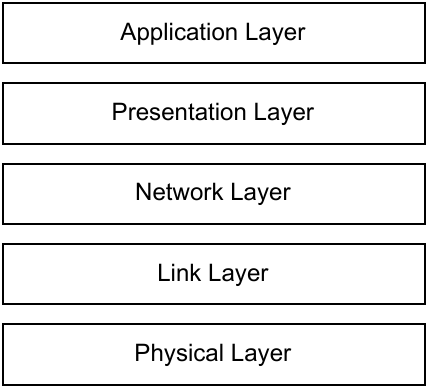
A detailed description of each layer’s functions, supported features, and frame format can be found in the following chapter and subsections:
- The Application Layer is described in Chapter 3 Application. This chapter includes application commands format definition, a detailed description of available commands, and flow charts showing the base scenarios with command usage.
- The Presentation Layer is described in section 5.1.1. This subsection provides information on how application commands are included in the layer. This subsection also defines the format of diagnostic data that may be included in a command or response.
- The Network Layer is described in section 5.1.2. This subsection describes the network security settings of the message.
- The Link Layer is described in section 5.1.3. This subsection defines the Beacon frame format and message frame format and their functions.
- The Physical Layer is described in section 5.1.4. This subsection defines the RF frame format, configuration and airtime values. This subsection also includes considerations of the time drift aspects.
5.1.1 Presentation Layer
The Presentation Layer supports exchange of Application Layer commands between two entities. The Presentation Layer also supports Application Layer security including encryption and frame size randomization. Presentation Layer frames may also contain diagnostic data that are typically sent by an Endpoint in the uplink direction.
5.1.1.1 Presentation Layer Frame format
The frame is divided into three main blocks as follows:
- The first block is the “Application Support Layer header”. This block provides information for decoding and interpreting the frame.
- The second block is “Network diagnostic data”. This block contains two main parts. The first part contains diagnostic data. The second part contains padding bytes.
- The third block is “Application command”. This block contains the application command and its payload.
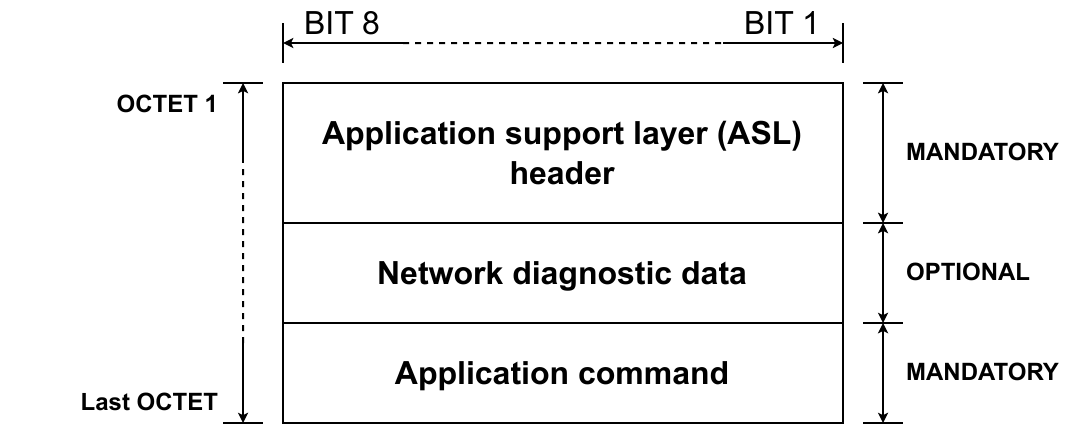
fig 5.2 Presentation layer - Blocks
5.1.1.1.1 Application Support Layer (ASL) header
The Application Support Layer header includes flags indicating the presence or absence of fields in the rest of the frame, the encryption status of the rest of the Network Diagnostic and Application Command blocks, and the Application Support Layer header version number. The Application Support Layer header version has an impact on whether a received message is processed or rejected. The last value in the Application Support Layer header is related to the uplink or downlink message number that allows control of the correct sequence of data transmit and receive.
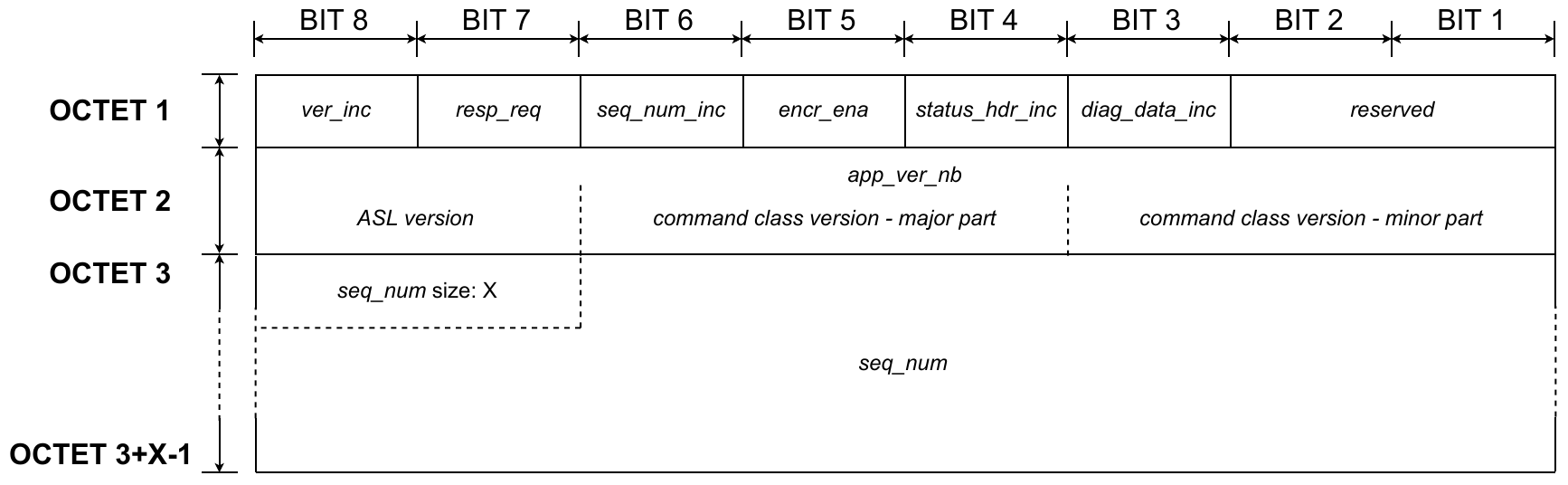
5.3 Presentation layer - ASL header
-
Application version number flag (
version_inc)Mnemonic Presence M/O/C Length Value ver_incM 1b Bit value Description ver_incM 1b 0 version number field not included ver_incM 1b 1 version number field included The value of the Application version number flag indicates whether the “Application frame version number” field is included in the frame.
- The Application version number is optional for messages exchanged with the Amazon Sidewalk Cloud.
- The Application version number shall be included in all destination addresses that are not in the cloud.
-
Response request flag (
resp_req)Mnemonic Presence M/O/C Length Value resp_reqM 1b Bit value Description resp_reqM 1b 0 response not requested resp_reqM 1b 1 response requested The value of the response request flag indicates whether the sender requests a response from the destination.
-
Sequence number flag (
seqn_inc)Mnemonic Presence M/O/C Length Value seq_num_incM 1b Bit value Description seq_num_incM 1b Bit value 0 sequence number field not included seq_num_incM 1b Bit value 1 sequence number included The value of the Sequence number flag indicates whether the “Sequence number” field is included in the frame.
-
Application level encryption flag (
app_enc_ema)Mnemonic Presence M/O/C Length Value encr_enaM 1b Bit value Description encr_enaM 1b 0 encryption disabled encr_enaM 1b 1 encryption enabled The value of the Application level encryption flag indicates whether the “Application command” block is encrypted with application level encryption.
-
Status header flag (
status_hdr_inc)Mnemonic Presence M/O/C Length Value status_hdr_incM 1b Bit value Description status_hdr_incM 1b 0 status header field not included status_hdr_incM 1b 1 status header field included The value of the Status header flag indicates whether the “Status code” and/or “Additional application data” fields are included in the frame.
-
Network diagnostic data flag (
nw_data_blob_inc)Mnemonic Presence M/O/C Length Value diag_data_incM 1b Bit value Description diag_data_incM 1b 0 diagnostic data not included diag_data_incM 1b 1 diagnostic data included The value of the Network diagnostic data flag indicates whether the “Network diagnostic data” block is included in the frame.
-
Application frame version number (
version)Mnemonic Presence M/O/C Length Value app_ver_nbC
version_incis set to 11B Bit number Description app_ver_nbC
version_incis set to 11B 8:7 ASL version app_ver_nbC
version_incis set to 11B 6:4 command class version - major part app_ver_nbC
version_incis set to 11B 3:1 command class version - minor part The value of the Application frame version number indicates the version of the Application Support Layer. This identifies the revision of the command class that is in use.
The meaning of selected parts of the field is as follows:
- ASL version: specifies the ASL header format. One format is specified. The value indicating the specified ASL header is 0x0.
- Command class version - major part: indicates significant changes introduced in the command class. All commands from a command class that have different major versions are not backward compatible. Devices that can only support major versions that are lower than the received command class version shall reject the incoming message.
- Command class version - minor part: indicates small changes introduced to the command class. Devices supporting only lower minor versions shall accept an incoming message and process only the parts of the command that can be understood. Fields that cannot be understood by the device shall be ignored.
-
Sequence number (
seqn)Mnemonic Presence M/O/C Length Value seq_numC seqn_incis set to 11 to 2 B counter value The value of the Sequence number indicates the sequence number of the message. The field contains two parts:
- the 2 most significant bits of the first byte specify the size of the field in bytes
-
the remaining bits are the sequence number:
- 1 B size: remaining 6 bits allow a sequence number range between 0 and 63
- 2 B size: remaining 14 bits allow a sequence number range between 0 and 16383
5.1.1.1.2 Network diagnostic data (nw_data_blob)
The Network diagnostic data field contains information related to signal conditions and message timing. Network diagnostic data are grouped in several formats by Format ID. Each Format ID indicates the type of diagnostic data that are included in the frame. The Format ID also informs whether padding bytes may be included in this part of the frame. The number of padding bytes is random. Adding padding bytes randomizes the packet size. Randomizing the packet size prevents an attacker from using statistical analysis to deduce the message type.
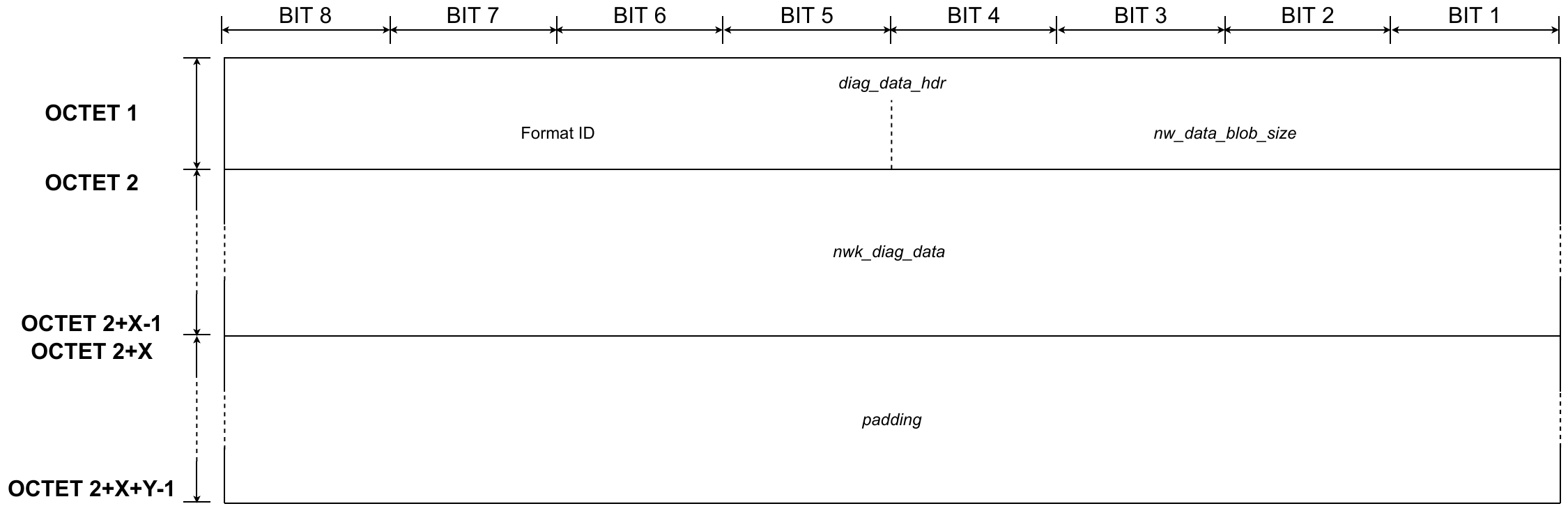
fig 5.4 Presentation layer - Network diagnostic data
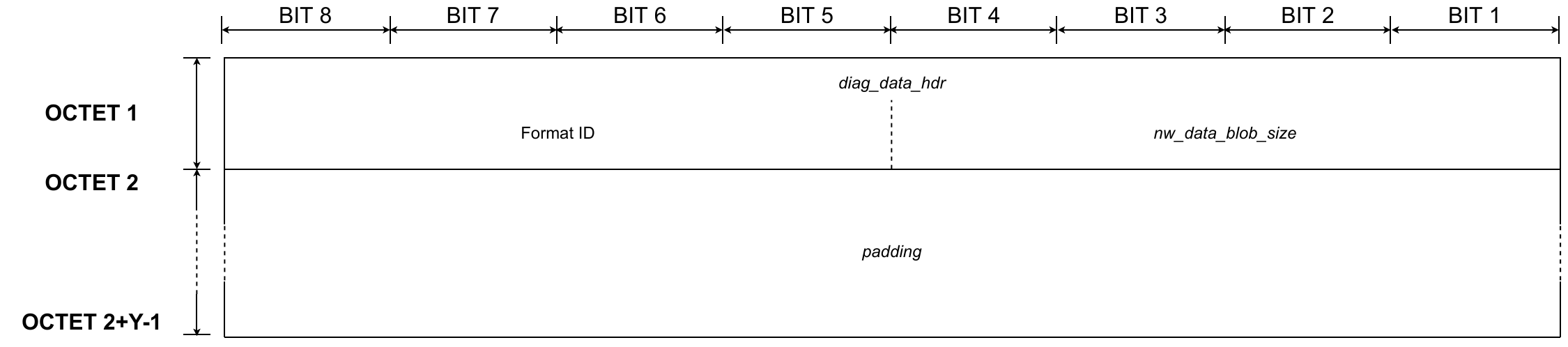
fig 5.5 Presentation layer - Network diagnostic data - Format ID 0
-
Network diagnostic data header (
diag_data_hdr)Mnemonic Presence M/O/C Length Value diag_data_hdrC diag_data_incis set to 11B Bit number Description diag_data_hdrC diag_data_incis set to 11B 8:5 Format ID diag_data_hdrC diag_data_incis set to 11B 4:1 nw_data_blob_sizeThe Network diagnostic data header contains the Format ID of the network diagnostic data. The Network diagnostic data header also contains the
nw_data_blob_size. Thenw_data_blob_sizeindicates the total size of thenwk_diag_dataandpaddingfields. -
Diagnostic data (
nwk_diag_data)Mnemonic Presence M/O/C Length Value nwk_diag_dataC diag_data_incis set to 1
Format ID > 0see NOTE diagnostic data The Diagnostic Data field contains additional diagnostic data. The data length and presence are Format ID-dependent.
The following table shows supported Format IDs.
Format ID number Diagnostic data presence Format ID size
format_id_size0 not present 0 3 present length of total TLV Based on the Format ID, the length will be different. The length of Format ID 0 is 0 as it does not include any ”Diagnostic data”.
- Format ID 0 No diagnostic data.
-
Format ID 3 Diagnostic data of this format is encoded in the format of TLV.
TLV key name TLV key ID TLV length Description Synchronization request 0x01 1B Value of TLV is not used.
-
Padding (
padding)Mnemonic Presence M/O/C Length Value paddingC diag_data_incis set to 1
(see NOTE 1)padding_sizepadding bytes The
paddingfield contains additional padding bytes to randomize the packet size. Randomizing the packet size improves packet security against size tracking.1: The presence of the field is based on Format ID. The
paddingfield presence is mandatory for Format ID 0.The length of the
paddingfield ispadding_size. The receiver calculates the number of padding bytes based on the Format ID of the network diagnostic data andnw_data_blob_size. Both values are provided indiag_data_hdrin the received message. The receiver shall use the following formula based on the Format ID:-
Format ID 0
All bytes in the “Network diagnostic data” block shall be padding bytes. The number of padding bytes is calculated using the formula:
padding_size=nw_data_blob_size* 2
The sender calculation of
padding_sizeis more complex and is constrained as follows:-
The total number of bytes included in the “Network diagnostic data” block (
format_id_size) and Presentation Layer (frame_pld_size) shall not exceedmax_packet_size.max_packet_sizehas different values for synchronous and asynchronous link modes.Connection mode maximum application payload size SubG-CSS 19 SubG-FSK 200 BLE 255
-
   The first step in calculating the padding field size is to check that
   packet_size does not exceed max_packet_size:

   packet_size = format_id_size + frame_pld_size

   If padding bytes may be added, then the initial random length of padding field is calculated:

   rand_pad = rand()%( max_packet_size - packet_size ) + packet_size

   next the number of padding bytes is calculated as a multiple of padding_block_size:

   pad_mod = rand_pad MOD padding_block_size

   If pad_mod is not a multiple of padding_block_size then pad_mod is recalculated:

   IF pad_mod != 0 THEN

   pad_mod = padding_block_size - pad_mod

   Next, the number of allowed bytes in the frame is taken into account using the following formula:

   total_size = MIN( rand_pad + pad_mod,max_packet_size)

   Then, the initial value of the padding bytes length is calculated:

   padding_size = total_size - packet_size

   The length of padding field is limited by max_padding_size:

   padding_size = MIN(padding_size,max_padding_size)

   Finally, the sum of padding_size and format_id_size is divided by 2:

   IF (padding_size + format_id_size) MOD 2 != 0
   THEN

   padding_size = padding_size - 1

   The nw_data_blob_size included in the frame shall be
   calculated from the following formula:

   nw_data_blob_size = ( padding_size + format_id_size)/2
5.1.1.1.3 Application command
The format of the “Application command” part of the frame is determined by the presence of the “Status code”, “Additional application data” and “Command” fields as follows:
- Case 1A: “Status code”, “Additional application data” and “Command” fields are included in the frame (see figure 5.6)
- Case 1B: “Status code” and “Additional application data” are included in the frame (see figure 5.7)
- Case 2A: “Additional application data” and “Command” fields are included in the frame (see figure5.8)
- Case 2B: Only “Additional application data” is included in the frame (see figure 5.9)
- Case 3A: “Status code” and “Command” fields are included in the frame (see figure 5.10)
- Case 3B: Only “Status command” field is included in the frame (see figure 5.11)
- Case 4A: Only “Command” field is included in the frame (see figure 5.12)
- Case 4B: No “Status code”, “Additional application data” and “Command” fields are included in the frame (see figure 5.13)
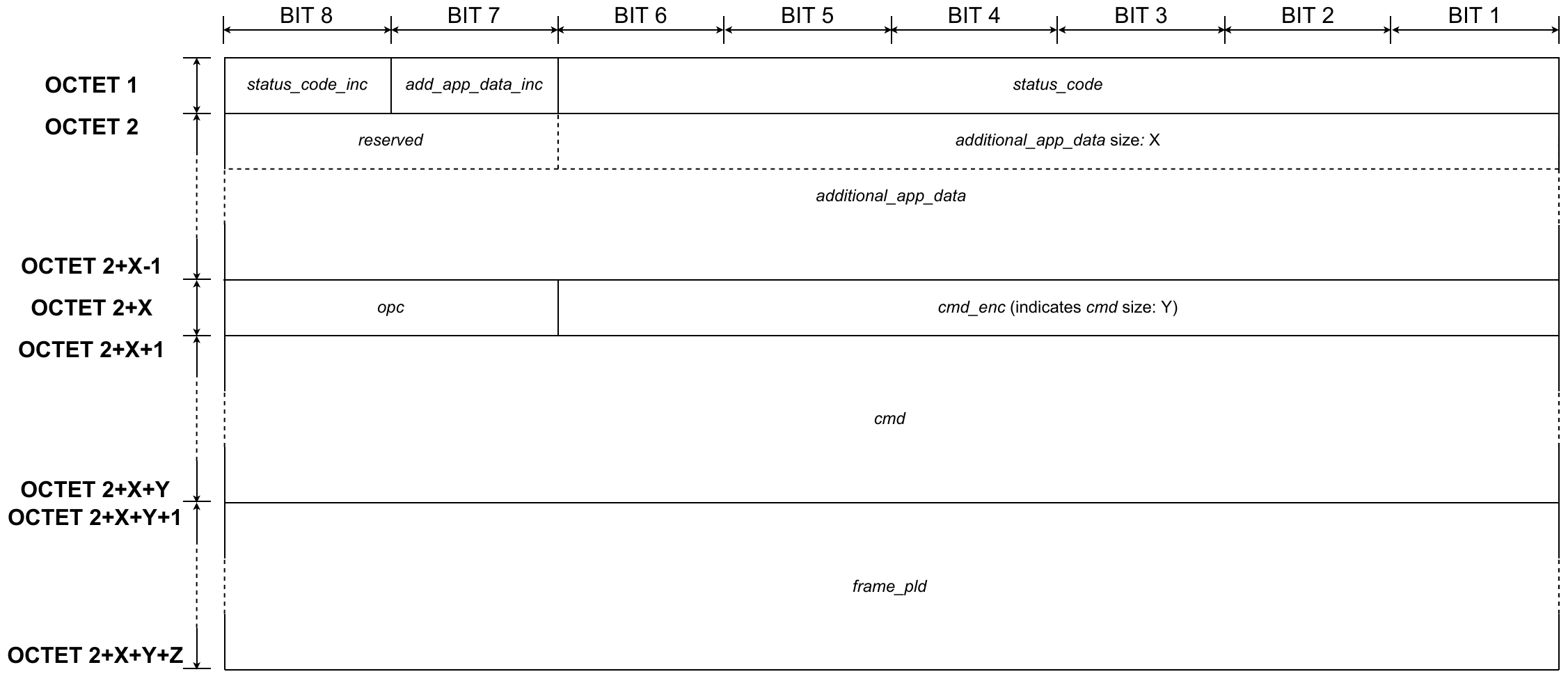
fig 5.6 Presentation layer - Application command - CASE 1A
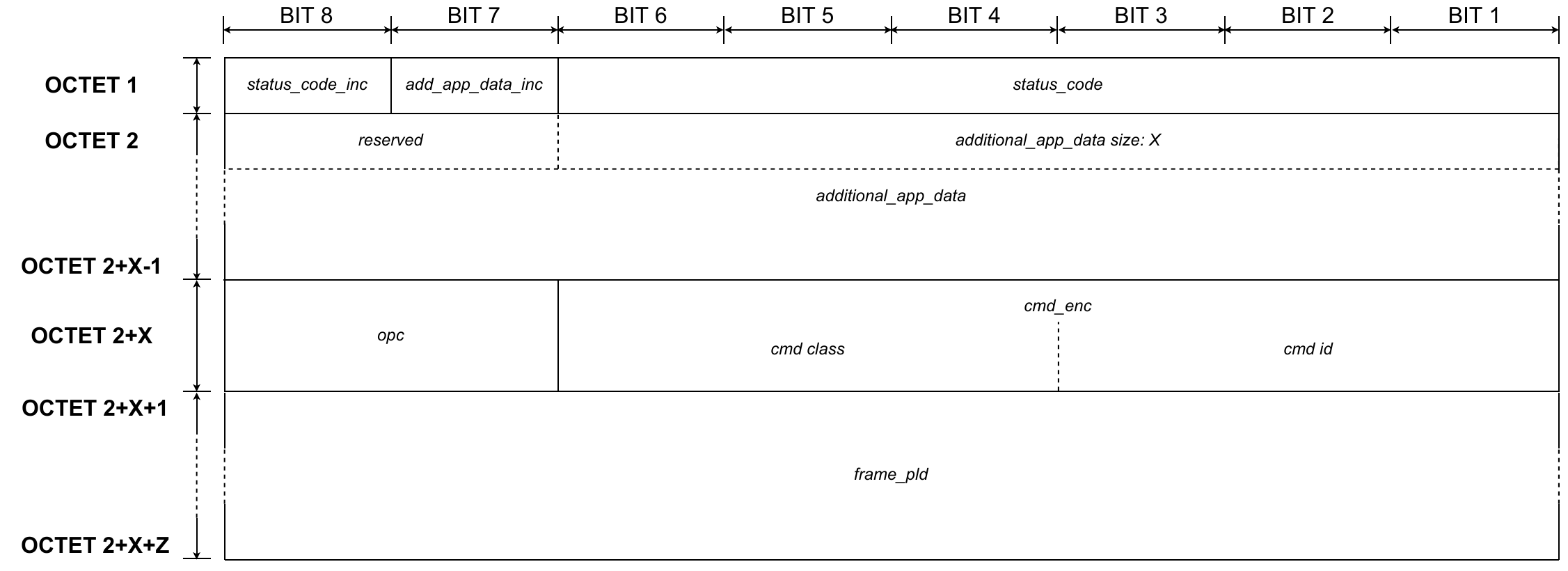
fig 5.7 Presentation layer - Application command - CASE 1B
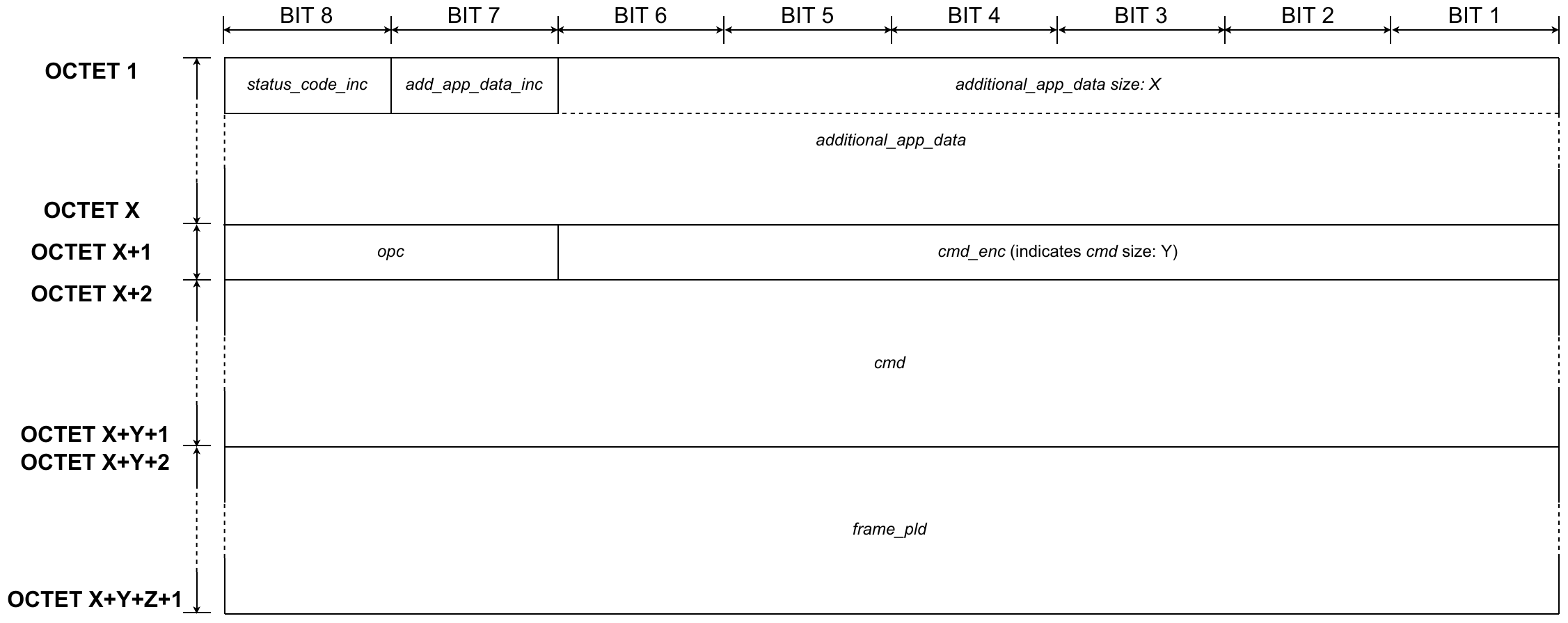
fig 5.8 Presentation layer - Application command - CASE 2A
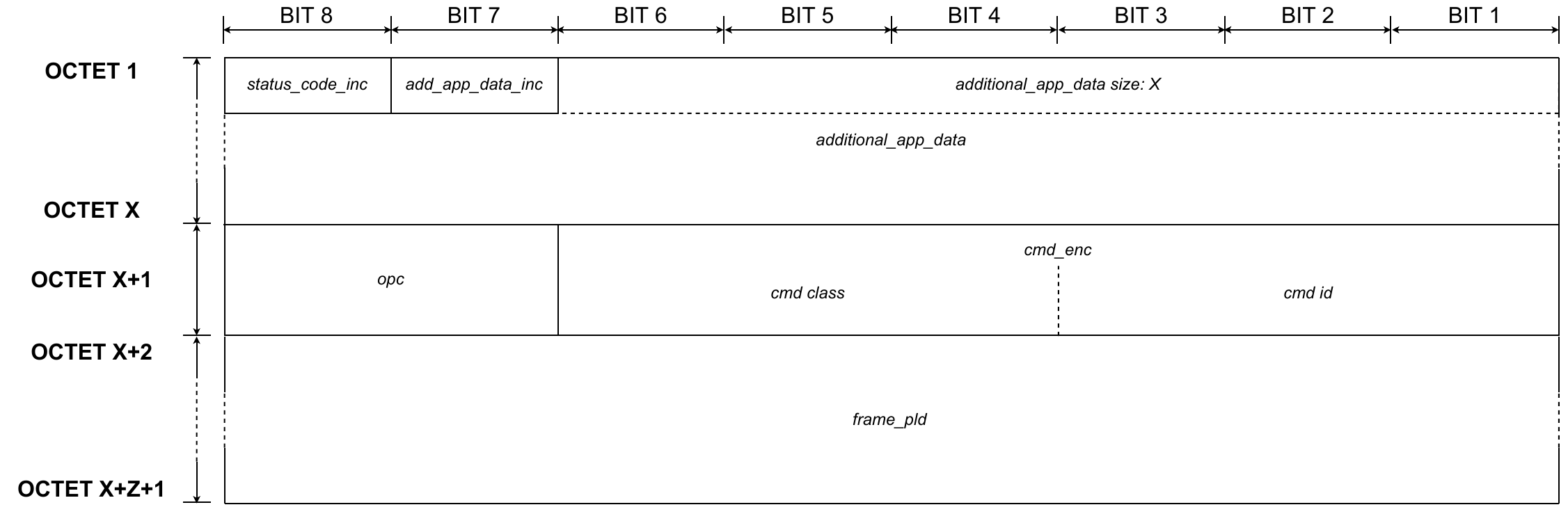
fig 5.9 Presentation layer - Application command - CASE 2B
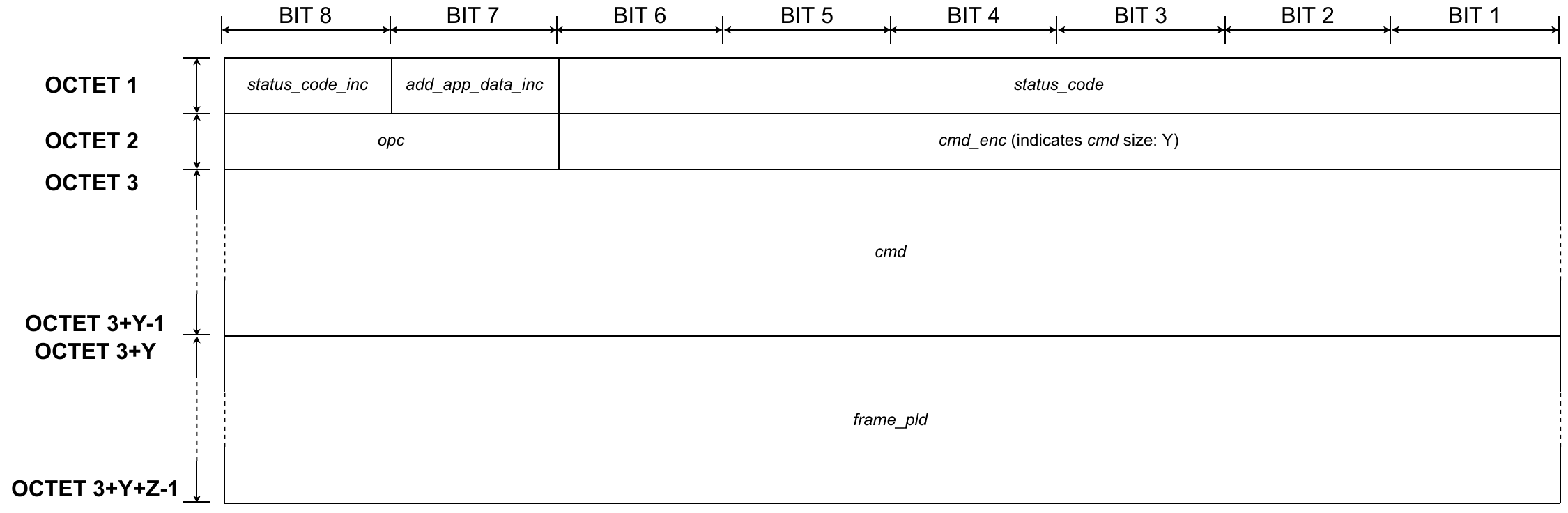
fig 5.10 Presentation layer - Application command - CASE 3A
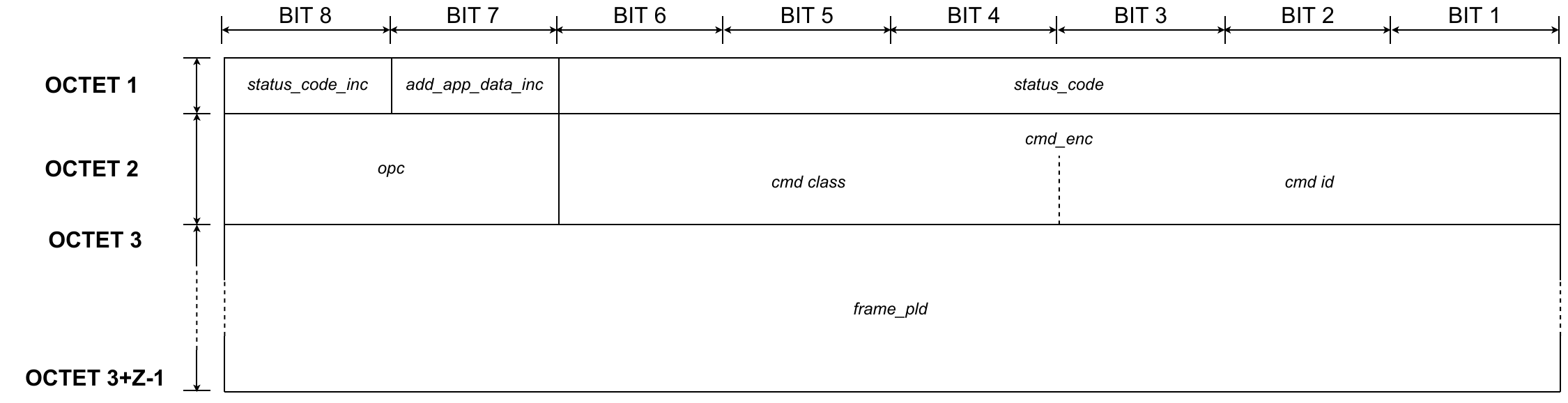
fig 5.11 Presentation layer - Application command - CASE 3B
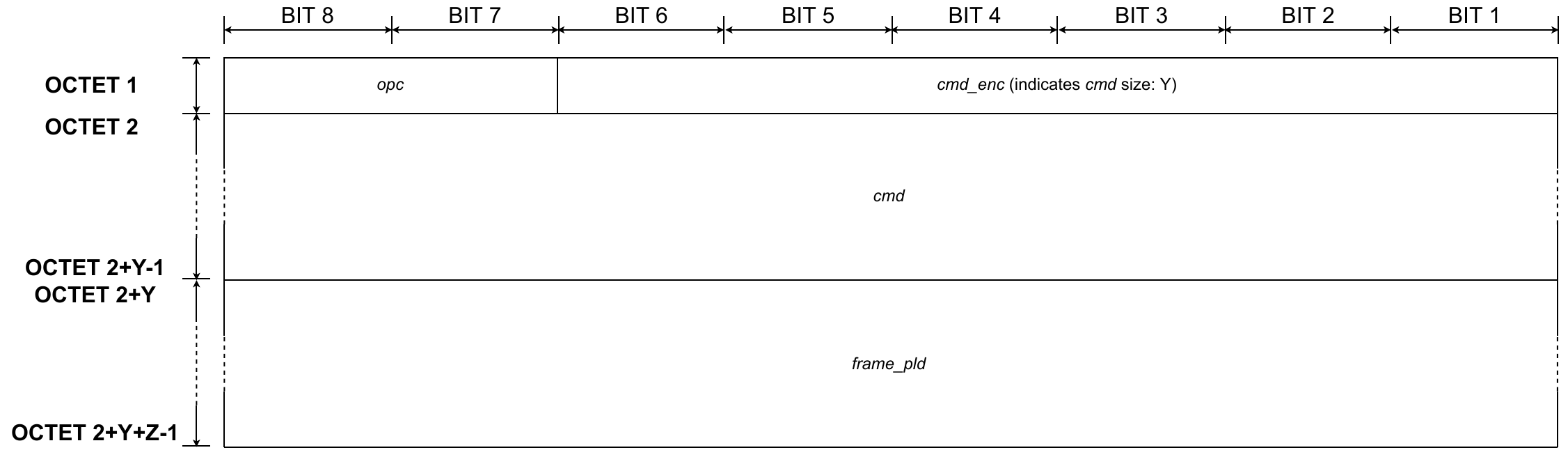
fig 5.12 Presentation layer - Application command - CASE 4A
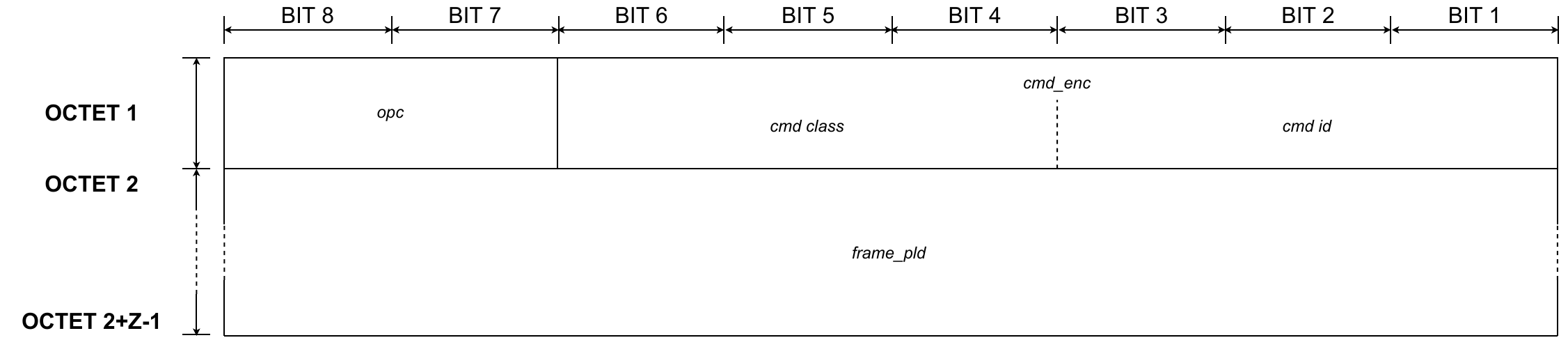
fig 5.13 Presentation layer - Application command - CASE 4B
-
Status code flag (
status_code_inc)Mnemonic **Presence M/O/C ** Length Value status_code_incC status_hdr_incis set to 11b Bit value Description status_code_incC status_hdr_incis set to 11b 0 status code not included status_code_incC status_hdr_incis set to 11b 1 status code is included The value of the status code flag indicates whether the frame includes the
status_codefield. -
Additional data flag (
add_app_data_inc)Mnemonic Presence M/O/C Length Value add_app_data_incC status_hdr_incis set to 11b Bit value Description 0 additional application data not included 1 additional application data included The value of the Additional data flag indicates whether the frame includes the
add_app_datafield. -
Status code (
status_code)Mnemonic Presence M/O/C Length Value status_codeC status_hdr_incis set to 1
status_code_incis set to 16b status code The value of status code indicates the status code of the operation. Only selected types of messages may contain a status code, as follows:
- Response type messages shall always include a status code.
- Notification type messages may or may not include a status code.
The status code is not applicable to read or write type messages, so the status code field shall not be present in “Application command header”.
Values of status codes can be found in 3.1 describing the application level frame format.
-
Additional application data (
add_app_data)Mnemonic Presence M/O/C Length Value add_app_dataC status_hdr_incis set to 1
additional_app_data_incis set to 11 to 63B application additional data The additional application data field contains additional application information which may be included by a device’s Application Layer. Additional data shall not be added if the resulting frame exceeds the MTU size.
The 6 least significant bits of the first byte represents the length of the application additional data.
The 2 most significant bits of the first byte shall be encoded using the following rules:
- If “Status code” is included, the bits shall be set to 0.
- If “Status code” is not included, the bits contain the value of “Status code flag” and “Additional data flag”.
-
Operation Code (
opc)
| Mnemonic | Presence M/O/C | Length | Value | ||
|---|---|---|---|---|---|
opc | M | 2b | Bits | Bits | Description |
opc | M | 2b | 0 | 0 | read from destination |
opc | M | 2b | 0 | 1 | write to destination |
opc | M | 2b | 1 | 0 | notify destination with data from sender |
opc | M | 2b | 1 | 1 | respond to previous read/write from destination (possibly includes data in response) |
The value of “Operation Code” indicates the operation code that identifies the application command type. The application command type can be: get, set, notify, or respond. For more information, see section 3.2.
-
Command encode (
cmd_enc)Mnemonic Presence M/O/C Length Value cmd_encM 6b 0x0 - 0x3F The value of the Command encode field indicates the coding format of the command class; the coding format of the command ID; whether the Command field is included in the Presentation layer frame; and the size of the Command field.
The Command encode field is interpreted as follows:
- 0x0 to 0x3B -
cmdfield is not included. Command class and command ID are encoded in 6 bits. -
0x3C to 0x3F -
cmdfield is included in the frame. The value indicates the size of the Command field as follows:- 0x3C indicates 1B size
- 0x3D indicates 2B size
- 0x3E indicates 3B size
- 0x3F indicates 4B size
- 0x0 to 0x3B -
-
Command (
cmd)Mnemonic Length Value cmC cmd_enc> 0x3B1 to 4B command class and command ID The Command field contains the command class and command ID. For more information see section 3.1.
-
Payload (
frame_pld)Mnemonic Presence M/O/C Length Value frame_pldO see NOTE Data to be written, arguments for a read, notify payload data or response data The Payload field contains command data. For more information, see section 3.1.
NOTE: The field does not contain an explicit payload length. Length can be derived using the following formula: Payload length = Total payload received over the air – ASL header with optional additional application data and/or optional network diagnostic data header
5.1.2 Network Layer
5.1.2.1 Network Layer overview
The Network Layer supports the network level security aspects of the frame, like authentication, encryption, and security type.
5.1.2.2 Network Layer Frame format
The Network Layer frame is divided into three main blocks. The first block is “Frame control”. The Frame control block contains information that provides information for decoding the rest of the frame. Frame control also contains information related to network security aspects and frame fragmentation. The second block is “Authentication”. The Authentication block includes information used in the authentication process. The third block is “Frame payload”. The Frame payload block contains higher layer data.
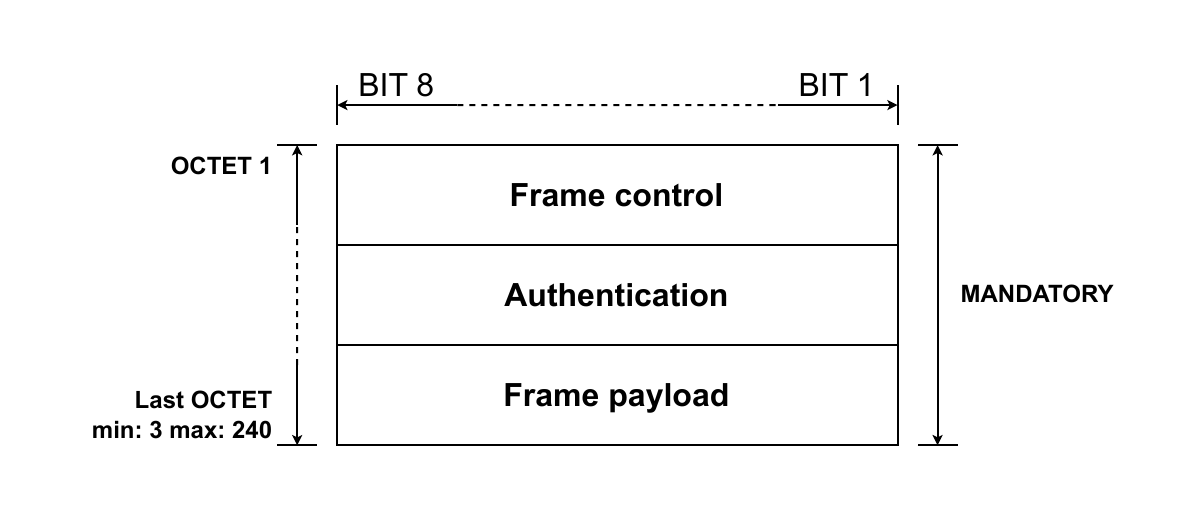
fig 5.14 Network layer - Blocks
5.1.2.2.1 Network Layer Frame Control Fields
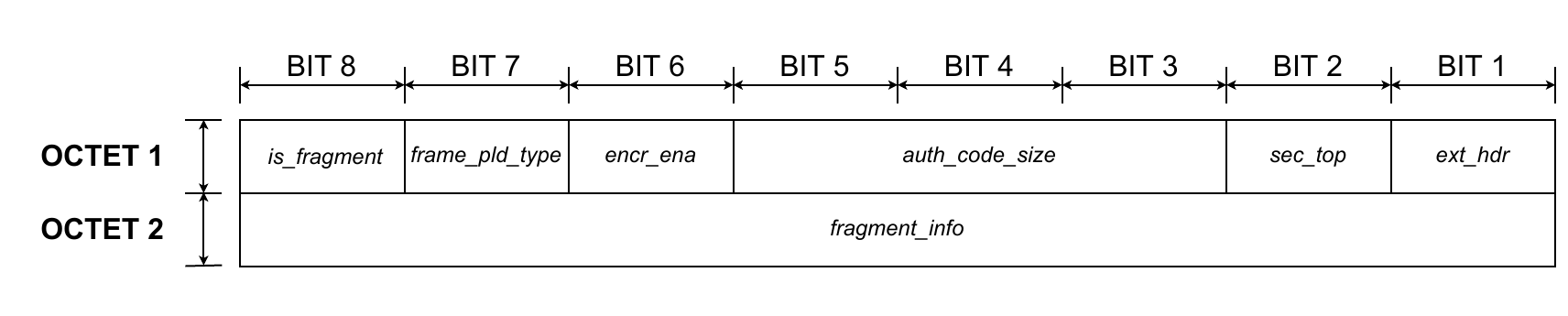
fig 5.15 Network layer - Frame control
-
Packet fragmentation flag (
is_fragment)Mnemonic Presence M/O/C Length Value is_fragmentM 1b Bit Description is_fragmentM 1b 0 not fragmented is_fragmentM 1b 1 fragmented The value of the Packet fragmentation flag indicates whether or not the Network Layer frame is fragmented.
NOTE: The current release of the protocol does not support frame fragmentation. The field shall be set to 0.
-
Payload type flag (
frame_pld_type)Mnemonic Presence M/O/C Length Value frame_pld_typeM 1b Bit Description frame_pld_typeM 1b 0 reserved frame_pld_typeM 1b 1 Presentation Layer frame The value indicates the type of payload available in the field
frame_pld.
NOTE: The current release of the protocol supports one payload type only and this is the Presentation Layer frame. This bit shall be set to 1 by default.
-
Encryption flag (
encr_ena)Mnemonic Presence M/O/C Length Value encr_enaM 1b Bit Description encr_enaM 1b 0 encryption disabled encr_enaM 1b 1 encryption enabled The value indicates whether the network frame payload (
frame_pld) field is encrypted. -
Authentication code size (
auth_code_size)Mnemonic Presence M/O/C Length Value auth_code_sizeM 3b Bit Bit Bit Description auth_code_sizeM 3b 0 0 0 no auth code auth_code_sizeM 3b 0 0 1 2 B auth_code_sizeM 3b 0 1 0 4 B auth_code_sizeM 3b 0 1 1 8 B auth_code_sizeM 3b 1 0 0 12 B auth_code_sizeM 3b 1 0 1 16 B auth_code_sizeM 3b 1 1 0 reserved auth_code_sizeM 3b 1 1 1 reserved The value indicates the size of the authentication code field (
auth_code). The maximum allowed size is:- 16 B when
ext_hdris set to 1 andsec_refis set to 0 - 12 B when
ext_hdris set to 1 andsec_refis set to 1 - 16 B when
ext_hdris set to 0.
- 16 B when
-
Network security topology (
sec_top)Mnemonic Presence M/O/C Length Value sec_topM 1b Bit Description sec_topM 1b 0 reserved sec_topM 1b 1 WAN security topology The value indicates the security topology.
NOTE: The current release of the protocol supports only one security topology. This bit shall be set to 1 by default.
-
Extended header flag (
ext_hdr)Mnemonic Presence M/O/C Length Value ext_hdrM 1b Bit Description ext_hdrM 1b 0 sec_reffield is not presentext_hdrM 1b 1 sec_reffield is presentThe value indicates extended configuration of the “Authentication” part of the network frame.
When
ext_hdris set to 0, then the GCS security reference shall be used.When
ext_hdris set to 1, then the GCS security reference is indicated bysec_reffield. -
Fragmentation info (
fragment_info)Mnemonic Presence M/O/C Length Value fragment_infoC is_fragmentis set to 11B reserved The value indicates the fragment number and the total number of fragmented packets.
NOTE: The current release of the protocol does not support frame fragmentation. The field is_fragmented shall be set to 0 so fragment_info is not included in the network frame format.
5.1.2.2.2 Authentication fields
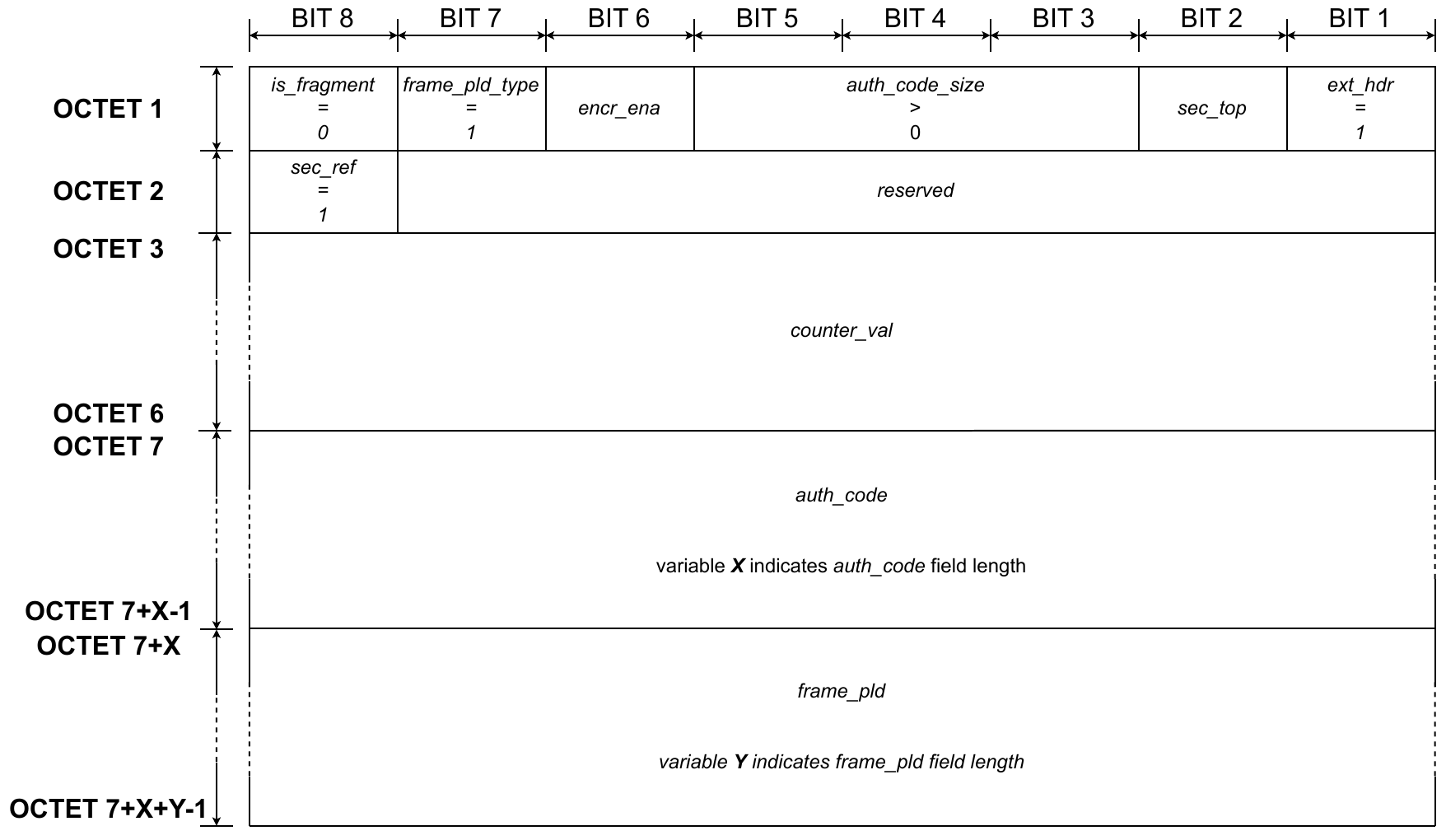
“Authentication” part of the frame may have three different formats based on the configuration included in the “Frame control” block and also the sec_ref field which is included only in case ext_hdr is set to 1. It is possible for the “Authentication” part not to be included in the Network Layer. The possible configurations are as follows:
-
ext_hdris set to 0 and:auth_code_size> 0 then the configuration includesauth_codefield only in “Authentication” block (see fig 5.16).auth_code_sizeis set to 0 then the configuration excludes the whole “Authentication” block from the Network Layer frame.
-
ext_hdris set to 1,auth_code_size> 0 this configuration applied in “Frame control” indicates the presence ofsec_refin the “Authentication” block. This configures the final format of the “Authentication” block:
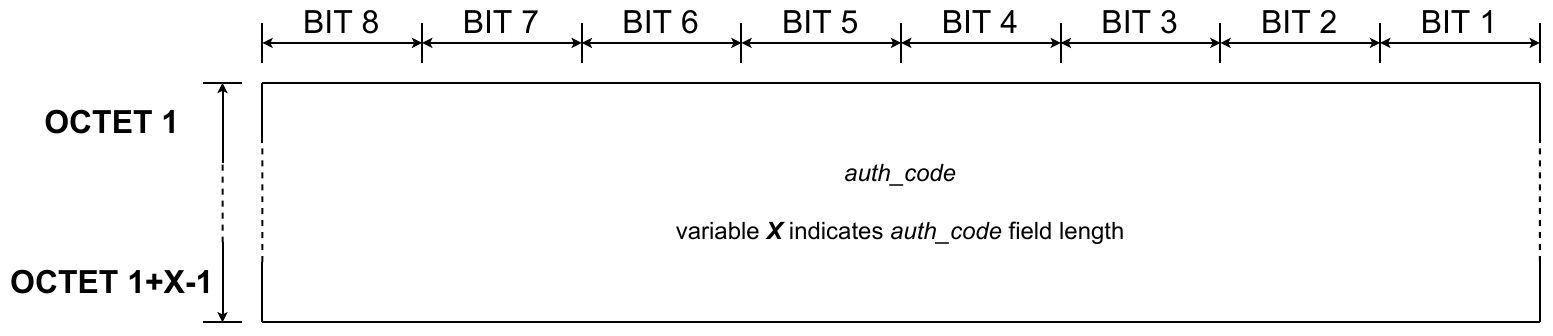
fig 5.16 Network layer - Authentication - Authentication code
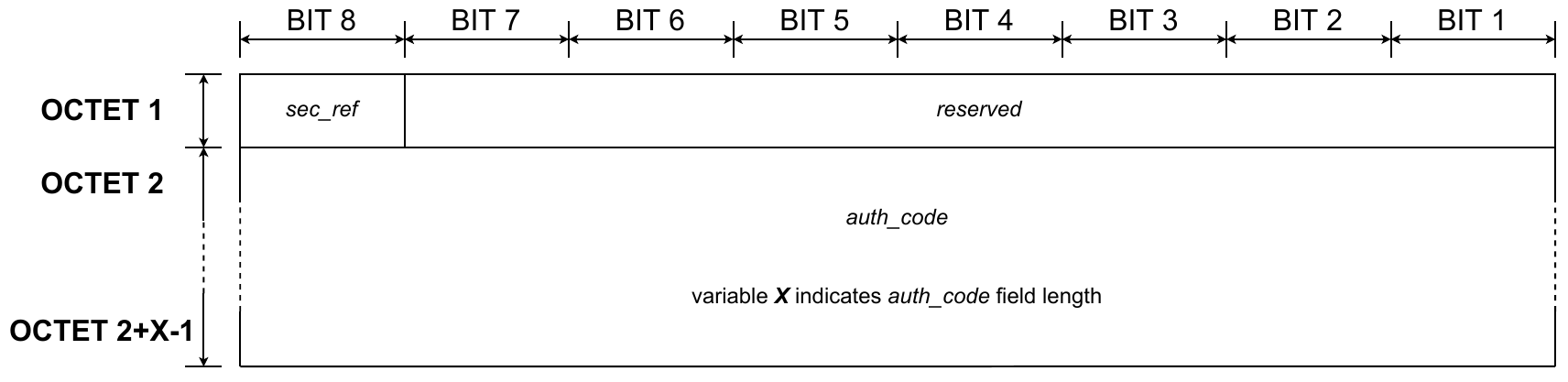
fig 5.17 Network layer - Authentication - Security reference GCS
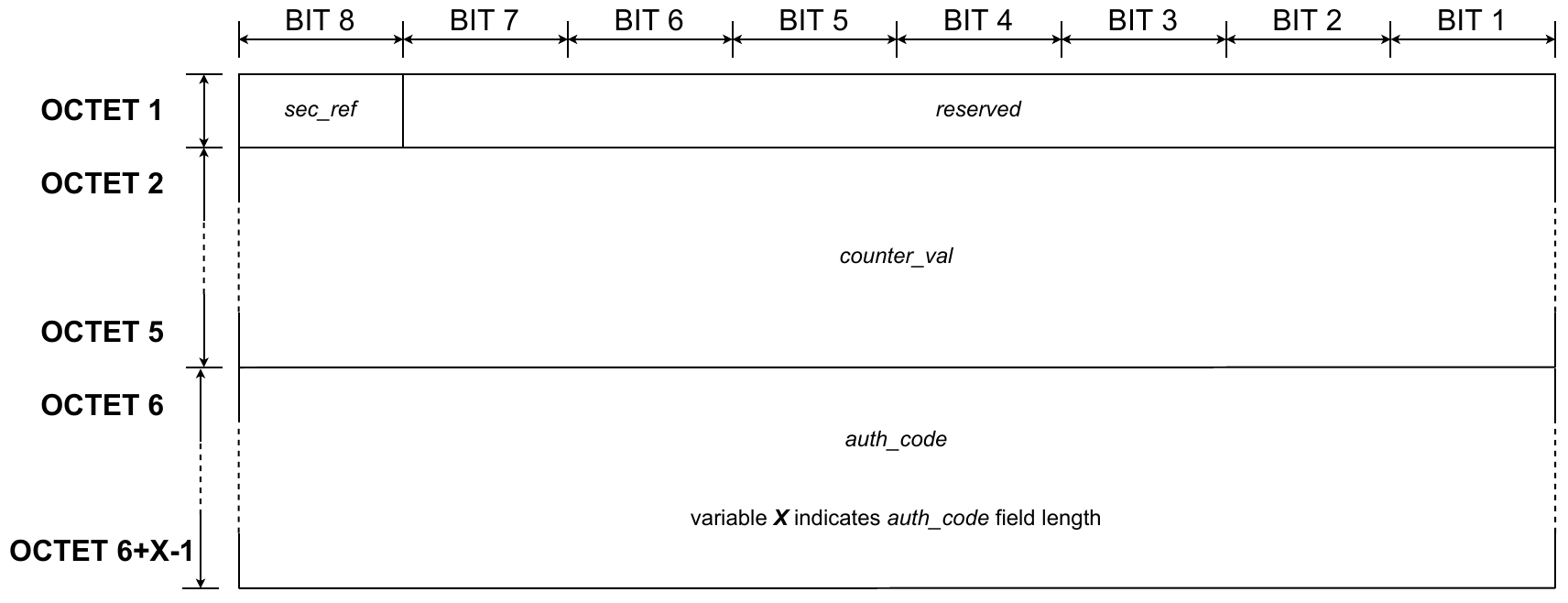
fig 5.18 Network layer - Authentication - Security reference COUNTER
-
Authentication code (
auth_code)Mnemonic Presence M/O/C Length Value auth_codeC ext_hdris set to 0
auth_code_size>0see auth_code_sizefieldauthentication code The field contains the value of the authentication code.
-
Security reference information (
sec_ref)Mnemonic Presence M/O/C Length Value sec_refC
ext_hdris set to 11B Bit number Bit value Description sec_refC
ext_hdris set to 11B 7 0 security reference GCS sec_refC
ext_hdris set to 11B 7 1 security reference COUNTER sec_refC
ext_hdris set to 11B 0 to 6 reserved The field indicates the security reference configuration. The default value of the GCS security reference is 0.
-
Counter value (
counter_value)Mnemonic Presence M/O/C Length Value counter_valC ext_hdris set to 1
auth_code> 0
sec_refis set to 14B counter value The field contains the counter value.
5.1.2.2.3 Network Layer Frame payload field (frame_pld)
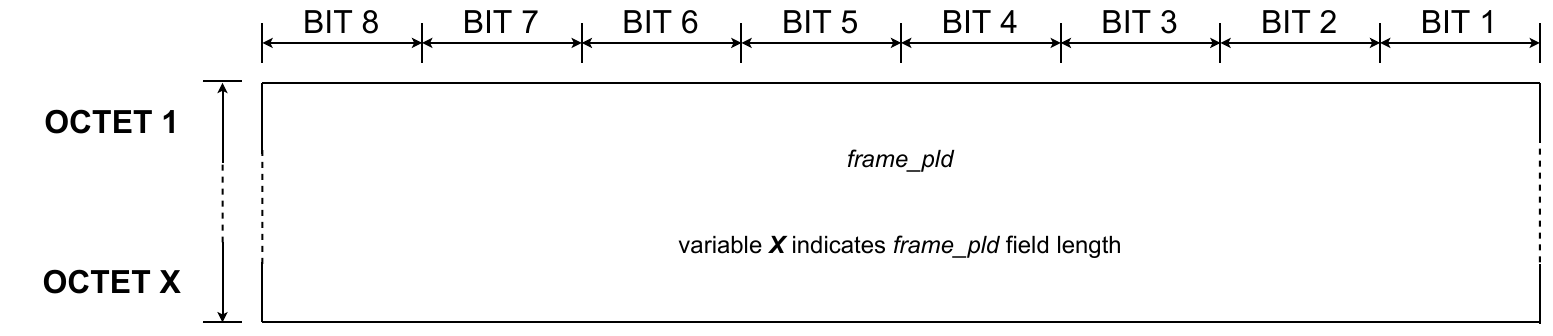
fig 5.19 Network layer - Payload
| Mnemonic | Presence M/O/C | Length | Value |
|---|---|---|---|
frame_pld | M | 1 — 221B | Presentation layer frame |
The field contains Presentation Layer frame data.
NOTE: The current release of the protocol shall have the Presentation Layer frame included in the Network Layer payload.
5.1.2.2.4 Network Layer configuration
Three generic formats of the Network Layer are possible based on the “Frame control” part:
-
The security information is not included in the frame:
auth_code_size= 0,ext_hdr= 0. The frame contains only “Frame control” and “Frame payload” parts (see figure 5.20).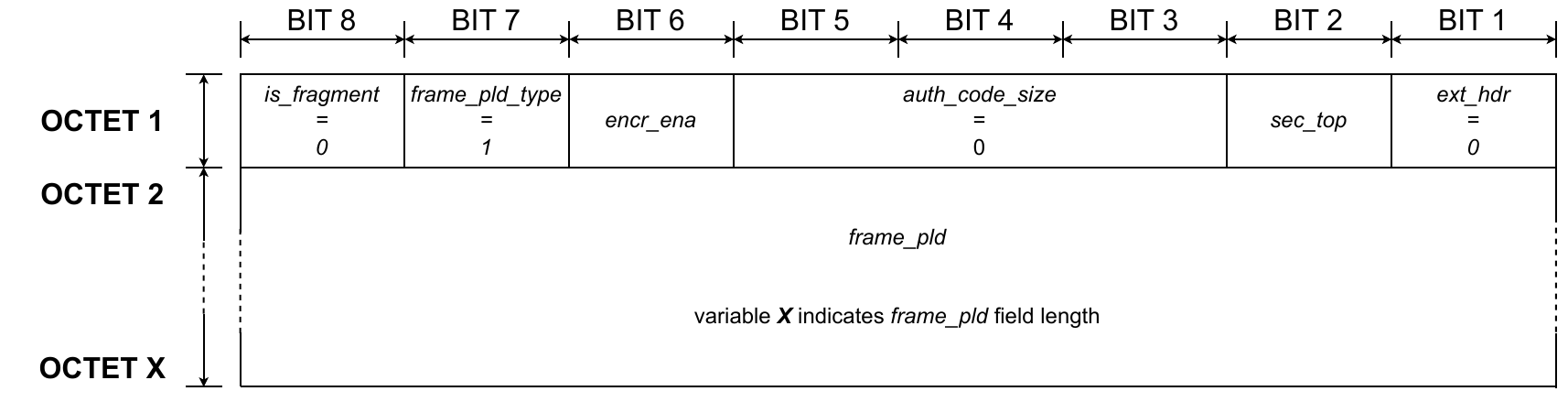
-
The security information is included but an extended header is not present:
auth_code_size> 0,ext_hdr= 0. The frame contains the following parts: “Frame control” , “Authentication” and “Frame payload” (see figure 5.21).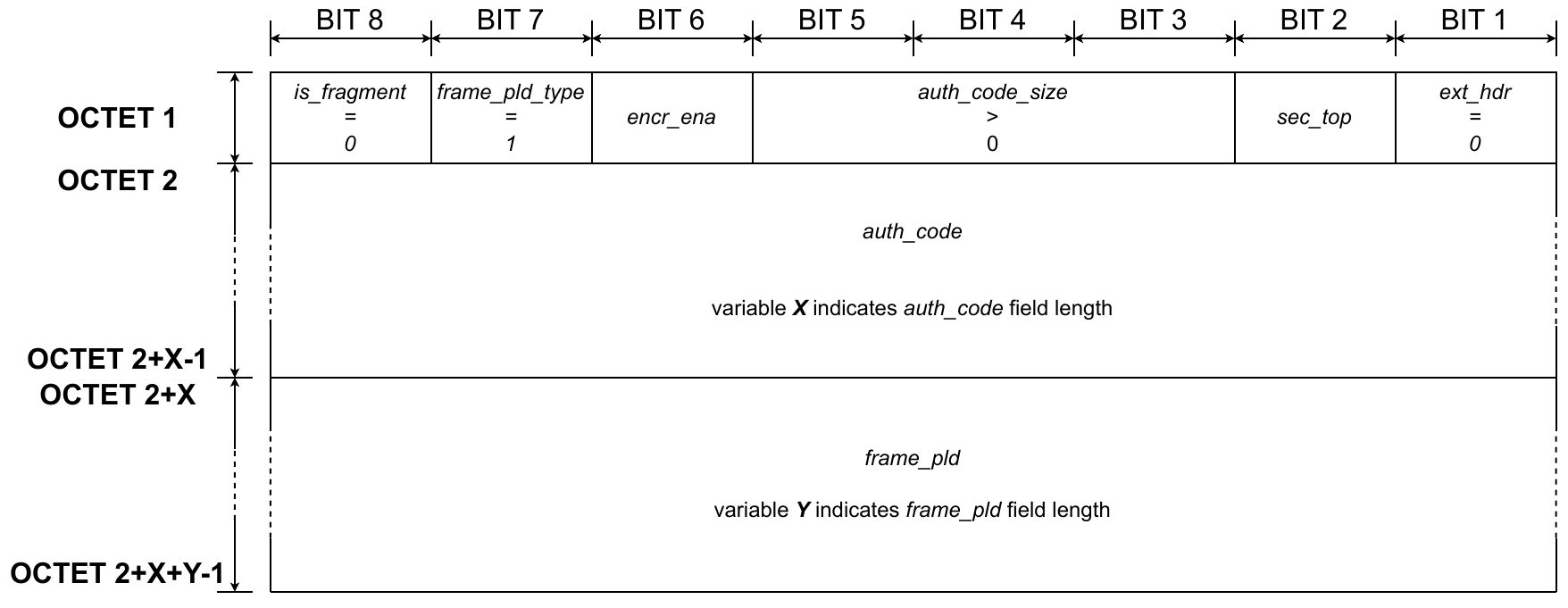
-
The security information is included in the extended header:
auth_code_size> 0,ext_hdr= 1. Additionallysec_refconfigures the format of “Authentication” block.figure 5.22 shows the case whensec_refis set to 0 and figure 5.23 shows the case whensec_refis set to 1. The frame contains all parts: “Frame control”, “Authentication” and “Frame payload”.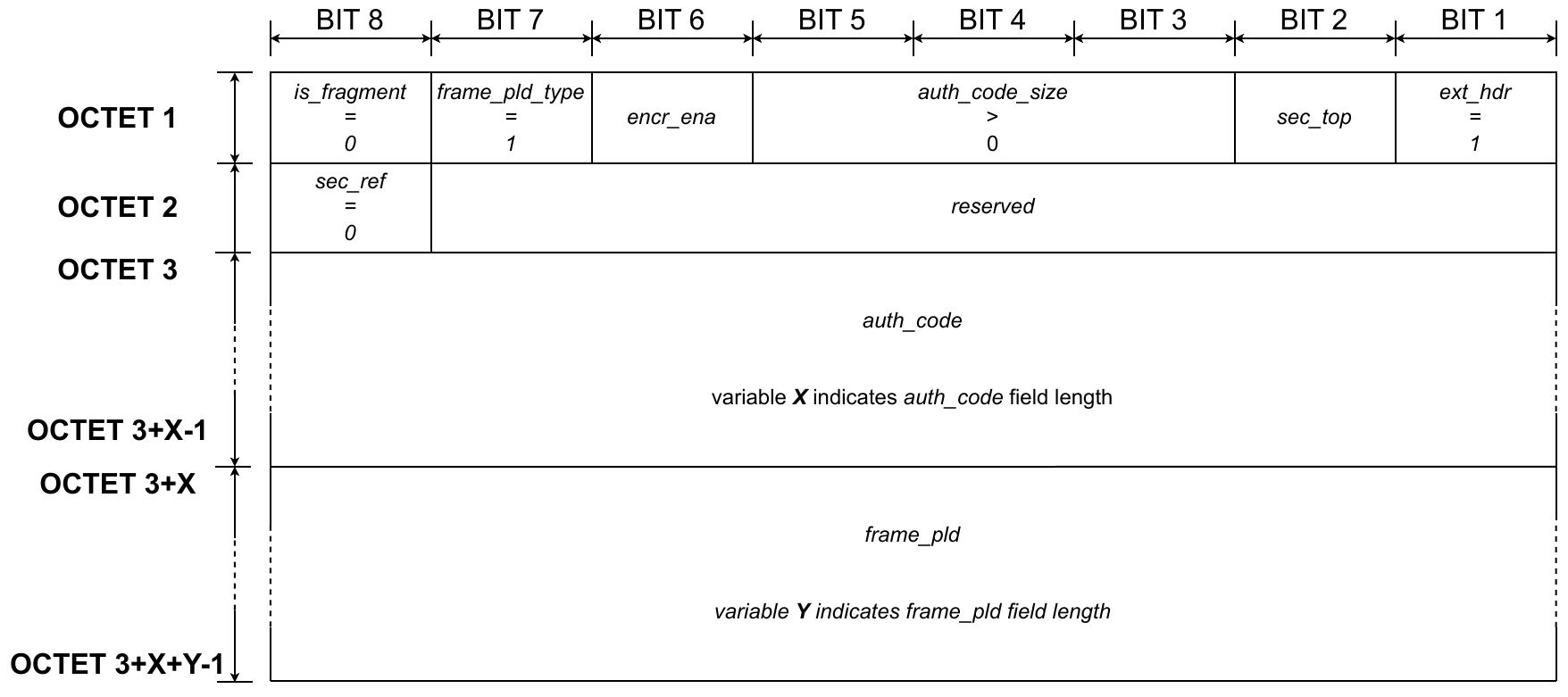
fig 5.22 Network layer - Frame format - Case 3A
5.1.3 Link Layer
The Link Layer is involved in Gateway discovery, maintenance, and link establishment for message exchange between two Endpoints. These functions are handled by two separate frame formats: Beacon frame format and message frame format.
The Beacon frame format is used for broadcasting status, and for broadcasting radio configuration parameters. Endpoints use the information in the Beacon frame to choose a Gateway. Information from the Beacon frame is used for maintenance of the Gateway-Endpoint connection, such as power control or channel hopping. The Beacon frame also informs about the state of the Gateway - for example, indicating congestion.
The message frame format is used for data exchange and data reception acknowledgement at the Link Layer level. The frame used for data exchange includes higher layer frames. The frame used for acknowledgement is terminated at the Link Layer level and does not contain a frame payload. Acknowledgements are sent between a Gateway and an Endpoint. Acknowledgements are only used with synchronous transmission. Asynchronous transmission type shall not use Acknowledgements.
5.1.3.1 Beacon Frame format
The frame is divided into different parts containing the Beacon-specific information as depicted in figure 5.24. The first one is “Frame control”, that provides information that allows correct decoding and interpretation of the frame. “Source address” and “Destination address” identify the sender of the Beacon and the PAN ID, which are part of the Gateway’s owner identification. “Connection status” provides information related to Gateway connection status to the cloud, its load, operation mode (synchronous/asynchronous or synchronous only) and roaming settings. “Power control” provides information on the antenna and power settings used by the Gateway. “Hopping parameters” contain values needed for calculation of an active channel used for uplink or downlink transmission. “Data and Security control” identifies the presence of optional “Data” part and also data size included in “Security”. “Data” is a container of all optional data that could be transmitted by the Gateway. “Security” contains a tag authenticating the Gateway for devices registered to the Gateway owner’s account.
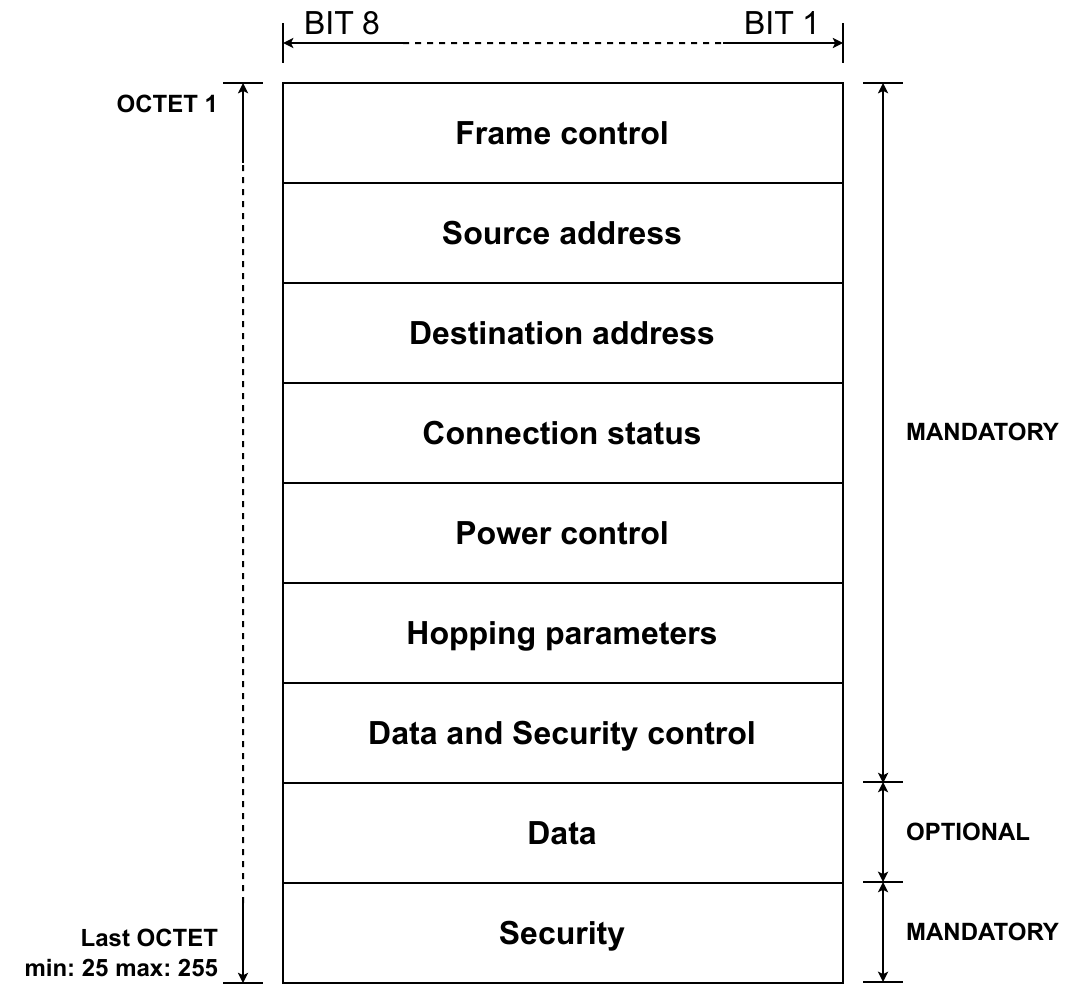
fig 5.24 Link layer - Beacon - Blocks
5.1.3.1.1 Link Layer Frame Control Fields

fig 5.25 Link layer - Beacon - Frame control
-
Frame type (
frame_type)Mnemonic Presence M/O/C Length Value frame_typeM 3b Bit Bit Bit Description frame_typeM 3b 0 0 0 no auth code The value indicates the frame type.
-
Protocol Version (
prot_ver)Mnemonic Presence M/O/C Length Value prot_verM 4b Bit Bit Bit Bit Description prot_verM 4b 0 1 0 0 Halo 2.0 protocol version The value of the protocol version indicates the Amazon Sidewalk Protocol version number. An Endpoint that receives the Beacon frame with a protocol version which is different from the supported one shall neither decode the frame nor join to the Gateway.
-
SubG-FSK version (
hdr_ver)Mnemonic Presence M/O/C Length Value hdr_verM 1B 0x0 The value of the SubG-FSK version indicates the version of SubG-FSK supported by the Gateway. SubG-FSK version identifies the Beacon, hopping pattern and PHY version supported by the Gateway.
5.1.3.1.2 Beacon Source address field (src)
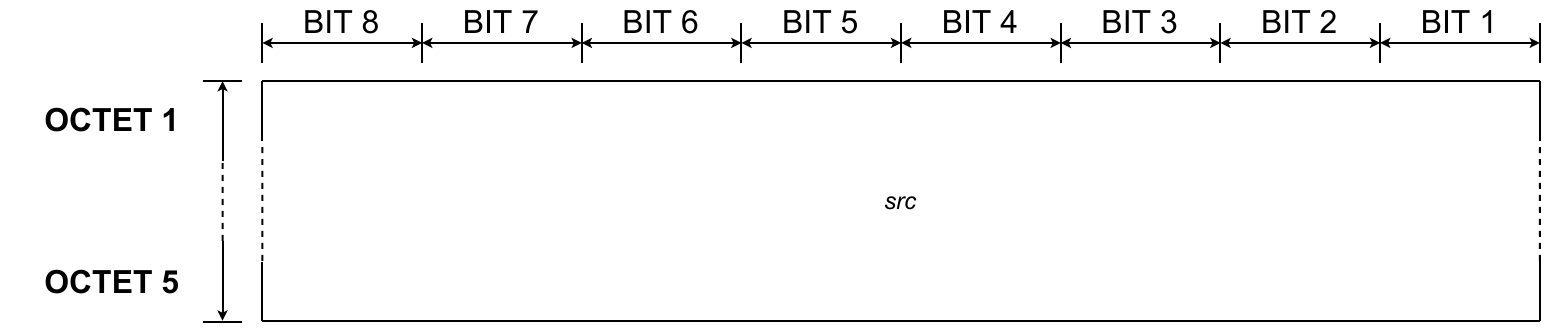
fig 5.26 Link layer - Beacon - Source address
| Mnemonic | Presence M/O/C | Length | Value |
|---|---|---|---|
src | M | 5B | global device ID |
The value indicates the device ID of the Gateway that is sending the Beacon.
5.1.3.1.3 Beacon Destination address field (dst)
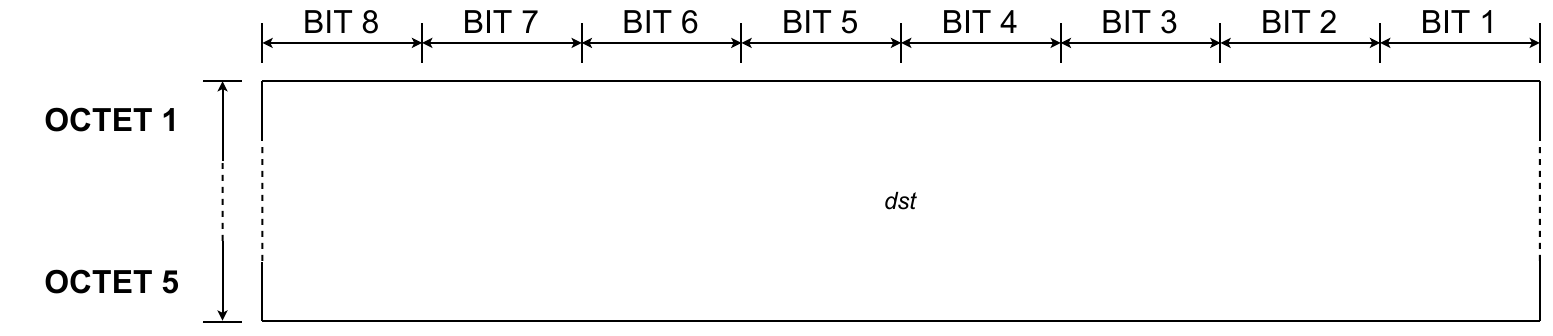 “”
“”
fig 5.27 Link layer - Beacon - Destination address
| Mnemonic | Presence M/O/C | Length | Value |
|---|---|---|---|
dst | M | 5B | PAN ID |
The value indicates the globally unique PAN ID.
5.1.3.1.4 Beacon Connection status fields

fig 5.28 Link layer - Beacon - Connection status
-
Roaming Support (
roam_opt)Mnemonic Presence M/O/C Length Value roam_optM 1b Bit value Description roam_optM 1b 0 roaming forbidden roam_optM 1b 1 roaming allowed The value of the roaming support indicates whether the Gateway transfers packets between roaming Endpoints and the Amazon Sidewalk Cloud.
NOTE: An Endpoint device that is roaming shall not attempt to connect to a Gateway that does not support roaming. If a Gateway has roaming disabled, then the Gateway can recognize roaming devices and drop packets from roaming devices.
-
Cloud connection indicator (
cloud_conn)Mnemonic Presence M/O/C Length Bit value Description cloud_connM 2b 0 0 disconnected cloud_connM 2b 0 1 experiencing recent intermittent disconnects cloud_connM 2b 1 0 connected in “Distress Gateway” mode cloud_connM 2b 1 1 connected The value of the cloud connection indicator indicates the Gateway-cloud connection condition. Endpoints may use this indicator while selecting a Gateway.
For more information on the “Distress Gateway” mode, see section 5.6.5.
-
Load indicator (
load_ind)
| Mnemonic | Presence M/O/C | Length | Bit value | Bit value | Description |
|---|---|---|---|---|---|
load_ind | M | 2b | 0 | 0 | light traffic |
load_ind | M | 2b | 0 | 1 | |
load_ind | M | 2b | 1 | 0 | |
load_ind | M | 2b | 1 | 1 | heavy traffic |
The value of the load indicator indicates the traffic load of the Gateway.
-
Gateway operation mode (
op_mode)Mnemonic Presence M/O/C Length Bit value Description op_modeM 1b 0 synchronous and asynchronous mode op_modeM 1b 1 synchronous mode The value of the Gateway operation mode indicates the modes of communication actively supported by the Gateway. The Gateway may be in synchronous transmission mode and not supporting asynchronous transmission mode, or the Gateway may be in preamble cycling mode. In preamble cycling mode, the Gateway cycles between synchronous and asynchronous transmission modes. (See section 5.2 and section 5.3.)
5.1.3.1.5 Beacon Power control fields

fig 5.29 Link layer - Beacon - Power control
-
SubG-FSK downlink EIRP (
hdr_dl_erp)Mnemonic Presence M/O/C Length Value hdr_dl_erpM 4b 0x0 – 0xF The value of the power control fields indicates the effective isotropic maximum radiated power of the Gateway used for the current Beacon round.
EIRP in dBm =
hdr_dl_erp * 4 -
SubG-FSK uplink power adjustment (
hdr_ul_adj)Mnemonic Presence M/O/C Length Value hdr_ul_adjM 4b 0x0 – 0xF The value of the SubG-FSK uplink power adjustment indicates the offset from ideal sensitivity in dB due to interference the Gateway is receiving.
Adjustment in dB =
hdr_ul_adj * 4
5.1.3.1.6 Beacon Hopping parameters fields
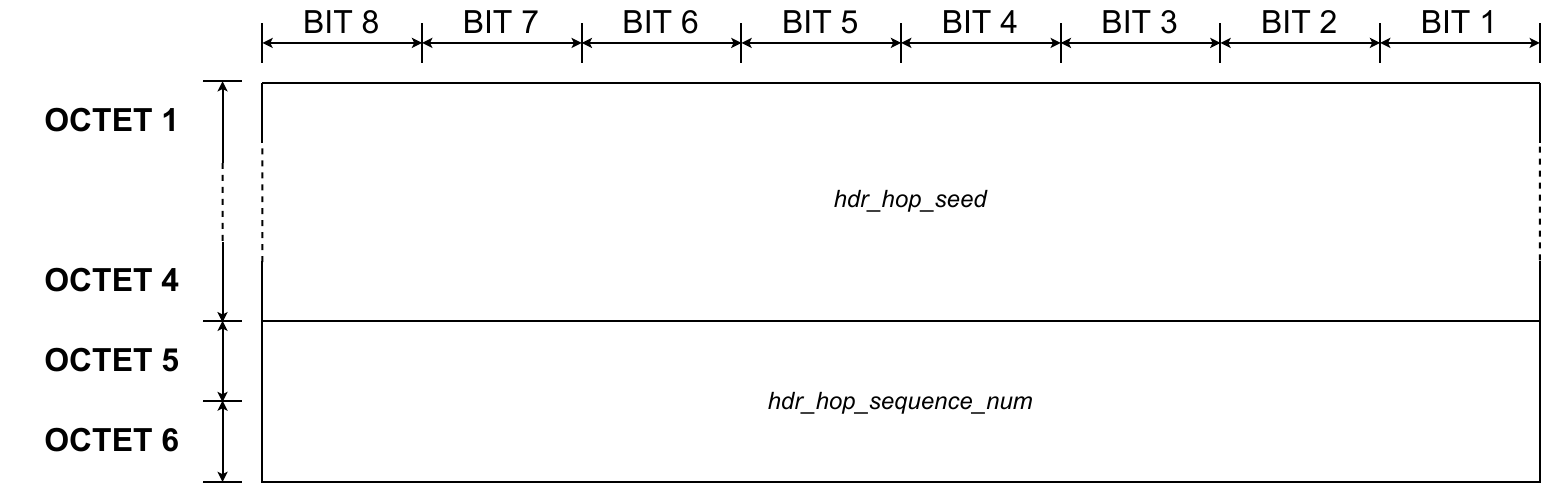
fig 5.30 Link layer - Beacon - Hopping parameters
-
Hopping seed
Mnemonic Presence M/O/C Length Value hdr_hop_seedM 4B 0x0 – 0xFFFFFFFF The Hopping seed field contains the value of the seed used in the channel hopping algorithm, described in section 5.2.4.
-
Hopping sequence number
Mnemonic Presence M/O/C Length Value hdr_hop_sequence_numM 2B 0x0 – 0xFFFF The value of the Hopping sequence number field contains the value of the sequence number used in the channel hopping algorithm, described in section 5.2.4.
5.1.3.1.7 Beacon Data and Security control fields

fig 5.31 Link layer - Beacon - Data and Security control
-
Data flag (
data_inc)Mnemonic Presence M/O/C Length Value data_incM 1b Bit value *Description data_incM 1b 0 Data is not included data_incM 1b 1 Data is included The value of the Data flag indicates the existence of optional data in the frame.
-
PAN authentication tag length (
auth_tag_len)
| Mnemonic | Presence M/O/C | Length | Bit value | Description | |
|---|---|---|---|---|---|
auth_tag_len | M | 2b | 0 | 0 | 4B |
auth_tag_len | M | 2b | 0 | 1 | 8B |
auth_tag_len | M | 2b | 1 | 0 | 12B |
auth_tag_len | M | 2b | 1 | 1 | 16B |
The value indicates the size of pan_auth_tag in the Security part of the frame.
5.1.3.1.8 Beacon Data fields
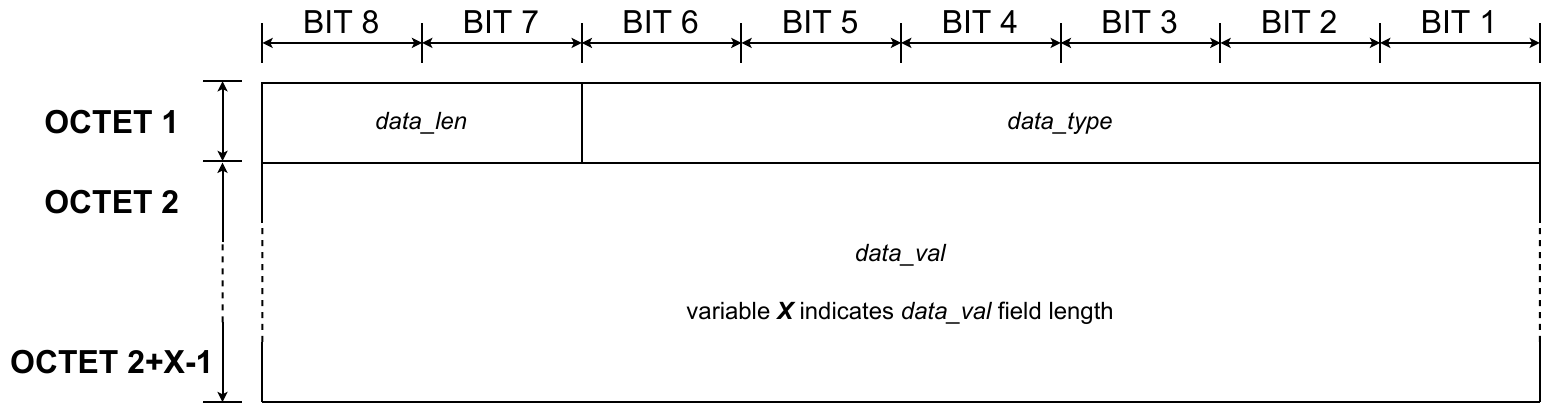
fig 5.32 Link layer - Beacon - Data - Case 1
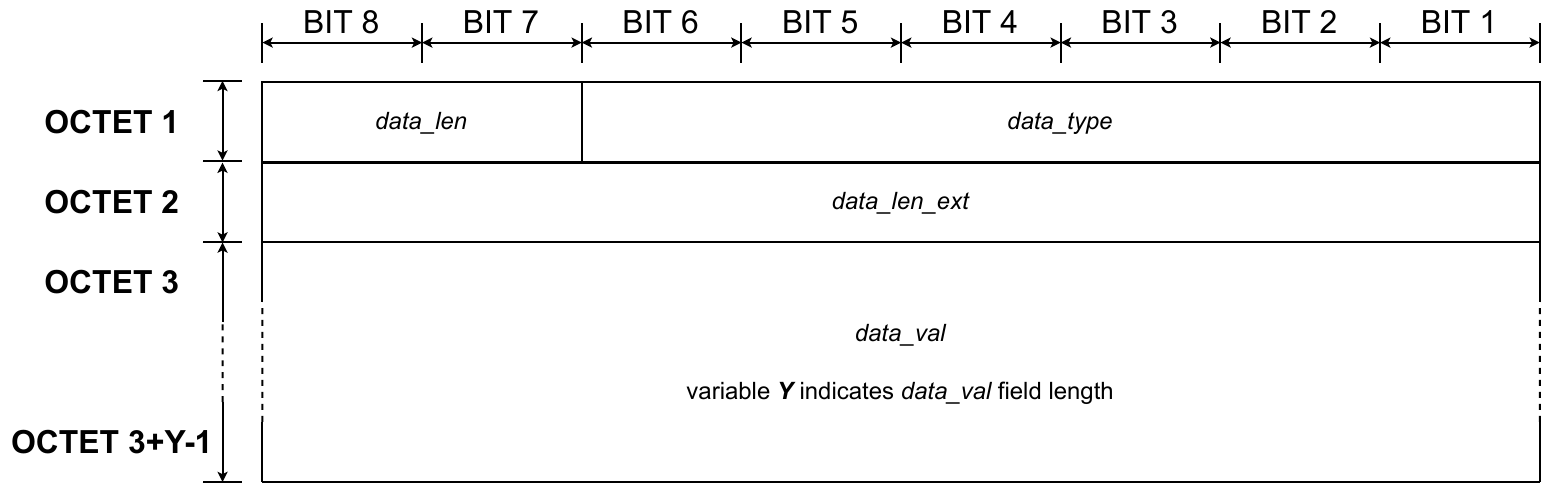
fig 5.33 Link layer - Beacon - Data - Case 2
- Data length (
data_len)
| Mnemonic | Presence M/O/C | Length | Bit value | Description | |
|---|---|---|---|---|---|
data_len | Cdata_inc is set to 1 | 2b | 0 | 0 | 1B |
data_len | Cdata_inc is set to 1 | 2b | 0 | 1 | 2B |
data_len | Cdata_inc is set to 1 | 2b | 1 | 0 | 4B |
data_len | Cdata_inc is set to 1 | 2b | 1 | 1 | data size is indicated in data_len_ext field |
The value of Data length indicates the size of the data_val field.
-
Data type (
data_type)Mnemonic Presence M/O/C Length Value Description data_typeC data_incis set to 16b 0x1 SubG-FSK-synchronous CS schedule The value of the Data type field indicates the data type included in the
data_valfield. -
Data length extension (
data_len_ext)Mnemonic Presence M/O/C Length Value data_len_extC data_incis set to 1
data_lenis set to 0x31B size of data_valfieldThe value of the Data length extension field indicates the size of the
data_valfield. -
Data value (
data_val)Mnemonic Presence M/O/C Length Value data_valC data_incis set to 1see data_lenordata_len_extoptional data values The value of the Data value field contains the optional data value. The length of the field is indicated in
data_lenordata_len_ext.The field value for “SubG-FSK-Synchronous CS schedule” for the ad hoc access model is coded as follows:
1B: offset
1B: periodicity
1B: CS-DL offset
1B: CS-DL periodicity
5.1.3.1.9 Beacon Security field (pan_auth_tag)
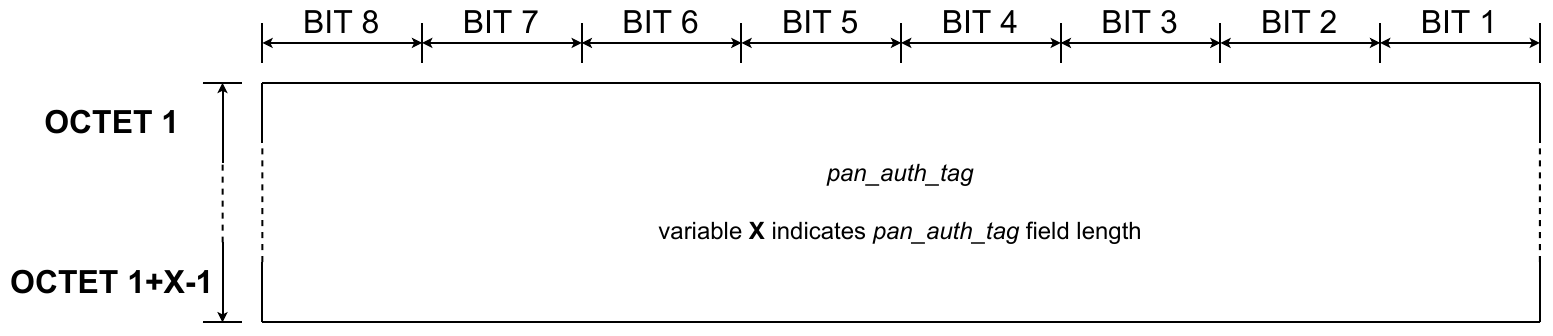
fig 5.34 Link layer - Beacon - Security
| Mnemonic | Presence M/O/C | Length | Value |
|---|---|---|---|
pan_auth_tag | M | see auth_tag_len field | authentication tag value |
The security field contains the value of the authentication tag.
5.1.3.2 Message frame format
The frame format has the following components:
- “Frame control” provides information that allows decoding of the frame and also controls the frame reception acknowledgment.
- “Source address” and “Destination address” identify both ends of the communication link.
- “Sequence number” contains the uplink or downlink message number that allows control of the correct sequence of data transmission and reception.
- “Frame payload” contains data from upper layers.
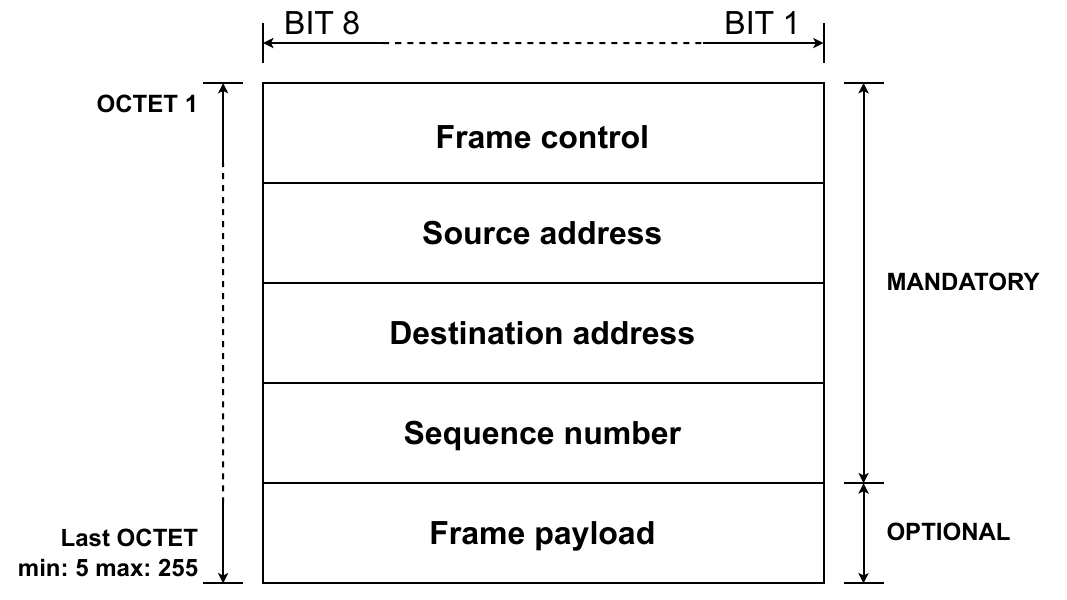
fig 5.35 Link layer - Message - Blocks
5.1.3.2.1 Message Frame Control Fields

fig 5.36 Link layer - Message - Frame control
- Frame type (
frame_type)
| Mnemonic | Presence M/O/C | Length | Bit value | Bit value | Bit value | Description |
|---|---|---|---|---|---|---|
frame_type | M | 3b | 0 | 0 | 1 | Data |
frame_type | M | 3b | 0 | 1 | 0 | Network Data |
frame_type | M | 3b | 0 | 1 | 1 | ACK |
The value of Frame type indicates the frame type. Based on this parameter, other fields in the frame may be optional or not present.
- Epoch frame flag (
epoch_bit/reserved)
| Mnemonic | Presence M/O/C | Length | Bit value | Description |
|---|---|---|---|---|
epoch_bit/reserved | M | 1b | Asynchronous mode uplink only: | Asynchronous mode uplink only: |
epoch_bit/reserved | M | 1b | 0 | Non-Epoch frame |
epoch_bit/reserved | M | 1b | 1 | Epoch frame |
| Synchronous uplink or downlink and asynchronous downlink mode: | Synchronous uplink or downlink and asynchronous downlink mode: | |||
epoch_bit/reserved | M | 1b | 0 | reserved |
The Epoch frame flag field is valid for the data frame format, with uplink direction in asynchronous mode only. The Epoch frame flag indicates whether the frame is used for the Endpoint to provide a time reference to the Gateway to synchronize Target Transmission Times.
The field is reserved and should be set to 0 for all other cases. Specifically:
- Data frame format in synchronous mode and asynchronous mode in the downlink direction.
- Network Data frame format for synchronous mode and asynchronous mode.
- ACK frame format.
NOTE: The Epoch frame flag field shall always be set to 0 for synchronous mode.
-
Protocol version (
prot_ver)Mnemonic Presence M/O/C Length Bit value Description prot_verM 4b 0 1 0 0 Halo 2.0 protocol version The Protocol version value indicates the Amazon Sidewalk Protocol version number.
NOTE: The current version of the specification supports only one protocol version.
-
Source field format (
src_frmt)The Source field format value indicates the sender of the data packet and additionally gives information about the
srcfield format.
| Mnemonic | Presence M/O/C | Length | Bit value | Description | |
|---|---|---|---|---|---|
src_frmt | M | 2b | 0 | 0 | cloud |
src_frmt | M | 2b | 0 | 1 | global device ID |
src_frmt | M | 2b | 1 | 0 | reserved |
src_frmt | M | 2b | 1 | 1 | reserved |
- Destination field format (
dst_frmt)
| Mnemonic | Presence M/O/C | Length | Bit value | Description | |
|---|---|---|---|---|---|
dst_frmt | M | 2b | 0 | 0 | cloud |
dst_frmt | M | 2b | 0 | 1 | global device ID |
dst_frmt | M | 2b | 1 | 0 | reserved |
dst_frmt | M | 2b | 1 | 1 | reserved |
The Destination field format value indicates the recipient of the data packet and gives information about the dst field format. When the cloud is the target, the Link Layer ACK response is sent by the Gateway. The message reception confirmation done by the cloud is handled in higher layers.
-
Network frame flag (
nwk_frame_ctrl)Mnemonic Presence M/O/C Length Bit value Description nwk_frame_ctrlM 1b 0 frame_pldfield is not presentnwk_frame_ctrlM 1b 1 frame_pldfield is presentThis Network frame flag field indicates whether the Link Layer frame includes the Network Layer frame.
The field is valid for “Data” and “Network Data” frame types only and shall be set to 1.
ACK frame type shall always be set to 0. Acknowledgement does not transport any data from higher layers.
-
Message acknowledge request (
ack_req)Mnemonic Presence M/O/C Length Value ack_reqM 1b Bit value Description ack_reqM 1b 0 ACK not requested ack_reqM 1b 1 ACK requested The Message acknowledge request field indicates whether a Link Layer acknowledgement of the message reception is requested. The acknowledgement may be requested for messages sent in synchronous connection mode only. The field shall always be set to 0 in messages sent in asynchronous connection mode.
The Message acknowledge request field is valid for data and network data frame formats only. The Message acknowledge request field is set to 1 by default for the following destinations:
cloudand global device ID.ACK frame type should always be set to 0 and has no meaning in this case.
5.1.3.2.2 Message Source address field (src)
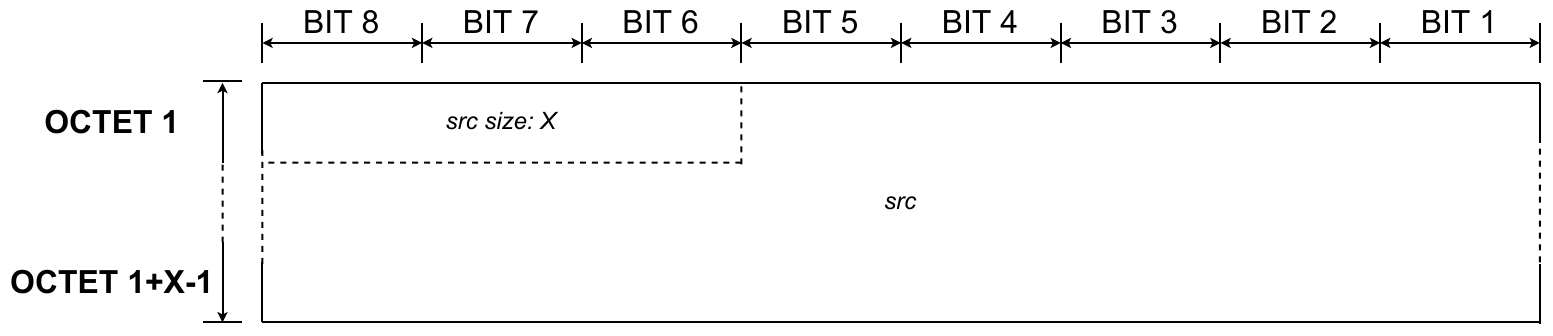
fig 5.37 Link layer - Message - Source address
| Mnemonic | Presence M/O/C | Length | Value |
|---|---|---|---|
src | M | 1 – 5B | 3 most significant bits of the first byte specify the field size. |
The Source address field contains the source address of the frame. The Source address format is indicated by the src_frmt field.
5.1.3.2.3 Message Destination address field (dst)
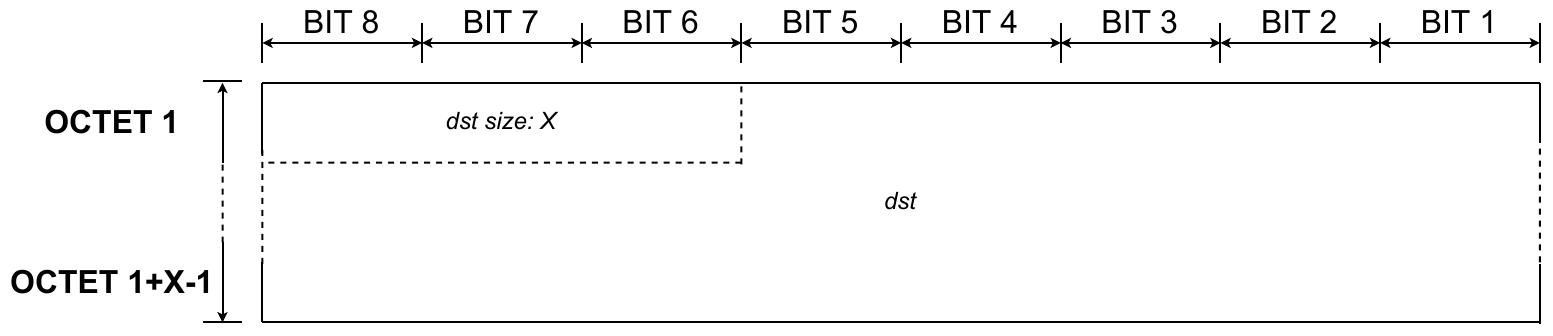
fig 5.38 Link layer - Message - Destination address
| Mnemonic | Presence M/O/C | Length | Value |
|---|---|---|---|
dst | M | 1 – 5B | 3 most significant bits of the first byte specify the field size. |
The Destination address field contains the destination address of the frame. The Destination address format is indicated by the dst_frmt field.
5.1.3.2.4 Message Sequence number field (seq_num)
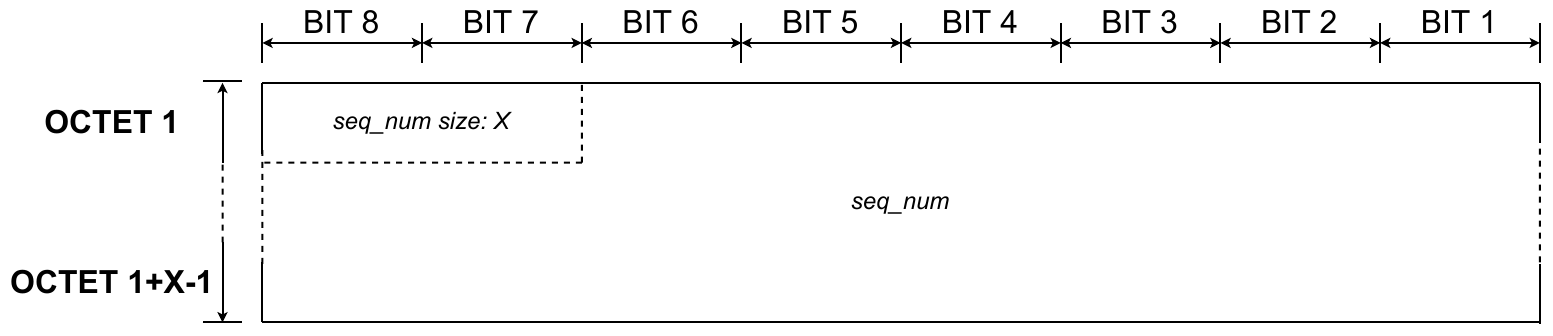
fig 5.39 Link layer - Message - Sequence number
| Mnemonic | Presence M/O/C | Length | Value |
|---|---|---|---|
seq_num | M | 1 – 3B | 2 most significant bits of the first byte specify the field size. |
The sequence number field indicates the sender’s packet sequence number.
The ACK frame type shall have a seq_num copy of the frame where acknowledgement was requested.
5.1.3.2.5 Message Link Layer Frame payload field (frame_pld)
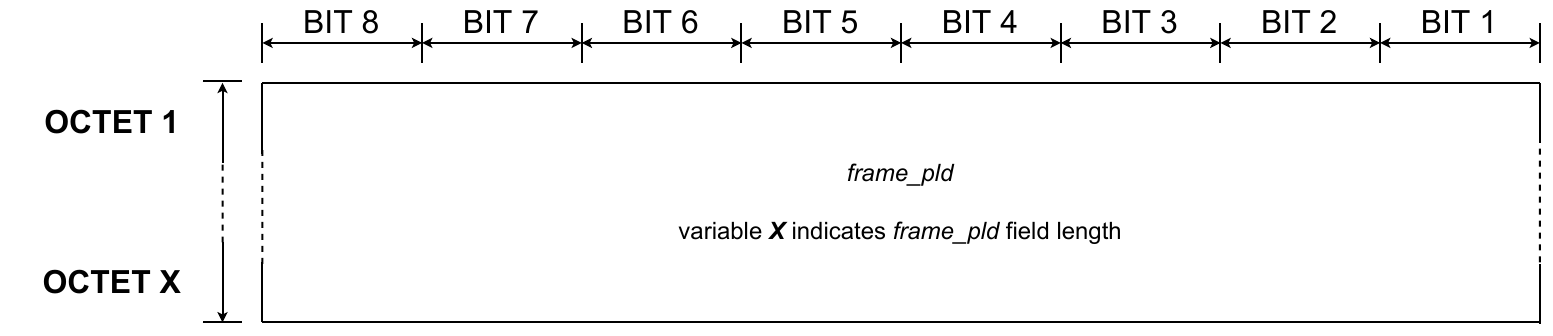
fig 5.40 Link layer - Message - Frame payload
| Mnemonic | Presence M/O/C | Length | Value |
|---|---|---|---|
frame_pld | Cnwk_frame_ctrl is set to 1 | 0 – 240B | Network Frame bytes |
This field contains the frame payload which includes the Network Layer Frame. This field can be included only if nwk_frame_ctrl is set to 1.
This field is not present in the ACK frame format.
5.1.4 Physical layer
The Amazon Sidewalk protocol uses a sub-GHz UHF band, ITU [1] ISM band 9 for signal transmission. Two modulation techniques in sub-GHz are defined by 802.15.4 standard [2] as follows:
GFSK (Gaussian Frequency Shift Keying) modulation is used in SubG-FSK, and LoRa [3] modulation is used in SubG-CSS.
For more information, see section 5.7. In both cases, half-duplex (HDX) transmission schemas are implemented to allow multi-user access.
In both cases, the RF frame consists of preamble, sync word, header, payload (Link Layer Frame) and optional Frame Check Sequence (FCS).

fig 5.41 RF frame
The RF frame length is limited by regional certification authority requirements for airtime occupation. See ETSI EN 300 220-2 and FCC part 15.247 for details. Allowed airtime and power levels depend on the region and operating bands. For more information, see section 5.7. An additional timing correction path is implemented because transmitter and receiver clocks are not synchronized and their frequencies drift. For more information, see section 5.1.4.3.
5.1.4.1 Data order
Bit order: i.e. byte ’e’ (0x65, 01100101 B) is presented at the baseband bus timeline as data sequence (see fig 5.42).
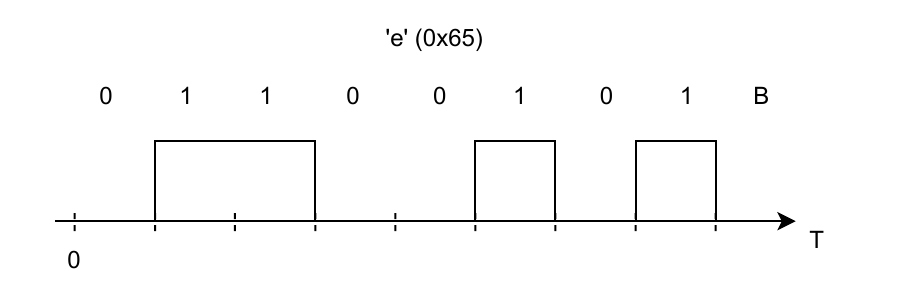
Byte order: Little endian is defined in the PHY frame [2].
5.1.4.2 RF frame formats
The physical frame is built as follows: The physical header (optionally precoded) is attached to a predefined preamble. Then, RF channel code is specified then the buffered data packet is channel encoded. The Frame Check Sequence is calculated and attached to the end of the frame. The baseband RF frame is sent to the modulator and up-converted to the preselected RF channel.
NOTE: Preamble, channel coding and FCS calculation are HW implemented.
Four steps are necessary for proper RF data reception. First, the receiver must synchronize its demodulator with preamble signal. The next step is to demodulate and decode header to gather information regarding receiving frame. Then, payload can be properly received. Correctness of transmission is confirmed by calculation of Frame Check Sequence at the end. After FCS evaluation link layer data content can be passed for further processing or discarded.
RF frame consists of five segments:
- Preamble - for bit synchronization, can be repeated for improving receiver synchronization and probability of reception (due to physical aspects: time drift, multipath effect, etc.);
- Sync Word - mark for start of data block;
- PHY Header - contains PHY data control bits;
- PHY payload - Link Layer Frame;
- FCS (Frame Check Sequence) - data block checksum.
The content and length of each segment depends on predefined modulation scheme.
5.1.4.2.1 Sub-G FSK frame format details
Bit ’1’ is represented as positive frequency shift (+dev/2 Hz), bit ’0’ - as negative frequency shift against center frequency F0.
The SubG-FSK PHY frame format follows IEEE 802.15.4. Preamble is followed with PHY layer header and data field. The frame is completed with a Frame Check Sequence (FCS). The field description details are as follows:
-
Preamble
Preamble consists of multiple bytes: 0x55, 01010101 B. Preamble can be extended for time drift compensation.
-
Synchronization Word
Synchronization Word (defined in [2] as SFD - Start Frame Delimiter). SFD is 2 B length.
- FEC disabled 0x904E (default value).
-
PHR PHY header
PHY header consists of 16 bits (2 B).
- 0-2 RSVD (0 default);
- 3 FCS type: 0-32 bits, default value: 1-16bit;
- 4 Data whitening: 0- disabled; 1-PN9 sequence with 0xF as starting condition is used (default value);
- 5-15 PSDU length (only 251 B are available in the present version of the specification).
-
Payload
The payload length is defined by PSDU length of PHY header, the payload is scrambled if Data whitening of PHY header is set. The maximum payload length is 251 B.
-
FCS Frame check sequence
- FCS type 1: Polynomial x16+x12+x5+1 (CCITT) is used for 16 bit FCS, default value;
- FCS type 0: In case of 32bit FCS then ANSI X3.66-1979 shall be used.
5.1.4.2.2 SubG-FSK Airtime summary
RF data rate is: 50 kbps, Application layer MTU size is up to 200 B;
PHY frame length is up to 251 B, < 55.12ms (14ms preamble).
5.1.4.2.3 SubG-CSS frame format details
LoRa symbols are used for SubG-CSS. LoRa symbols are composed of chirps. Detailed LoRa uplink PHY frame format is described in Application Note AN1200.22 [3]. Preamble is followed by PHY layer header (PHDR), then calculated PHDR_CRC is placed. The next data field is attached. Uplink frame is completed with a CRC. With current implementation, only SF11 with Coding Rate (CR) 4/5 is used. The field description details are as follows:
-
Preamble
The number of preamble symbols is programmable. Downlink Preamble can vary between 8 - 23 symbols in order to compensate for any timing error. Uplink Preamble contains 16 symbols.
- Synchronization Word contains value 0x34.
-
PHY header
PHDR - contains 6 symbols.
PHDR_CRC - 16 bit CRC.
PHY header is protected by 4/8 CRC.
-
PHY Payload
PHY payload - contains encapsulated higher layer frame. Max Payload size is 44 B for SF 11.
-
CRC
Polynomial x16+x12+x5+1 is used for 16 bit CRC calculation. If 8 bit CRC is used, then last 8 bits of 16 bit CRC are used. The default value for CRC is 16 bits.
Upchirps are used in the uplink, downchirps in the downlink. In the downlink, the symbols are IQ inverted. This is done to achieve orthogonality between uplink and downlink signals.
5.1.4.2.4 SubG-CSS Airtime summary
RF data rate is < 1760 bps, PDU size up to 44 B;
Uplink PHY frame duration is: 279.552 ms (preamble 16 symbols, data 44 B);
Downlink PHY frame duration is: 246.784 ms (preamble 8 symbols, data 44 B), 308,224 ms (preamble 23 symbols, data 44 B).
5.1.4.3 Time drift
In synchronous mode the transmitter chooses timing of packet’s preamble in accordance with expected receivers listening window.
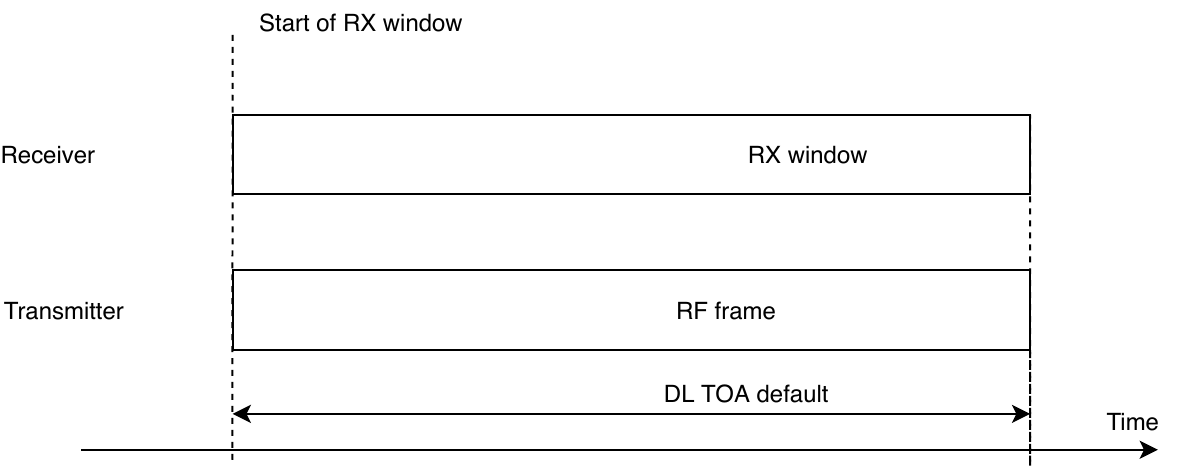
Due to oscillator (XO) frequency offsets and drifts multiplied by MCU clock generator internally calculated in Endpoint RF frame timings can be biased with error which exceed system requirements. When frequency disparity between two nodes exceeds the specifications of +/-100 ppm, the Endpoint may not have enough preamble symbols, resulting in a packet loss. The time drift between the nodes is impacted by calibration errors between the hardware and temperature-dependent oscillation frequency variations. The Amazon Sidewalk SDK provides two mechanisms for bounding the drift:
- Temperature compensation: Internal Endpoint RTC compensation based on calibration table and measuring circuit temperature in 10 s intervals. Procedure is valid for each state of connection (asynchronous and synchronous).
-
Link layer offset compensation: Compensate for any timing error between the Gateway and the Endpoints.
Measured drift constitutes time offset to apply for an Endpoint’s upcoming link layer operations.
For SubG-CSS, TX drift compensation is implemented (additional 30 ms preamble length is added). RX window size must cover possible worst case scenarios: 30 ms TX time advance due to clock rushing out and 30 ms additional TX time extension due to extended preamble.
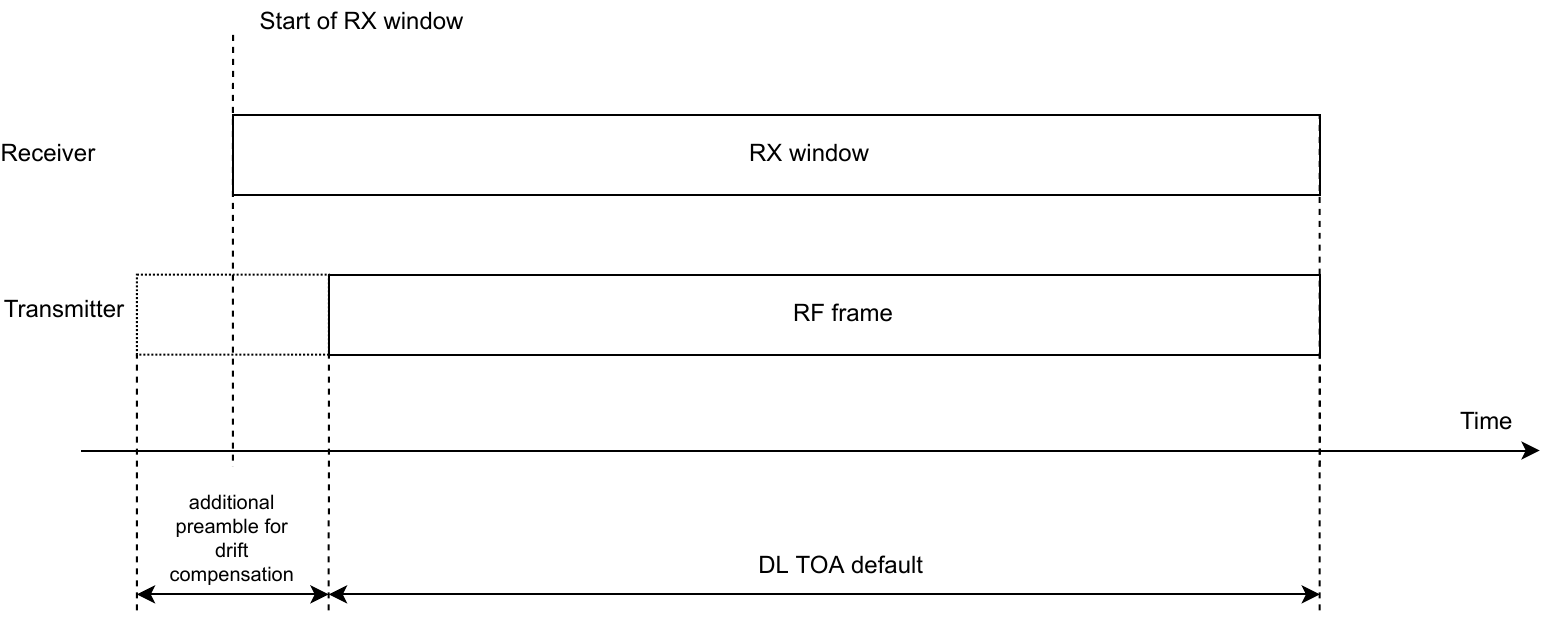
fig 5.44 Timedrift compensation